
3-Newcomer
June 14, 2023
Solved

How to install Kepware Edge (demo or full version) on an AWS server (EC2 instance)?

  • June 14, 2023
  • 1 reply
  • 1782 views

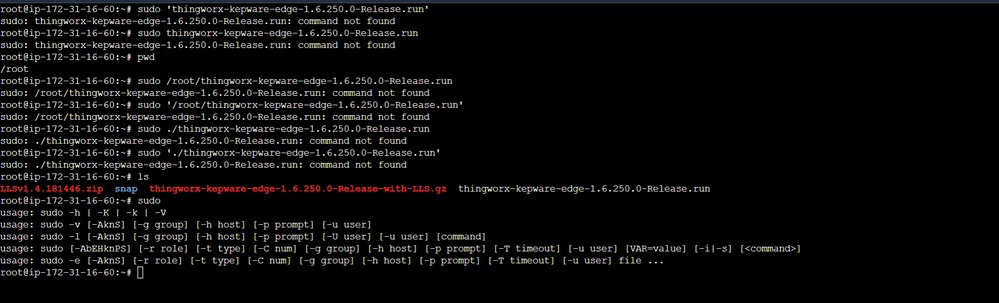
I tried to install kepware edge on an EC2 instance. But the error message shows 'command not found'. I tried multiple variations of the command by just using the filename, or the file name with location, but the error persists. The command for getting the CLI which is this command+ '--help' also shows the same error.


Are there some other steps to install Kepware Edge on an EC2 instance (I have already installed default-jdk and lsb)?
 

ok.png


Best answer by cmorehead

@AS_10658952 ,


I recommend checking that you have execute permissions on the installer .run file with:    ls -lh


Then add the missing permission if needed:   sudo chmod +x <file>, should set the execute permissions.
 

sudo chmod 777 <file>


Important to note that permission 777 makes the installer executable and read/write for all users.


You may need to move the executable out of the root to a subfolder as some distros restrict running from the root folder.


Thanks,

*Chris

1 reply

3-Newcomer
June 14, 2023

To Add: The instance is running Ubuntu 20.04.4 LTS (x86-64)

cmorehead13-AquamarineAnswer
13-Aquamarine
June 22, 2023

@AS_10658952 ,


I recommend checking that you have execute permissions on the installer .run file with:    ls -lh


Then add the missing permission if needed:   sudo chmod +x <file>, should set the execute permissions.
 

sudo chmod 777 <file>


Important to note that permission 777 makes the installer executable and read/write for all users.


You may need to move the executable out of the root to a subfolder as some distros restrict running from the root folder.


Thanks,

*Chris