1-Visitor
March 22, 2022
Solved

XMCD convertor not working

  • March 22, 2022
  • 4 replies
  • 7511 views
xmcd convertor not working. I mean i Cant click on it

Best answer by DJNewman

Hello,

Is your Prime 8 in "Mathcad Express" mode (the converter won't work here) or is it a full licence (or the 30-day free trial)?


If it's a full paid-for licence, then when you were installing it, did you check the XMCD, MCD Converter at this part of the installation?
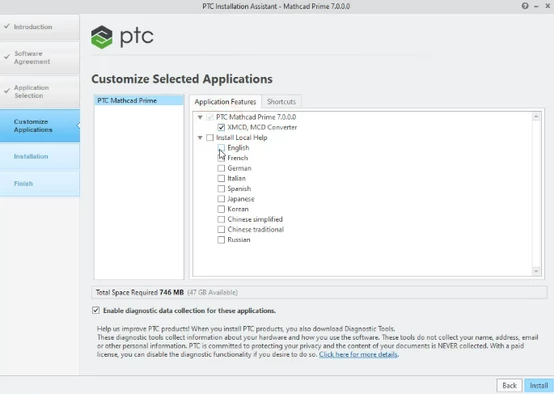
 

DJNewman_0-1648750044170.png

(Imagine it says Prime 8.0.0.0)


4 replies

DJNewman
18-Opal
March 22, 2022

What is your Mathcad Prime version?

PTC Marketer Creo and Mathcad. I run their YouTube channels, some Creo campaigns, and all Mathcad campaigns and communications.
1-Visitor
March 23, 2022

I am using ptc mathcad 8.0 but here after downloading, I cant click on the xmcd convertor in order to convert a file. actually the file is of older version. can you or anyone please convert this file into mathcad 8.0 version. I have been trying since last month to convert it but unfirtunately cannot do it.

thanks

24-Ruby III
March 23, 2022
18-Opal
March 23, 2022

Perhaps you need mathcad 15 installed too? - Just guessing.

DJNewman
18-Opal
March 23, 2022

As an FYI, starting in Prime 7, you don't need Mathcad 15 installed to use the convertor. (You did for Prime 6 and prior.)

PTC Marketer Creo and Mathcad. I run their YouTube channels, some Creo campaigns, and all Mathcad campaigns and communications.
24-Ruby III
March 23, 2022

 Hi,


Try this solution - "Error "Conversion Failed, Conversion aborted.." while converting legacy Mathcad worksheet to Prime": https://community.ptc.com/t5/PTC-Mathcad-Installation/Error-quot-Conversion-Failed-Conversion-aborted-quot-while/m-p/707519#M50 

1-Visitor
June 1, 2022

Bro i have installed matchad 6.0.0. can you or anyone convert the attached file in matchad 6.0.0 and sent it back please? I am very worried

23-Emerald IV
June 1, 2022

Here you go.

The messages from the converter are:

LucMeekes_0-1654092535205.png

Success!
Luc

7-Bedrock
March 31, 2022

Hi 

I am new and have the same issue. I have a MathCad15 file and need to use it in MathCAD 8 Prime.  The Converter on the IN/OUT tab is greyed out.  Is there something I need to install separately?  My files are too big to attach. Thanks for any help.

DJNewman
DJNewman18-OpalAnswer
18-Opal
March 31, 2022

Hello,

Is your Prime 8 in "Mathcad Express" mode (the converter won't work here) or is it a full licence (or the 30-day free trial)?


If it's a full paid-for licence, then when you were installing it, did you check the XMCD, MCD Converter at this part of the installation?


DJNewman_0-1648750044170.png

(Imagine it says Prime 8.0.0.0)


PTC Marketer Creo and Mathcad. I run their YouTube channels, some Creo campaigns, and all Mathcad campaigns and communications.
7-Bedrock
March 31, 2022

Full paid for version.  Thank you so much...Re-installed. Yes that worked.  Now i have a bunch of errors on the file I converted.  But this is a step up from where I was earlier.  I am new all around to this environment so I don't know how quickly I will work through these errors.  Thanks again.