19-Tanzanite
March 7, 2021
Solved

3D Plot - Divide By Zero "Difficulty"

  • March 7, 2021
  • 2 replies
  • 3345 views

Hello Dear Friends,

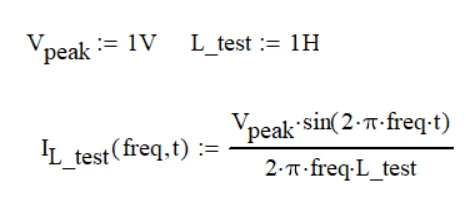
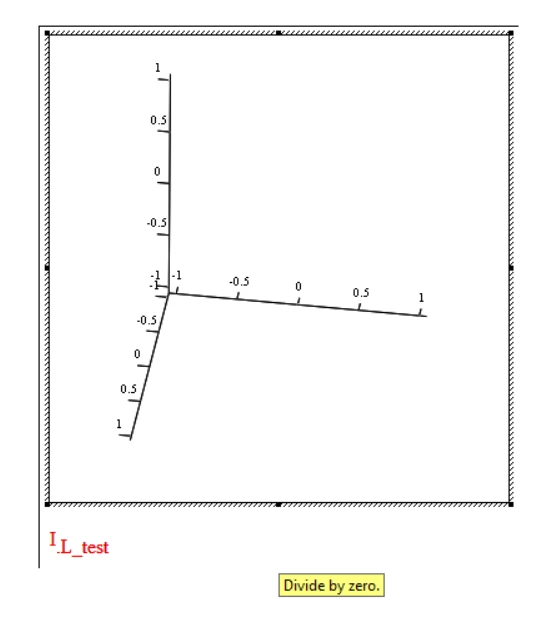
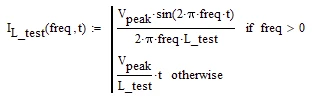
I would like to plot the following equation in 3D Plot in the variables freq and t, but I don't realize how I could manage to fool (if possible, obviously) Mathcad 15 about 'Divide By Zero'.
Or what am I wrong or do I not take into account when plotting the chart?
CornelBejan_0-1615130667579.png

CornelBejan_1-1615130727796.png


Another thing is:

CornelBejan_6-1615131097727.png

----------------------------------------------------------------------------------------------------------

Case 1:
CornelBejan_5-1615131077144.png


CornelBejan_2-1615130752569.png


Case 2:

CornelBejan_3-1615130775871.png


CornelBejan_4-1615130791214.png


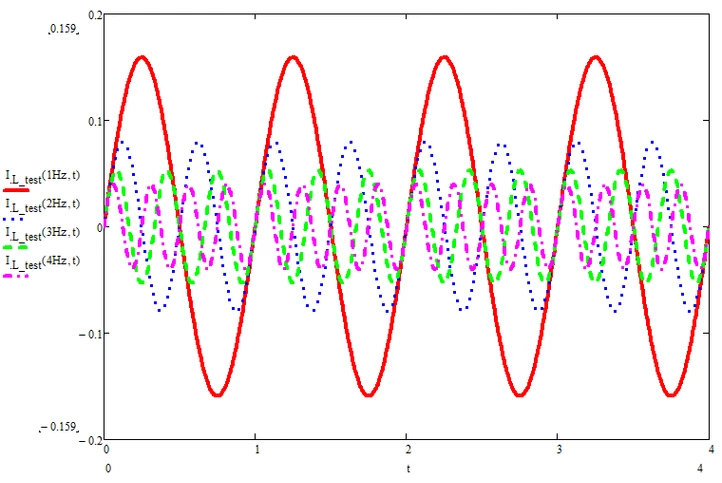
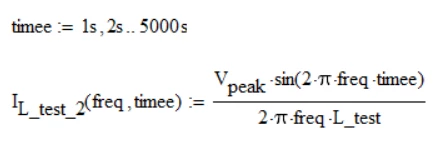
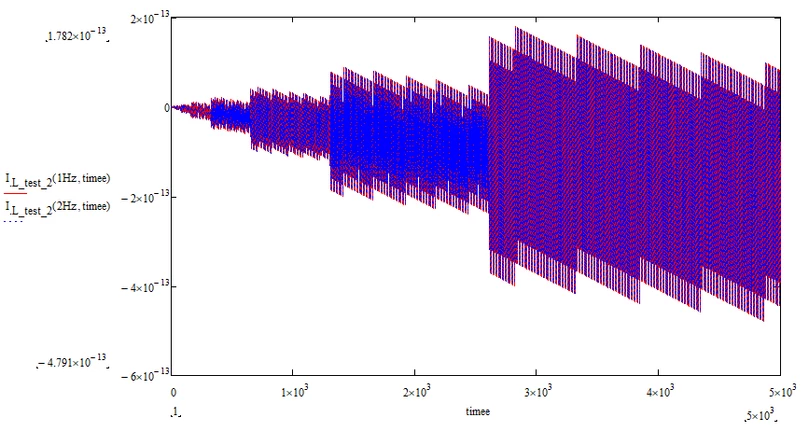
Why does the second graph not display like the first?


Thank you.
Best regards.
Best answer by Werner_E

@Cornel wrote:

Hello Dear Friends,

I would like to plot the following equation in 3D Plot in the variables freq and t, but I don't realize how I could manage to fool (if possible, obviously) Mathcad 15 about 'Divide By Zero'.
Or what am I wrong or do I not take into account when plotting the chart?

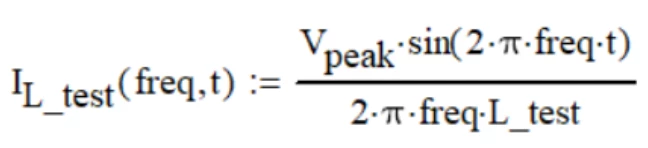
Either avoid frequency=0 as Valery had shown, or, if you really need results for frequencies very close and up to zero, you may redefine your function:

Werner_E_0-1615145110661.png


Why does the second graph not display like the first?

Why do you think they should?  The first one shows the range from 0 to 4 seconds but in the second one you demand a range 1250 times larger. Furthermore with the range you define you are sampling at multiples of 1s which means that all sampled function values would be zero! Your plot show values up to 10^-12 because of numerical inaccuracies.

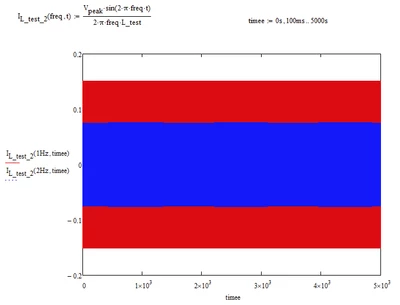
Here are the "sine waves" for a smaller sampling frequency:

Werner_E_1-1615145643608.png

Maybe you had 5000 ms= 5 s   in mind??

Werner_E_2-1615145710634.png


2 replies

24-Ruby IV
March 7, 2021

Plot3D.jpg

Werner_E25-Diamond IAnswer
25-Diamond I
March 7, 2021

@Cornel wrote:

Hello Dear Friends,

I would like to plot the following equation in 3D Plot in the variables freq and t, but I don't realize how I could manage to fool (if possible, obviously) Mathcad 15 about 'Divide By Zero'.
Or what am I wrong or do I not take into account when plotting the chart?

Either avoid frequency=0 as Valery had shown, or, if you really need results for frequencies very close and up to zero, you may redefine your function:

Werner_E_0-1615145110661.png


Why does the second graph not display like the first?

Why do you think they should?  The first one shows the range from 0 to 4 seconds but in the second one you demand a range 1250 times larger. Furthermore with the range you define you are sampling at multiples of 1s which means that all sampled function values would be zero! Your plot show values up to 10^-12 because of numerical inaccuracies.

Here are the "sine waves" for a smaller sampling frequency:

Werner_E_1-1615145643608.png

Maybe you had 5000 ms= 5 s   in mind??

Werner_E_2-1615145710634.png


Cornel19-TanzaniteAuthor
19-Tanzanite
March 7, 2021

I had tried (at least initially, as you can see from the message and you noticed) a way to start from the value 1 (that's because I was thinking about the 3D chart, and I said to see what it looks like for the 2D chart.), and not from the value 0, due to the fact that I had received that message with "Divide By Zero".
But if I put the first value 1 then it didn't work to put the second value (increment value) to be less than 1 (or at least that's how I saw it look in Mathcad 15).

CornelBejan_1-1615147165449.png

I had initially tried to avoid the starting value to be 0, this is the argument, I mean that's how I thought in the first phase.

It was an initial attempt, after which I said to post here on the group to see what other opinions other colleagues will come up with.


It's okay now, I mean after I've read the posts from both of you (@ValeryOchkov, @Werner_E ).

Thank you.
Best regards.

25-Diamond I
March 8, 2021

But if I put the first value 1 then it didn't work to put the second value (increment value).

The second value of a range is NOT the increment but its the second value of the series.

For an increment of 100 ms starting from 1s you would have to write "1s,1s+100ms .. " or "1s, 1.1 s ..".