
25-Diamond I
July 19, 2013
Question

Bug in Mathcad 15 when changing a vector element from text to scalar

  • July 19, 2013
  • 3 replies
  • 7081 views

I came across a strange effect while reading in some data from an Excel sheet and changing some elements which where formatted as text in Mathcad back to be numbers. Mathcad woul not recognize the resulting matrix/vector to be a matrix of scalars (while it is, or at least should be).

See below and attached a simplified example. Can anybody explain that strange effects?

BTW, the same sheet converted works fine in Prime2.

Addendum: If you make the second assignment work as described by pressing F9 and you move arround the first V^2 assignment, it works, too!!????

The German error message is something like: "The object reference is not set to an instance of an object". Obviously users are not expected to ever see this message.

(Remark: The absolute value has to be set from Determinant to absolute value)
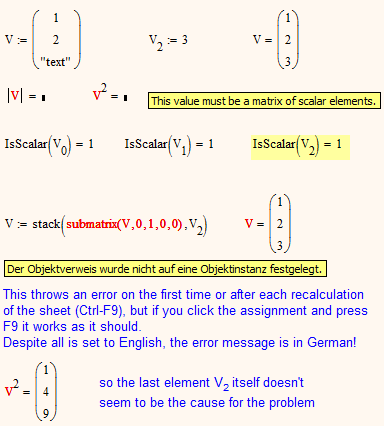
vector_error.png

3 replies

19-Tanzanite
July 19, 2013

Obviously a bug. I'm surprised it hasn't been noticed before.

Werner_E25-Diamond IAuthor
25-Diamond I
July 19, 2013

Richard Jackson wrote:

Obviously a bug. I'm surprised it hasn't been noticed before.

Yes, indeed. Not sure if this bug was present in older Mathcad versions. I am using MC15 M020.

I just reported it to PTC (case # 11508302, but I'm not sure if others are allowed to look at it)

19-Tanzanite
July 19, 2013

Not sure if this bug was present in older Mathcad versions

Not in MC13. I don't have an easy way to test MC14 or earlier builds of MC15.

1-Visitor
July 19, 2013

Werner Exinger wrote:

Addendum: If you make the second assignment work as described by pressing F9 and you move arround the first V^2 assignment, it works, too!!????

The second assignment works also when I assign the stack(...) to V1 and then delete the "1". And as you say V^2 works too.

It is so strange to make changes bottom-right with an effect on the upper-left of the worksheet!

Werner Exinger wrote:

The German error message is something like: "The object reference is not set to an instance of an object". Obviously users are not expected to ever see this message.

The error message is in English in my worksheet. Can it be from Windows?

Werner_E25-Diamond IAuthor
25-Diamond I
July 19, 2013

It is so strange to make changes bottom-right with an effect on the upper-left of the worksheet!

Yes, its sure a bad programming error throwing that NullReferenceException. Obviously the changes at the bottom happen to create an object properly and so the upper parts are affected, too.

The error message is in English in my worksheet. Can it be from Windows?

I use a German version of Mathcad and a German Windows. With localized Mathcad versions I have the choice to us them in English or (in my case) German. Usually this affects keywords as well as error messages and help text (in contrary to Prime). My guess is that this runtimer error message is from the underlying .NET RTsystem and is simply handed over by Mathcad.

Maybe someone with Mathcad 14 can report if the error is present here, too.

13-Aquamarine
July 20, 2013

This are the results for MC15 M010:

FilipWernerM010.PNG

Werner_E25-Diamond IAuthor
25-Diamond I
November 3, 2013

According to PTC the bug will be fixed in MC15 M030