8-Gravel
April 19, 2023
Solved

Excel and combobox

  • April 19, 2023
  • 3 replies
  • 5931 views

I wanted to link excel with combo box can that be done in prime?

Best answer by terryhendicott

Hi

Have created one matrix with the data

Created a column vector called Edit_Copy_Paste that concatenates two columns.

Used Copy and paste to get this column into the editbox in one copy and paste operation that includes full column.

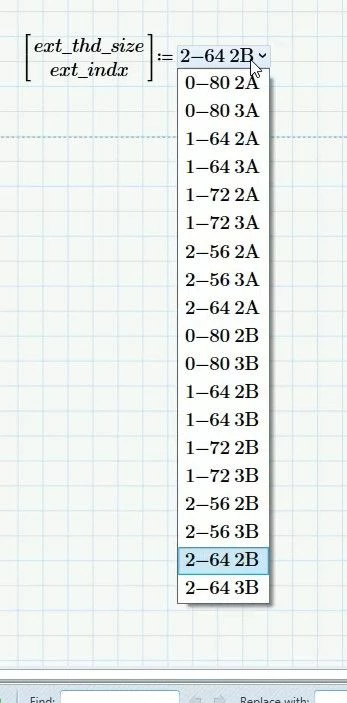
Capture.JPG

Capture2.JPG

Cheers

Terry

3 replies

25-Diamond I
April 20, 2023

@JM_10241707 wrote:

I wanted to link excel with combo box can that be done in prime?


No, its hard to understand that a company like PTC really dares to offer a combo box with such a simple basic functionality.

Believe it or not, but you are really supposed to manually type in every single entry! No scripting (its promised for future versions - we will see), no way to use an already defined vector or matrix from Prime or to import the data from Excel. Its a shame!
As an extra, the combo box does not even support composite units like km/h, m/s or Nm. A no-go for a program which  is  was famous for its unit support.

21-Topaz II
April 20, 2023

Hi,

It is better if the excel sheet and which column/s of the Excel data to link to the combo box is provided.  Then can see what can be done.

Getting the Excel data into Prime is possible by reading file or using Excel component.  Getting the column or columns of Excel data into a combo box is possible with a neat trick.   Some sample data will enable showing you how it can be done.


It is not possible to get the combo box to update when Excel is changed!


Cheers

Terry

8-Gravel
April 22, 2023

I am looking for any method to connect the excel spreadsheet to list box even if there is no direct way to do it. Here  is the data I need to find a  way to pull information out of table

21-Topaz II
April 23, 2023

Hi,

Can you include the Excel support data

Cheers

Terry

21-Topaz II
April 20, 2023

Hi,

Found the example I was looking for from past posts.

Enclosed is an Excel file with actual data 2091 rows by 166 columns.

Prime sheet has two combo boxes one to select an individual row with 2091 entries and one to select a column with 166 entries and it outputs the data in the relevant data cell as an example.

For the Prime read excel data statement the path will need to be adjusted for your system.


Statements to create the combo boxes within Prime are located on the Rows and Columns worksheets.  I did not type the 3000 odd entries in the Prime combo boxes but let Excel create them.  It is just copy and paste to get them into Prime.


Is this the sort of thing you are after?  I can explain in detail if it is.


Cheers

Terry

25-Diamond I
April 20, 2023

I sure would be interested in that workaround - if PTC does not provide a decent way to do it, a workaround may be better than nothing.


I could only think of two ways but both seem to be much too cumbersome:

1) Use copy and paste. Unfortunately copy and paste is implemented in Prime in a rather unattractive and dilettante  way. So we would be limited to copy just the part which are visible on screen one after the other.

2) Editing the "worksheet.xml" file which is inside the mcdx file (which actually is just a renamed zip archive. The necessary structure to be copied there could be created by Excel or an external program.


But I wouldn't call either of these methods acceptable, workable or suitable for everyday use, but rather a gimmick that shows what is possible after all, despite PTC's dilentantism.

So I think you have found another method that I obviously am not thinking of and sure would be very interested to learn what that would be.

21-Topaz II
April 20, 2023

Hi,

It is the second option - editing the worksheet.xml file.

Much to cumbersome,, not really for everyday use, and a gimmick I agree but it beats typing in 2091+166 items into the combo boxes.

Using Excel to create what needs to be pasted into the worksheet.xml file.


It is better than nothing.


Cheers

Terry