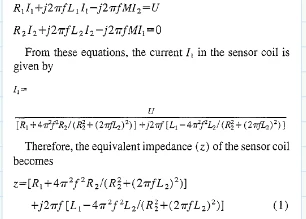
Hi I am using Mathcad 9.0. I want to find the current I1 and put the value into the second equation so that I can represent the equation in I=U/Z from. But I can do it manually and not in Mathcad.
I have attached my mathcad file as well as the picture, how I want to express my model.
Thanks for looking into it. I have rectified the error.
I have solved my problem manually, but I want to solve it using Mathcad. I have attached the picture of my manual calculation. The file is named as "a.jpg". I want to get a simplified value of I1 in the form of I1=U/Z. just like in the picture I have inserted along with the message.
You have to type 1j (or 1i) for the imaginary unit - without any space or multiplication in between!
Unfortunately unlike in good old real Mathcad, the leading "1" is not suppressed when displaying the result.
You can set the math formatting for the whole sheet to display 1j instead of 1i, but the symbolics isn't integrated good enough in Prime and it ignores that setting and always shows just 1i.
You may define j:=1j at the top of the sheet so you can simply type j instead of 1j, but when evaluating expression symbolically you still will see 1i
Furthermore you have to place a multiplication character between R1 and I1 and also between R2 and I2. Either an explicit one (*)or and implicit one (Ctrl-U).
Thanks for looking into it. I have rectified the error.
I have solved my problem manually, but I want to solve it using Mathcad. I have attached the picture of my manual calculation. The file is named as "a.jpg". I want to get a simplified value of I1 in the form of I1=U/Z. just like in the picture I have inserted along with the message.