
15-Moonstone
August 20, 2015
Solved

How to add one extra row in matrix or in excel component ?

  • August 20, 2015
  • 1 reply
  • 1813 views

Hi..

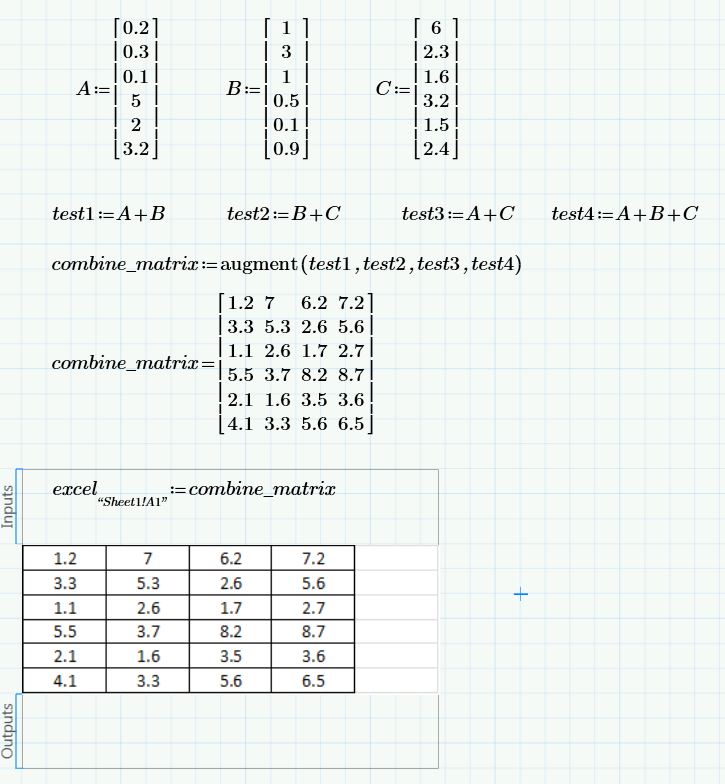
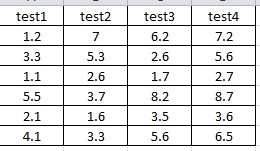
I need to add one extra row in matrix or in excel component, for more detail pls see below e.g.

In excel component it shows only values, but i want to show its heading also to understand it better as per shown in second snap (i.e. test1, test2, test3, test4).
1.JPG

2.jpg

so please can anybody help me.

Regards,

Prashant Pandarkar

Best answer by StuartBruff

header:=augment("test1","test2","test3","test4")

header_matrix:=stack(header,combine_matrix)

Stuart

1 reply

23-Emerald V
August 20, 2015

header:=augment("test1","test2","test3","test4")

header_matrix:=stack(header,combine_matrix)

Stuart

15-Moonstone
August 20, 2015

Yes, Given solution is working.

Thank you very much.

And I have one more question i.e. I want to save every output matrix in one excel.

i.e. If i change 5 times its input values, then i should get 5 output in one single excel as iteration base.

1.JPG

Thanks,

Prashant

23-Emerald V
August 20, 2015

prashant pandarkar wrote:

- I

Yes, Given solution is working.

Thank you very much.

And I have one more question i.e. I want to save every output matrix in one excel.

i.e. If i change 5 times its input values, then i should get 5 output in one single excel as iteration base.

Unfortunately, I don't have Excel on my PC and I'm not familiar with the Prime Excel component, so I can't play with it to confirm how it works.  If, for example, it were possible to use a string variable in the excel component address, then it might be possible to simply adjust the write address during your iteration.

One way that should work is to construct a matrix with all of the iterations.  See below for one example - I'd use a program in practice, but this version should work in Prime Express (apart from the Excel component being available after 30 days, but the EXCELWRITE function should work).

Stuart