
16-Pearl
August 28, 2023
Question

Mathcad Community Challenge September 2023 - Math Art

  • August 28, 2023
  • 10 replies
  • 12531 views

This month’s challenge is fairly open-ended: create art in Mathcad Prime. Using the Chart Component, XY Plot, Polar Plot, Contour Plot, or 3D Plot, create some kind of image that evokes the beauty of math. It can be as simple or as complex as you want.

Here are a couple 2D curves I created:
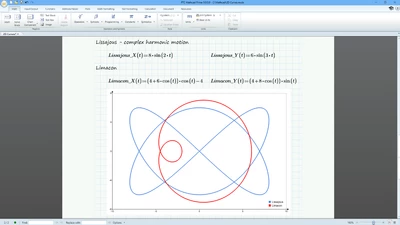
DaveMartin_0-1693229076542.png


Here is a surface called a “monkey saddle” along with 3D Plots of its Gaussian curvature and mean curvature:
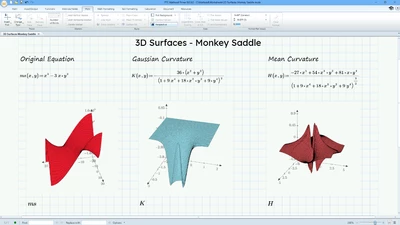
DaveMartin_1-1693229076559.png


Feel free to make something light-hearted and fun. Someone posted an equation for the chest symbol for a certain caped crusader online. Here is that equation adapted for the Chart Component in Mathcad Prime:
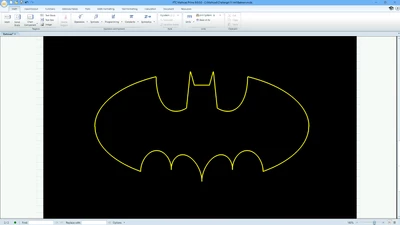
DaveMartin_2-1693229076565.png


One resource that I have used for my curves and surfaces is “Modern Differential Geometry of Curves and Surfaces” by Alfred Gray. Many of the equations can be adapted for graphing in Mathcad.

What art can you make with Mathcad?


Find the Mathcad Community Challenge Guidelines here!


10 replies

DJNewman
18-Opal
August 28, 2023

A happy face made in the Chart ComponentA happy face made in the Chart Component


Alright, I'm happy this is up now! 🙂


Anyway, this is very open-ended! Show off some cool (or beautiful) stuff, folks, and be creative!


By the way, this still ends on September 30 despite it being posted on August 28.

PTC Marketer Creo and Mathcad. I run their YouTube channels, some Creo campaigns, and all Mathcad campaigns and communications.
5-Regular Member
September 7, 2023

everyone should try zooming out on David's worksheet to see a surprise!

pakhomova_0-1694105259691.png


DJNewman
18-Opal
September 7, 2023

My mood right nowMy mood right now

PTC Marketer Creo and Mathcad. I run their YouTube channels, some Creo campaigns, and all Mathcad campaigns and communications.
23-Emerald I
August 30, 2023

There have been five challenges so far; this is number six.  Since it requires the chart component I cannot participate using Express.

But it's miss labeled!

This is a Mathcad add-in software challenge.  It requires the use of software that has been patched onto Prime.


I propose a different challenge, unfortunately it is restricted to a very few.  "Features that we used to have in (as Luc terms it, real) Mathcad still not available in Prime."


As one of my favorite Russians is fond of saying, "It's not a solution without animation."

DJNewman
18-Opal
August 30, 2023

There's been eleven challenges including this one...!


The prompt says,

" Using the Chart Component, XY Plot, Polar Plot, Contour Plot, or 3D Plot"

You can use the Chart Component, several other "native" plot types, or the XY Plot, the last of which is available in Mathcad Express.

And I absolutely know you can make artsy stuff in the Prime XY Plot. I've seen it before on this board. 🙂

PTC Marketer Creo and Mathcad. I run their YouTube channels, some Creo campaigns, and all Mathcad campaigns and communications.
23-Emerald I
August 30, 2023
Sorry, I missed the count!

And you’re right! Looking at the additions by Luc, Werner and others demonstrates that native plotting is capable (at least 2D). So I guess the question really is, “Why is Mathcad native plotting so constrained?”

16-Pearl
September 13, 2023

I was playing around with the equation for a Klein bottle in Mathcad. I'll leave this here as a starting point in case anyone wants to build on it. Created in Prime 9.0.

Klein Bottle.png


19-Tanzanite
September 16, 2023

Here's a simple one done in Prime Express.


Sept2023.png


16-Pearl
September 17, 2023

Reminds me of spirograph when I was a kid.


19-Tanzanite
September 17, 2023

Perhaps better with each ring plotted separately.  In M15 I could have included NaNs in the stack commands to prevent lines being drawn from the end of one group to the beginning of the next.

Sept2023b.png 

ttokoro
21-Topaz I
21-Topaz I
September 17, 2023

3D-Lissajous figure plot shows diffetent face for each xy, yz and zx plane. Prime 9.


image.png

t.t.
ttokoro
21-Topaz I
21-Topaz I
September 18, 2023

Plot of C60+20*n. Prime 9 attached.

image.pngimage.pngimage.png

t.t.
18-Opal
September 18, 2023
25-Diamond I
September 18, 2023

@ppal_255687 wrote:

Some nice ones were done here:

https://community.ptc.com/t5/Mathcad/Mathematical-ways-to-draw-a-heart/m-p/143447


There's still a long way to go until next Valentine's Day, but if you like hearts, you might also be interested in:
Re: What name has this closed curve? - PTC Community

If you are interested, I can post the MC15 sheet, but I am not sure if Viacheslav N. Mezentsev's "implicitplot3D() function would work OK in Prime after conversion to create the 3D heart.

Werner_E_0-1694998920672.png


5-Regular Member
September 19, 2023
DJNewman
18-Opal
September 26, 2023

Reminder that this is the last week of September!


And there's still lots and lots of potential art that you, a Mathcad user, can submit here.


I really want to see someone submit fractal art.

PTC Marketer Creo and Mathcad. I run their YouTube channels, some Creo campaigns, and all Mathcad campaigns and communications.
16-Pearl
October 1, 2023

Today is October 1st and normally the challenge would end today. However, last week I was contacted by someone from a design school in Spain, and their students create art in Mathcad. I was slow to respond as I was dealing with my own stuff. (Along with a third of the company, I was fired from my day job at a Silicon Valley drone startup.) I'm going to start looking at the current submissions but give a couple days in case the students or anyone else wants to post their art.

5-Regular Member
October 5, 2023

Hello Dave and Community!


I'd like to share my Mathcad chart experience with you. With a bit of practice and a commitment to learning, I've managed to create visually appealing outputs.

Initially, I was apprehensive about Mathcad charts, but I quickly found them easy to grasp. To add a personal touch, I chose a dark pink cosmos flower, reminiscent of my childhood home in Ukraine (see reference photo).

The process of creating and refining the chart was enjoyable and rewarding. Mathcad's user-friendly tools and community resources were invaluable.

I'm excited to present my Mathcad chart project, hoping it inspires you to infuse creativity into your work. Your feedback is appreciated!

And guess what? You can play around with the number of flower petals in the chart by simply replacing '8' with any number you'd like! (File attached for your convenience.)


-TJ

pakhomova_0-1696540224765.pngpakhomova_1-1696540229569.jpeg


DJNewman
18-Opal
October 5, 2023

Pro-tip (which goes for any Mathcad worksheet): Instead of hard-coding the 8 in the Inputs, you can replace that with a variable like PetalCount by defining PetalCount:=8 outside (above) the Chart Component.
So it'd look like X2:= cos(PetalCount t)*cos(t)   & Y2:= cos(PetalCount t)*sin(t)


That way, you can change that PetalCount definition once, and it propagates to the two times you use it in the Inputs (for the X and Y expressions).

PTC Marketer Creo and Mathcad. I run their YouTube channels, some Creo campaigns, and all Mathcad campaigns and communications.
16-Pearl
October 6, 2023

Thank you, everyone, for your submissions. The September challenge is now officially closed. Thanks for your participation. The blog post will be live next week.

DJNewman
18-Opal
October 11, 2023

Hi y'all:

Badges are distributed and the blog post is published!

https://www.mathcad.com/en/blogs/community-challenge-art-gallery

PTC Marketer Creo and Mathcad. I run their YouTube channels, some Creo campaigns, and all Mathcad campaigns and communications.