
1-Visitor
January 18, 2024
Solved

Stacking a Matrix with a For Loop

  • January 18, 2024
  • 1 reply
  • 3656 views

I'm struggling to get a for loop to run in Mathcad Prime 7.0.0


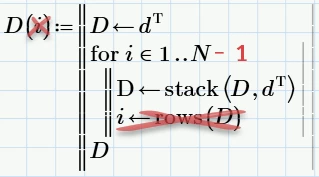
I have a matrix "d" that I want to stack "N" times. The matrix "d" could have any number of rows, and "N" >= 1  (these are defined elsewhere in my sheet). But I cannot for the life of me figure out how to iterate through the loop. Where have I gone wrong?


The examples I see are using "i" inside the loop to perform an operation (sum several terms, etc.). Maybe since I'm not actually using "i" for the calculation anywhere it's breaking? Maybe because my stacked matrix isn't actually a function defined by "i"? Should I be using while instead of if?
Best answer by Werner_E

Its always better to attach the worksheet itself, not just a picture!


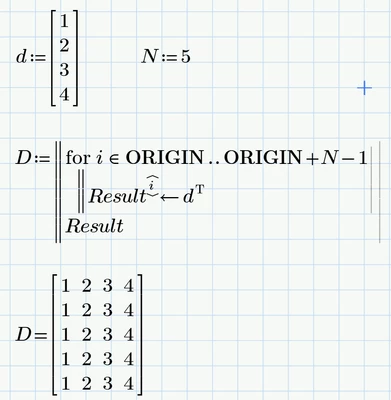
You do not want to define a function, so simply assign the program to a normal variable D

Do not change the loop variable i inside the loop (unless you know exactly what you do and what PTC did when they implemented programmed loops).

The loop must run from 1 to N-1 or from 2 to N because you already initialized the local variable D with a row of values.


Try this:

Werner_E_0-1705602579915.png


Here is an alternative using the row operator

Werner_E_1-1705602803421.png

Did not know which value you have ORIGIN set to, so I made the program ORIGIN-aware.

If ORIGIN=0, then i  in  0 .. N-1

If ORIGIN=1, then  i  in  1 .. N


1 reply

Werner_E25-Diamond IAnswer
25-Diamond I
January 18, 2024

Its always better to attach the worksheet itself, not just a picture!


You do not want to define a function, so simply assign the program to a normal variable D

Do not change the loop variable i inside the loop (unless you know exactly what you do and what PTC did when they implemented programmed loops).

The loop must run from 1 to N-1 or from 2 to N because you already initialized the local variable D with a row of values.


Try this:

Werner_E_0-1705602579915.png


Here is an alternative using the row operator

Werner_E_1-1705602803421.png

Did not know which value you have ORIGIN set to, so I made the program ORIGIN-aware.

If ORIGIN=0, then i  in  0 .. N-1

If ORIGIN=1, then  i  in  1 .. N


1-Visitor
January 18, 2024

The rest of my document is a work in progress and I was too ashamed to share it. I've got other error warnings all over, it's poorly arranged, incomplete equations, miscellaneous notes, etc. Trying to combine a few of my company's excel sheets and some other engineer's incomplete attempts into one document for a smoother experience.


The row operator method works perfectly! Problem solved!

The adjusted for loop does not, same result as before where it only displays the single line results. It doesn't need to be done that way, it's just the easiest way I thought I could stack up or augment my matrices.


Thank you Werner, you're a gift to humanity.

1-Visitor
January 18, 2024

My apologies again for not sharing it the first time, thought it was a trivial issue to solve (and clearly it was since you had two simple solutions). Will do better next time.


Every example I found of how to define a for loop included f(i) so I just presumed that it was a necessary step. I agree it doesn't make much sense, but as I'm brand new to this I thought "Without defining it as a function of i, how could it be looping for i terms?" And then when it broke I suspected that this part which was not making much sense was the culprit.

The tricky part for me was when I tried to replicate the error after your second reply: it worked just fine. I was so perplexed. I retyped it several times in various sheets (old and new), and every time it just worked. I had long deleted my original testing zone where I had written the bit I sent in the attachment, lost the original so I was just stuck with the knowledge and shame that if I just removed the (i) definitions it would have worked out for me all on my own. Had it produced one too many rows I could have easily figured out that subtracting one from N would get me where I wanted.


Perhaps the non-italicized D came from the text formatting of a previously (mostly) deleted "for" or "stack" function as I was working my way through the learning.