
10-Marble
August 18, 2025
Solved

While loop with interactive exit/break

  • August 18, 2025
  • 3 replies
  • 3039 views

Hello again
I have (yet another) possibly trivial question.

I want to make a program loop that will add elements to an array as long as the user wants to.

Is this even possible in MathCAD?

In python the basic loop would look something like below (formating difficult):


answer='Y'counter=0
array=[]
while answer=='Y':
    answer=str(input("Add another? (Y/n) :"))
    answer=answer.upper()
    array.append(answer)
print(array) 


This can look like this when run in Python:

Add another? (Y/n) : Y
Add another? (Y/n) : n
['Y', 'Y', 'N']
Best answer by Werner_E

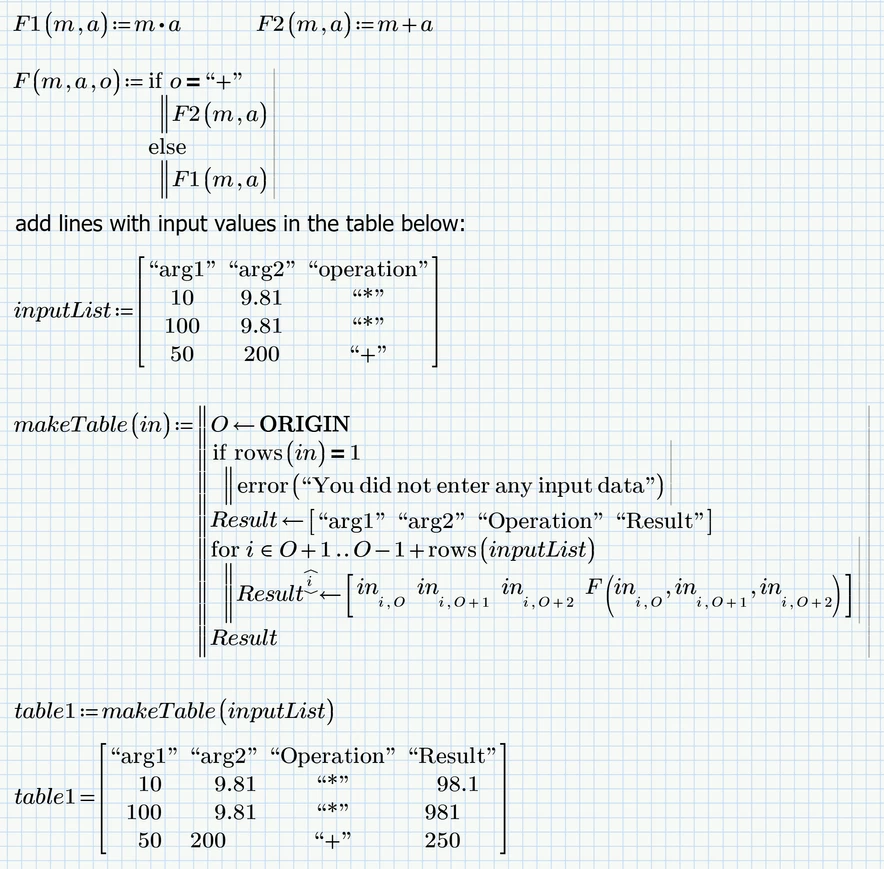
Here is on possible approach for my option1, turning the calcs into functions. I followed the example you posted but can't be sure if this approach will fit if the calculations are more complex and forked.

The functions (F1, F2) may have different number of arguments. Prime does not allow a user function which can be called with a varying number of arguments. Way out could be to provide all arguments in a vector and just use the necessary one.

The input data also must not be provided in an matrix, but it makes the automatic creation of the table much easier.

Werner_E_0-1755608393832.png


Drawback of this method sure is that arguments and operation which should be done cannot be made selectable via ListBoxes but must be typed in manually by the user which is failure prone. 

Prime 11 sheet attached


3 replies

25-Diamond I
August 18, 2025

There is no way that a Mathcad or Prime program can do any user interaction once its running.

Maybe what you are looking for is possible to achieve using one of the advanced controls which is turned into a function, opens a message window and is called from within the Mathcad program.

This should be possible to do in real Mathcad (v. 15 and below) but I doubt that it would be possible to do in Prime as turning an advanced control into a function is not really possible to do and I am not sure if we can call  'MsgBox' from within a Prime script.  Prime's scripted controls are definitely more limited than the controls in old real Mathcad.

10-Marble
August 19, 2025

Thank you again @Werner_E 

Guess I forgot to mention I am using Prime 11.0.0.0 (Just abandoned MathCAD 15 as our IM infrastructure does no longer supports it. 
Starting to wonder if that was a mistake.. 😢. But we never really used the more advanced features/functions in MathCAD 15, so what I am trying to achieve 


I was afraid this would be the answer, as I could not find anything in MathCAD similar to the Python "input" statement.


Basically what I am trying to achieve is to make a "snapshot" of the calculation results (with varying input data) and save this into a table/array/matrix.

I have looked into maybe using the Advanced control "Button", as it appears to run the internal code once every time it is clicked. 
Finding the documentation regarding input/output from advanced controls a bit lacking. Also I have to make a decision about what programming language to use inside the control. I have some general experience using Python, but that seams to require an additional installation, while Jscript and VBscript is available out of the box on Windows?

Anyway, I will make an attempt at the solution provided by @terryhendicott and see how it turns out.

Regards
Hallvard

21-Topaz II
August 18, 2025

Hi,

It is possible without programming,

Type the following without the spaces put in for clarity:-

array [colon] [CTRL] M "

Enter first text line between the quotes

If you want another line type, the arrow right takes you outside the quotes:-

[Arrow Right] [Shift] [Enter] "

Enter line of text between the quotes.

Keep going until the array is finished.

Capture.JPG

21-Topaz II
August 18, 2025

Correction.

Keys together are [CTRL]+M and [SHIFT]+Enter


10-Marble
August 19, 2025

Hello @terryhendicott 

Thank you for the reply.
What you are explaining is how to manually define an array/vector.

It may be that I could add some text box instructions for the users to achieve this..
Something like
"Add this line to store the result in the table:
inputi:=input  resulti:=result
Where i is the next linenumber"..
May be the simplest solution in the end...

Anyway I realize my explanation was a bit "oversimplified".

In reality the structure of the Prime document is a bit more complex. I will try to outline it below.


  1. Area containing global parameters used for calculations (some fixed, and some project specific and changeable)
  2. In this case an "Basic" combo control used to select parameters for the specific case one want to calculate. In this case there are 19 different calculation possibilities, one of which has to be selected (this actually works quite good)
  3. Area containing formulas to calculate the answers
  4. Area containing the actual calculations
  5. (The problem area) The option to save the current input/results into a table/file/somewhere (like using the >> file (append to file) command from a shell.
  6. Change the input (bullet 1, 2 above) to calculate a new case and (optionally) add input and result to the table until all relevant cases have been calculated...

It may be that I have to look into the API or COM interface to achieve this in an interactive manner..

Regards
Hallvard

25-Diamond I
August 19, 2025

Its still not absolutely clear to me what exactly you try to achieve even though in the meantime you outlined your worksheet structure, but it gets clearer.

Once you change input values at the top of the sheet, the sheet is recalculated from anew and values which were calculated before are lost.

I can see two options to overcome this:


1) turn your calculation into functions of the input values. Then you can call these function(s) one after the other using varying inputs and collect all results in a suitable data structure like an array or nested matrices.


2) Save the results of one calculation run in an external file using an appropriate WRITExxx  function.
To collect a series of runs and avoid to overwrite the data already saved you could either

a) use automatically created different file names for each run, so you end up if one file for each run

b) Use the appropriate READxxx function to read in the data already saved, combine it with the new data and resave

c) If possible an appropriate you also can use WRITEPRN the first time and then APPENDPRN to add data to an already existing file

Which function for writing data is most appropriate depends on the type and structure of your data. See here what Prime has to offer.


10-Marble
August 19, 2025

Hello again @Werner_E 

Thank you for your continued support. 😁

Basically what I want is to do is to allow the user to

  1. Define the input
  2. Calculate the result
  3. Add the input and result to a table
    (well it must be a matrix as far as I understand, but something looking like a table can be made by stacking and augmenting arrays/vectors)
  4. Ask the user if he/she wants another calculation if Yes goto 1 else continue to 5
  5. Display the result which contains a summary of all the calculations.

I may add that I am attempting to put this into a "Template", so I do not know in advance exactly which calculations are needed on the specific project. Could possible include instructions to the users on how to prepare the input of all calculations in one go..

I guess I could also use a similar approach as in the previous case you helped me with where I basically performed all possible calculations, and then used check-boxes to select which results to include in the result table. (Many more possible combinations in this case, but CPU cycles are cheap these days.) 😉

But from what you are writing it may look like saving and reading to/from a file may be another possible solution.
I have not investigated the file related functionality yet..

Regards
Hallvard

23-Emerald IV
August 20, 2025

The challenging part is your step 4, described as that (the) Mathcad (sheet) takes the initiative to interact with the user.

You may have a look at what was done to create games using Prime, here: https://community.ptc.com/t5/Mathcad/Mathcad-Community-Challenge-Summer-2024-Game-Gallery/m-p/959091 


Success!
Luc