10-Marble
February 1, 2024
Solved

Can i change the origin of my part?

  • February 1, 2024
  • 1 reply
  • 1530 views

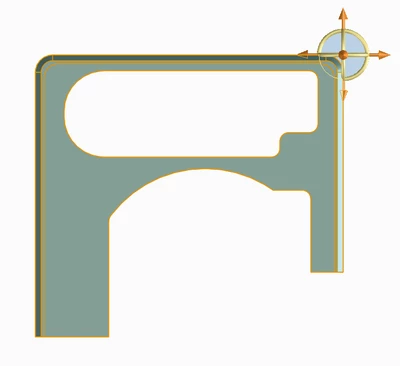
I want to change the origin of my part to the opposite side? 
Creo/Elements Direct
 

EI_10453429_0-1706802992391.png


    Best answer by Kotom-Eng

    I'll give you my method, I don't know if there is a better one.


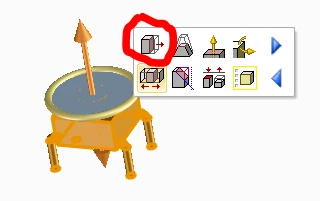
    Select the whole part with a box. This will select all the faces of the part.
    KotomEng_3-1706810064592.png


    Click on "Move 3D".

    The part becomes blue, that means that although only faces are selected, Modeling detects that the whole part is selected and will apply the move to the part and not the faces. This means that the part itself is not changed, only its position.
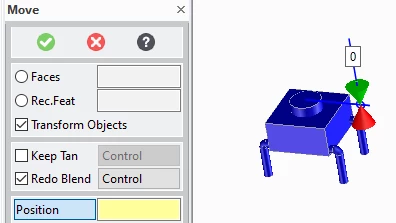


    KotomEng_0-1706808872409.png


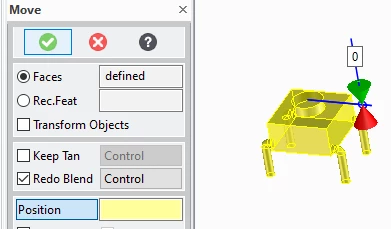
    Uncheck "Transform Objects". The part becomes yellow, that means that the move will be applied to the faces. Therefore the position of the part is not modified, but the position of the faces is changed with respect to the origin. Which is equivalent to changing the origin of the part.
    KotomEng_1-1706809811117.png


    Now, move the part as you like.


    Attention! if the part is used in other assemblies, after moving the origin of the part, the part will appear moved.


    1 reply

    Kotom-Eng16-PearlAnswer
    16-Pearl
    February 1, 2024

    I'll give you my method, I don't know if there is a better one.


    Select the whole part with a box. This will select all the faces of the part.

    KotomEng_3-1706810064592.png


    Click on "Move 3D".

    The part becomes blue, that means that although only faces are selected, Modeling detects that the whole part is selected and will apply the move to the part and not the faces. This means that the part itself is not changed, only its position.


    KotomEng_0-1706808872409.png


    Uncheck "Transform Objects". The part becomes yellow, that means that the move will be applied to the faces. Therefore the position of the part is not modified, but the position of the faces is changed with respect to the origin. Which is equivalent to changing the origin of the part.

    KotomEng_1-1706809811117.png


    Now, move the part as you like.


    Attention! if the part is used in other assemblies, after moving the origin of the part, the part will appear moved.


    10-Marble
    February 2, 2024

    Really thanks!
    It worked for me
