
1-Visitor
November 3, 2012
Solved

How to install sample data with solution

  • November 3, 2012
  • 1 reply
  • 2414 views

I have tried to install the sample data wth solution, but It give me this message "The integration between Source and Integrity must be enabled to install the sample data." I don't know what exactly it means, so the I can just install the solution without the sample data, How can I work out this problem?
    Best answer by jgorsline

    Haizi,

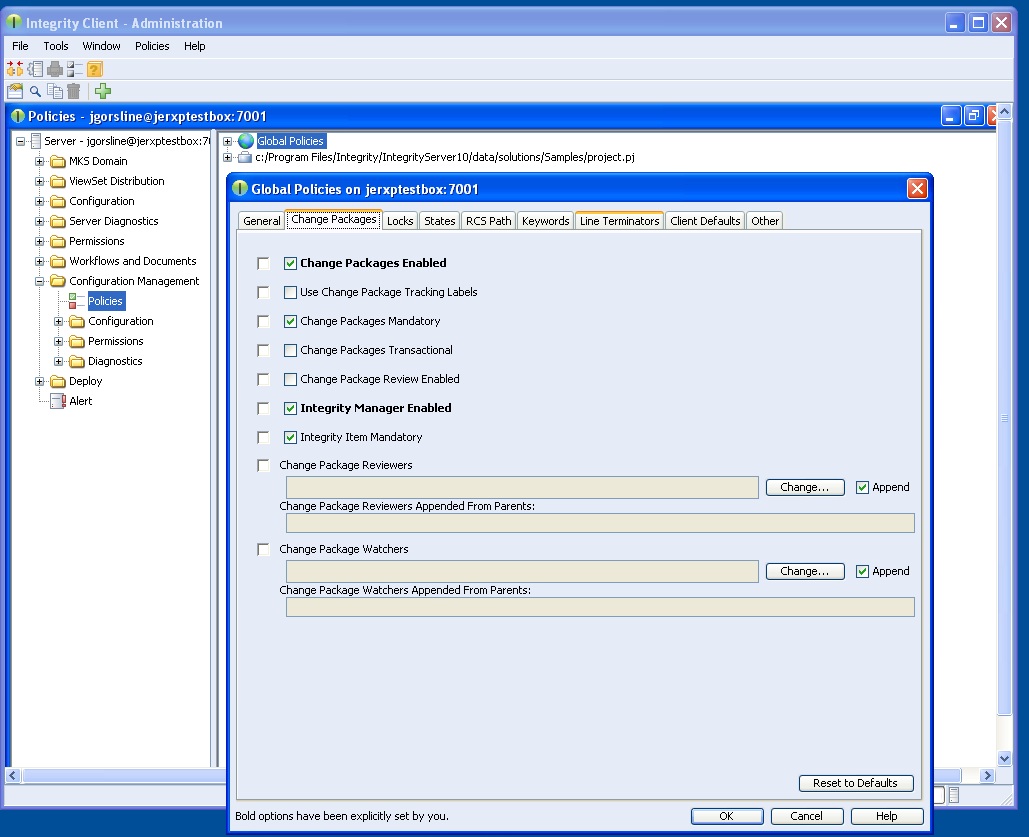
    This is just a small configuration step you need to take. In the Integrity Admin Client, in the Configuration Management node, click on Policies, and then right click on Global Policies and select Edit. On the Change Packages tab, put a check next to "Integrity Manager Enabled". Apply and restart your client for this to take effect. Once you have done this, the sample data/solution should install without a problem.

    See the picture below:

    Manager_enabled.jpg

    1 reply

    jgorsline1-VisitorAnswer
    1-Visitor
    November 8, 2012

    Haizi,

    This is just a small configuration step you need to take. In the Integrity Admin Client, in the Configuration Management node, click on Policies, and then right click on Global Policies and select Edit. On the Change Packages tab, put a check next to "Integrity Manager Enabled". Apply and restart your client for this to take effect. Once you have done this, the sample data/solution should install without a problem.

    See the picture below:

    Manager_enabled.jpg

    1-Visitor
    November 10, 2012

    Thanks a lot for your reply, I have solved this problem with your answer, by the way, this method is just for the Importing, in some case I need migrate/move the solution from one server to another server after some modification in the original server, so how to do the solution Exporting?

    1-Visitor
    November 11, 2012

    Are you looking to set up a staging environment type system or is this a one-time move?