
1-Visitor
September 9, 2016
Question

How to set a relationship field editable at the backward-direction, but not editable at the forward direction?

  • September 9, 2016
  • 2 replies
  • 7261 views

Hi @all,

we have an item-type which is representing a hierarchical structure of release artifacts (function-packages). If we are developing new functions, then these functions can be splitted into packages, and the packages can also hold other packages (and so on) until we come to the smallest development artifact (a module).

In integrity we have built an item-type "package" which is holding both sides of a relationship field. The forward direction of this relationship field is named "subordinated packages" and the backward direction is named "superordinated packages". So in each package the users can see, which other packages are holding the package which the user is viewing and which other packages this package contains.

There are also some triggers which are reacting if the hierarchy is changing. So as example the item type is containing date-fields (for planned release dates), which will be inherited in each subordinated item by such triggers.

Now to my problem: if i have an existing hierarchy of 3 packages: package A at the top, package B in the middle and package C at the bottom, and i want to put a fourth package D as a subordinated package into package B i can do this by editing the relationship field in two ways.

The "downstream-way": i am editing the forward-part of the rel-field in package B and add package D into this field.

The "upstream-way": i am editing the backward-part of the rel-field in package D and add package B to this field.

Both actions are triggering the above mentioned inheritance, but only the downstream-way is working. If we are trying to use the upstream-way, the trigger is starting in the superordinated package B and if it comes to its own subordinated packages, it will try to modify the date-field in the subordinated package D, which is already modified. So we are running into an cyclical trigger error (see the attached screenshot)
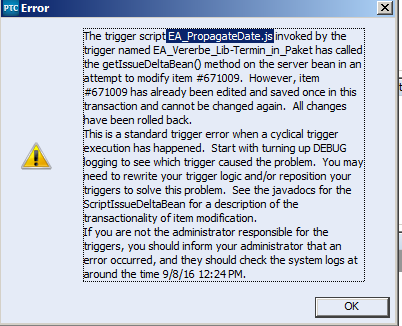
CyclicalTriggerError.png

Now we had the idea to permit the users to modify these relationships by the upstream-way by setting the backward-part to "not editable". But this doesn't work as we cannot build relationships at all if we do so.

Is there any way to work around this cyclical trigger? Or to set the backward-part of this relationship field to "not editable" for direct, but not for indirect modifying?

Thanks, Jens

added a scheme of the mentioned hierarchy...

2 replies

16-Pearl
September 12, 2016

Hi Jens,

some ideas:

1 instead of completely disabling the relationship edit, limit it to "system user" (if anyhow possible)

2 use IBPL ("superordinated package") and QBR (""subordinated packages") fields.

his will allow only the "upstream-way" as in package D you must/can define package B. But Package B the QBR will automatically find/reference Package C and D.

But:

+ QBR fields are read-only by definition, so no editing conflict.

- you'll be limited to a "single-value" relationship for the "superordinated package" (a typical tree design)

3. maybe you could change your "copy dates trigger" from rule / event base to a schedule one. That should eliminate the circle detection, as you have no event.

- e.g. define a query for packages that changed in the last hour

- run a trigger hourly that uses this query, to find and analyse/modify the items base on the "downstream relation".

HTH Matthias

JensN.1-VisitorAuthor
1-Visitor
September 14, 2016

Hi Matthias,

thanks for your answer. Unfortunately nothing of your ideas will work in our environment 😕

1. I didn't find such a systemuser in our environment and i don't have an idea how to create or implement some kind of such a systemuser.

2. Unfortunately a single-value field for the "upstream-way" isn't an option.

3. I somehow like the idea of scheduling the "copy dates trigger", because it would help us also in some other cases, where we encounter some kind of "race conditions" with some triggers. But this wouldn't be accepted by the users, because they have already a problem with seeing changes or results only after clicking "apply" instead of seeing them instantly. If they have to accept to wait for results of their actions for a certain time they won't accept the tool at all.

kind regards, Jens

16-Pearl
September 16, 2016

Hi Jens,

there is of course always option

4. create a custom GUI (POJO or Web-based) that analyses / visualizes your relationship tree, locally stores changes and finally publishes them to Integrity. (comparable to the "Edit in Work" workflow).

This is expensive but might be worth it

HTH Matthias

1-Visitor
May 22, 2017

Hi Jens-Uwe,

If you have to create relationship field either backward or forward non editable then you can set editability rule on one of them and just check on Never editable in Editability rule tab. Hope this helps or let me know about this.

Regards

Kapil Jain

JensN.1-VisitorAuthor
1-Visitor
May 26, 2017

Hi Kapil,

thanks for your idea, but this doesn't work. If an user tries to edit the relationship (at the side where it is allowed), after clicking apply he will get the error message:

"MKS124128: You are attempting to add the item 12345 as a relationship to this item. The target item 12345 does not permit editing the reverse relationship field <name of the relationship field>, which points back at the item you are trying to update."

kind regards, Jens