
1-Visitor
April 21, 2016
Solved

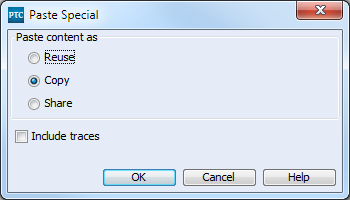
Paste Special - Include Traces
  • April 21, 2016
  • 3 replies
  • 2239 views

pasteSpecialIncludeTraces.png

When using Paste Special and checking Include Traces, it doesn't seem to actually include the traces. What is required for this to work? I tried setting those relationship fields to by Copy Fields but then you can't copy without including the traces. I'm using Integrity 10.7.

    Best answer by nborrerojr.

    Apparently when the relationships were made, the checkbox for "Trace" wasn't checked so that's what broke this.

    3 replies

    5-Regular Member
    April 22, 2016

    Nolin,

    This should work.  Can you provide more info?  Is this a case where the trace is actually happening, but the trace status is not updating or refreshing to actually show that?  If so, that may be a known issue.  What version of Integrity are you using?

    1-Visitor
    April 25, 2016

    am using Integrity 10.7. The trace does not copy unless that specific relationship is included in the copy fields. Refreshing to document has no effect.

    1-Visitor
    August 29, 2016

    I'm running into this issue again. As a temporary fix, I've added the relationship field to the Copy Fields but now it always copies which means I have to go into the field and delete the traces after pasting the item if I don't want them.

    We are still using Integrity 10.7. I've confirmed that unless I have the relationship field in the Copy Field, it is not creating the trace.

    What steps should make this work?

    nborrerojr.1-VisitorAuthorAnswer
    1-Visitor
    December 5, 2016

    Apparently when the relationships were made, the checkbox for "Trace" wasn't checked so that's what broke this.