
1-Visitor
January 5, 2021
Solved

Adding '%' character after the value of the Pie Chart Widget's tool tip

  • January 5, 2021
  • 2 replies
  • 2074 views

In one of the mashups in my company's Thingworx application, we show a percentage as the pie slice's value:
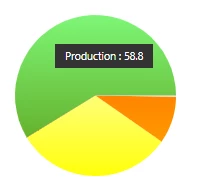
pie-graph-tool-tip.png

The users would like to see '58.8%' for the value, but my team is struggling to find a way to append that. The ValueFormat property appears to only control the numeric formatting. We haven't been able to find the HTML that appears for it so that we might try some Custom CSS magic.


Can this be done with the widget?

Best answer by odukiya

Hello @John_H 


If you only need to show % sign after your data you can enter the "0000.0 %" in the ValueFormat .


Please feel free to revert in case it doesn't resolve your query.


Thanks

Om Dukiya

2 replies

odukiya16-PearlAnswer
16-Pearl
January 5, 2021

Hello @John_H 


If you only need to show % sign after your data you can enter the "0000.0 %" in the ValueFormat .


Please feel free to revert in case it doesn't resolve your query.


Thanks

Om Dukiya

John_H1-VisitorAuthor
1-Visitor
January 5, 2021

Thank you to @odukiya and @emscur . I don't know why that did not work for us before.

5-Regular Member
January 5, 2021

Hi @John_H,


This can be achieved by setting the ValueFormat to 0.0%. The screenshots below show this functionality:


ValueFormat propertyValueFormat property   Mashup during runtimeMashup during runtime


I hope you find this information helpful.


Thanks,

Emmanuel