
1-Visitor
November 5, 2015
Solved

Creating a Thermometer from a Shape Widget

  • November 5, 2015
  • 1 reply
  • 4125 views


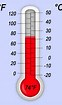
I want to create a basic thermometer.  That is, take a shape widget and adjust its height (and color) based on input data stream. The result will be something like this with the shape being that in red (it can be a rectangle, doesn't need the bulb at the bottom) and the height representing the level to which temperature has risen or fallen.  In this example 68% F. 

Seems I can’t bind much to a shape dynamically to make it grow or shrink based on input data.  Any pointers to documentation or examples?  Thanks.
 

    Best answer by Aanjan

    Beck, you should be able to achieve this with State Formatting and Dynamic Fill. Here is a very simple way to test this is - add a Slider and a Shape widget to a Mashup. Bind the Slider 'value' to Shape's 'data'. Now, in the Shape widget's properties, click on 'EnableDynamicFill' and then click on ShapeFormatting. Here you can customize the State-based Formatting. For example, red when below 40, yellow when between 40-60 and green when above 60. Now when you view the Mashup, and move the Slider, the Shape should grow/ change colors in real time.

    1 reply

    Aanjan5-Regular MemberAnswer
    5-Regular Member
    November 5, 2015

    Beck, you should be able to achieve this with State Formatting and Dynamic Fill. Here is a very simple way to test this is - add a Slider and a Shape widget to a Mashup. Bind the Slider 'value' to Shape's 'data'. Now, in the Shape widget's properties, click on 'EnableDynamicFill' and then click on ShapeFormatting. Here you can customize the State-based Formatting. For example, red when below 40, yellow when between 40-60 and green when above 60. Now when you view the Mashup, and move the Slider, the Shape should grow/ change colors in real time.

    1-Visitor
    November 6, 2015

    Thanks, this worked.

    I must have had something messed up in my original shape as I was unable to bind a value to it which was causing the confusion.

    Once I started over with a fresh shape - all works well.

    Thanks again!

    5-Regular Member
    November 6, 2015

    No problem, glad to see it worked! You can possibly add another shape in the bottom, with the shape type set to circle (same data bound, EnableDynamicFill not checked) so as to give it a thermometer like display.