13-Aquamarine
May 19, 2023
Solved

How to disable and enable button by selecting multi-selected dropdown widget in thingworx.

  • May 19, 2023
  • 1 reply
  • 1949 views

I want to validate the button when I select the multi-selected dropdown values, the button should be enabled, and vice versa.

 

Best answer by Velkumar

Hi @Hrishabh.Sharma 


You can create a service to validate multiple selected rows and based on that you can enable and disable the button


Create service with infotable input 

var result = true;
// selectedValue : InfoTable Input
// If Infotable contains multiple rows
if(selectedValue && selectedValue.length > 1)
{
 // enable button
 result = false;
}


Mashup Binding should look like this :
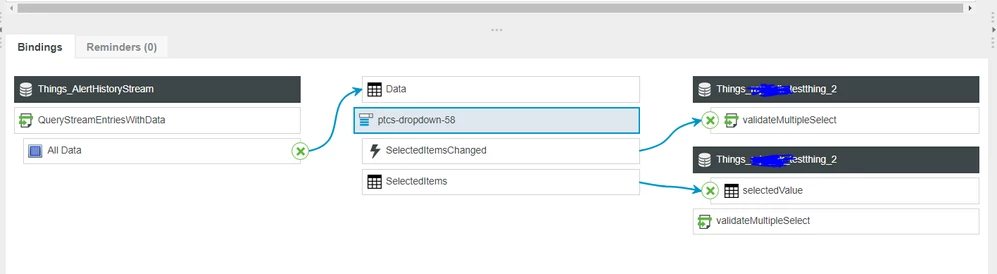
Velkumar_0-1684496207623.png


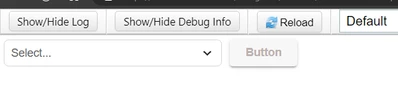
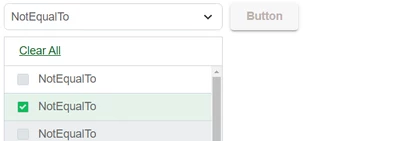
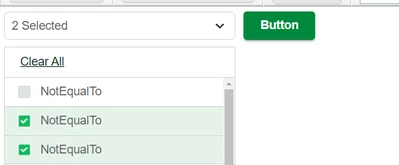
Mashup will look like this :


Velkumar_1-1684496259741.png


Velkumar_2-1684496284875.png


Velkumar_3-1684496303075.png


When multiple value selected button will enable


/VR


1 reply

Velkumar19-TanzaniteAnswer
19-Tanzanite
May 19, 2023

Hi @Hrishabh.Sharma 


You can create a service to validate multiple selected rows and based on that you can enable and disable the button


Create service with infotable input 

var result = true;
// selectedValue : InfoTable Input
// If Infotable contains multiple rows
if(selectedValue && selectedValue.length > 1)
{
 // enable button
 result = false;
}


Mashup Binding should look like this :

Velkumar_0-1684496207623.png


Mashup will look like this :


Velkumar_1-1684496259741.png


Velkumar_2-1684496284875.png


Velkumar_3-1684496303075.png


When multiple value selected button will enable


/VR


16-Pearl
May 22, 2023

Instead of the extra service https://github.com/doubleSlashde/InfotableInspectorWidgetTWX could be used to get Selected-RowCount in Frontend and evaluate button "disabled"-state via expression. But needs the extra extension - depending on how often it is needed the extension may be useful.