
1-Visitor
October 10, 2019
Solved

How to insert units in the value display

  • October 10, 2019
  • 1 reply
  • 2838 views

Hi there,


I am showing an information in the value display and this information is referent the weight where I use the unit "ton" (tonne). Like the image below:

 

image1.JPG


To do it I used two value display, one to bind my value and other to write the unit (ton). Follow image below:
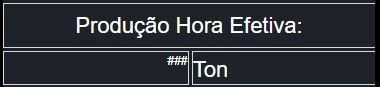
 

image2.JPG


My question is: Is there any way to insert in the same value display the value and the unit? I have ever searched in the properties from value display and I did not find nothing about it.


Regards,

Leonardo.


Best answer by zyuan1

You can use an Expression function, get your numeric input and the Unit together in one String, and then send the new result to the Value Display.

1 reply

22-Sapphire I
October 10, 2019

I've always just used the label next to the value display.

You can always make the background and line transparent and then overlay that over a box so it looks like a single display.

einsfele1-VisitorAuthor
1-Visitor
October 11, 2019

Hi @PaiChung 


Thanks for your answer.


I do it too, but I would like to find some way to configure it in the same value display.


If I do not find other solution I will keep it.

5-Regular Member
October 15, 2019

True, but for the 10 Expressions, they are having the similar script so it's easy to create and don't cost much resource as well.


Another solution is to use the Collection widget (previously called Repeater ).  By repeating the same mashup according to the rows of the infotable input, you only need to configure 1 ValueDisplay+Label or 1 ValueDisplay+Expression for the design.