
14-Alexandrite
May 12, 2023
Solved

How to make the bar chart to be displayed for 7 days as a limit instead of getting all data?

  • May 12, 2023
  • 1 reply
  • 2762 views

Hello,


I am using thing Worx 9.3.0 version , I want to display the 7 days data on the bar chart , whether it may be recent 7 days or any when I select the start date to end date only that data should get displayed in the mashup ,


As of now my mashup bar chart is having data from last 2 years so I need to make the chart which can be selected and viewed according to dates instead of all data 


please help me what needs to be done  , if anyone have some ideas on this 


Regards,

Shree 
Best answer by Velkumar

Hi @NH_shree 


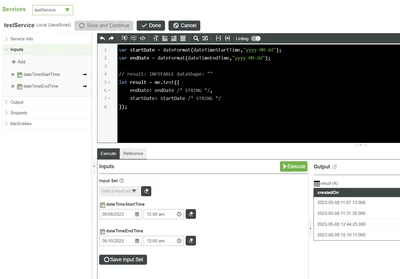
You can create a service with dateTime inputs to accept input from DateTime Widget and query data from DB


Velkumar_0-1684142113508.png


And whenever DateTime value is changed in Mashup, you can trigger this service to fetch new Data from DB 


/VR

1 reply

19-Tanzanite
May 12, 2023

Hi @NH_shree 


From where you are getting 2 years data (DataTable, Stream or External DB)?


/VR

NH_shree14-AlexandriteAuthor
14-Alexandrite
May 13, 2023

Hello @Velkumar , 


I am getting my data from the external database connected to thingworx , to access it I am using sql queries services in thingworx.


Regards,

Shree

NH_shree14-AlexandriteAuthor
14-Alexandrite
May 15, 2023

Hi @Velkumar ,


Can't we use datetime widget and make the graph works based on the dates which we select ,


suppose for example if we are getting all data in the chart can we just select from 01/05/2023 to 7/05/2023 data to be displayed on the chart and meanwhile if we want to change the dates it should reflect in the viewmashup screen like we should give the input on the view mashup screen instead of mentioning start and end date in the sql query service , 


I am expecting the output like this, is it possible to do and how can we do  ?


Regards,

Shree