

How to use a toggle button to display true/false status
Hello community,
I am working on a dashbboard where I want to use a toggle button to display a OK/NOK value with this toggle.
Already got it working that depending on the status true/false the switch toogles.
But now I want to add some colors to that. I used the CSS widget configurator to create a design for both status:
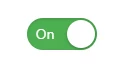
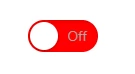
.slider-checkbox {
width: 70px!important;
height: 32px!important;
}
.slider-checkbox > .widget-checkbox>input {
display: none
}
.slider-checkbox > .widget-checkbox {
width: 70px!important;
height: 32px!important;
overflow: visible;
}
.slider-checkbox > .widget-checkbox>label {
display: block;
position: absolute;
left: 0;
top: 0;
width: 100%;
height: 100%;
background: #FF0000;
box-shadow: inset 0px 1px 3px 0px rgba(0,0,0,0.15);
border-radius: 16px;
box-sizing: border-box;
transition: background .2s ease-in-out;
}
.slider-checkbox > .widget-checkbox>input:checked+label {
background: #4CAF51;
}
.slider-checkbox > .widget-checkbox>label>span {
display: block;
margin: 2px;
width: calc(32px - (2 * 2px));
height: calc(32px - (2 * 2px));
position: absolute;
top: 0;
left: calc(70px - 32px);
transition: all .2s ease-in-out;
background: #ffffff;
border-radius: calc(16px - 2px);
z-index: 1;
box-shadow: 0px 1px 3px 0px rgba(0,0,0,0.4);
}
.slider-checkbox > .widget-checkbox>input:not(:checked)+label > span {
background: #ffffff;
}
.slider-checkbox > .widget-checkbox>label::after,
.slider-checkbox > .widget-checkbox>label::before {
line-height: 32px;
background: none;
position: absolute;
left: 0px;
width: calc(70px / 2 - 2px)!important;
height: 32px!important;
vertical-align: middle;
text-align: center;
font-size: 14px;
font-weight: 400 !important;
}
.slider-checkbox > .widget-checkbox>label::before {
color: #ffffff;
border: none!important;
margin: auto!important;
left: 2px;
content: "On";
}
.slider-checkbox > .widget-checkbox>label::after {
color: #aaaaaa;
left: calc(70px / 2 - 2px);
content: "Off";
}
.slider-checkbox > .widget-checkbox>input:not(:checked)+label>span {
left: 0;
}
Unfortunatly the custom class seems not apply the CSS design to the button.
I also found out that in the configurator a small hint is placed to use a checkbox field and modify it with tht CSS code. But both ways did not apply the design to the toggle or the checkbox.
May you got a hint for me how to get a solution?
XOXO,
Karma