1-Visitor
December 29, 2016
Solved

If RemoteThing is outline ,how to Convert it's property value to zero?

  • December 29, 2016
  • 6 replies
  • 5580 views

Hi ,everyone,

Now ,I meet one question just as my title describe, I want to change the property to escape the cache effect.

My method is create a Subscription ,when the "isConnected" property change to false,convert other property to zero,but it seems didn't work well,maybe because it has been bind to the machine,anyone has other method ?Please tell me ,thank you .

Best answer by jkaczynski

Hello Xiang,

There is a workaround to achieve your objects. A little bit hacky, but if you really need to reset the value, you can follow those steps:

1. Create additional, normal property on your Remote Thing. On the screenshot below I have two properties: remote (gets data from my Agent) and actual (local property with no remote binding).

2. Create two subscriptions:

    a. One on DataChange of your remote property - this subscription should update the value of actual with the value of your remote property:
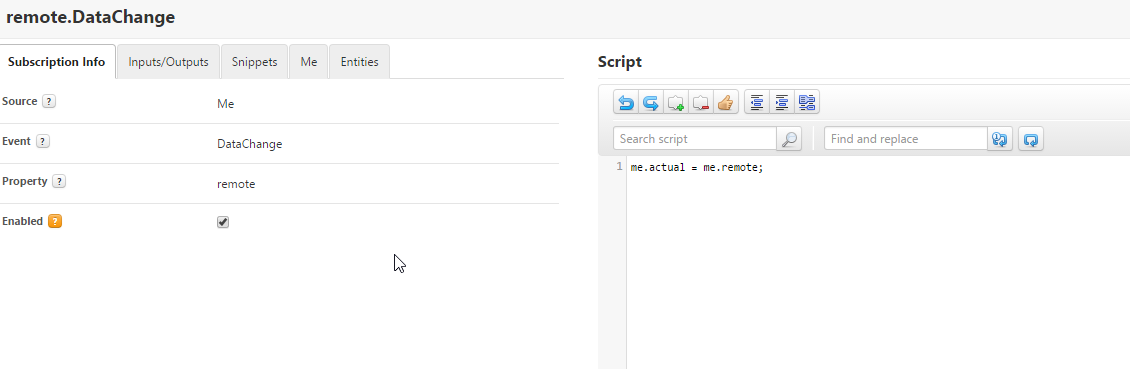
     b. Second on DataChange of isConnected property - this subscription should check if property isConnected is being set to false, if so - should reset the value of actual to 0.
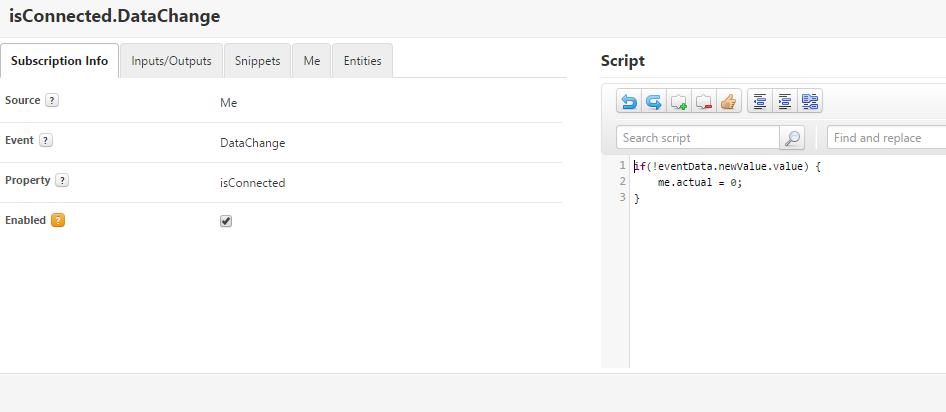
Now all you need to use the property actual, not remote. When the value of remote changes, the value of actual is changed too. If your Agent disconnects, the value is set to 0.

This method is not the most clean solution, however it works.

Hope it helps in your problem.

Regards,

J.

6 replies

5-Regular Member
December 29, 2016

Hello what exactly do you mean by "cache effect"? You should be able to change a property value in response to a data change event on the isConnected property no problem. Have you tried this and you are seeing issues?

向郭_011-VisitorAuthor
1-Visitor
January 6, 2017

yes ,I tried what you said ,but it seems not work well,when the remotething is offline ,it's property value is not turn to zero.

"cache effect " is when the remotething is offline,thingworx record it's online value ,and don't turn it's value to null or zero.

5-Regular Member
January 11, 2017

What is the JavaScript in your subscription to isConnected? What ThingWorx version? That should totally work

5-Regular Member
December 29, 2016

Xiang, are you looking into resetting a property to zero if your RemoteThing is offline/ not connected?

向郭_011-VisitorAuthor
1-Visitor
January 6, 2017

yes,that's what I need.

1-Visitor
January 6, 2017

You need to configure cache time in order to fix this.

cacheTime — Tells the ThingWorx server how to behave when reading a

remote property. This parameter can take the following values:

○ -1 — Indicates that the VirtualThing always sends its value, and the

server should never request it from the remote application. The value

returned always comes from the in-memory cache of the server. Use this

value for properties that are configured to be pushed to the server.

○ 0 — Indicates that every time the server uses the value, it should request it

from the VirtualThing.

○ Any other positive value — Indicates that the server should cache the

value for that many seconds and then retrieve it from the VirtualThing

only after that time expires. This setting is important for properties that

may be accessed frequently by many users. For example, if 100 users

attempt to access a property value within a 10 second period, you may

want to set this value to 30 seconds. That would ensure that only a single

request for the property is sent to the edge every 30 seconds. However, the

value returned by the platform could be out of date by up to 30 seconds.

This setting is important for properties that may be frequently accessed by

many users. For example, if 100 users attempt to access a property value

within a 10 second period, you may want to set this value to 30 seconds.

That setting would ensure that only a single request for the property is sent

to the edge every 30 seconds. However, the value returned by the Platform

could be out of date by up to 30 seconds

向郭_011-VisitorAuthor
1-Visitor
January 12, 2017

Dear Tori, my subsciption is as follows,besides the subscription,what else should I do?

If the thing is not the Kepware remotething,the subscription works well ,but that didn't useful in my work.

Thingworx Version:7.2.4-b46

Subscription info:

Source :Me

Event: DataChange

Property: isConnected

Enabled: true

inputs/Outputs: null

Snippets:

     if(me.isConnected){

     }else{

     me.measureTemperature = 0;

     }

向郭_011-VisitorAuthor
1-Visitor
January 12, 2017

In the Thingworx Monitoring ----Script, Log message is as follows:

Execution error in service script[Remotething is connected.DataChange]:Wrapped java.lang.Exception: Unable to write property...........because thing is not connected.

5-Regular Member
January 13, 2017

What are your remote bind settings on the property? There should be a section for those on the thing template or shape where the property is defined under the edit menu for the property.

向郭_011-VisitorAuthor
1-Visitor
January 14, 2017

Snap1.jpg