
Solved
Info Log issue
ThingWorx 8.5.0-b12 :
I used logger.info("Information") in a service in the above version of Thingworx. But it is not displaying info logs.
Can you please verify and confirm?

ThingWorx 8.5.0-b12 :
I used logger.info("Information") in a service in the above version of Thingworx. But it is not displaying info logs.
Can you please verify and confirm?
If I follow below steps I can see the info level message both in the monitoring tool and script log under storage folder:
1. Monitoring > ScriptLog > Configure > set log level to Info
2. create a service like below and execute
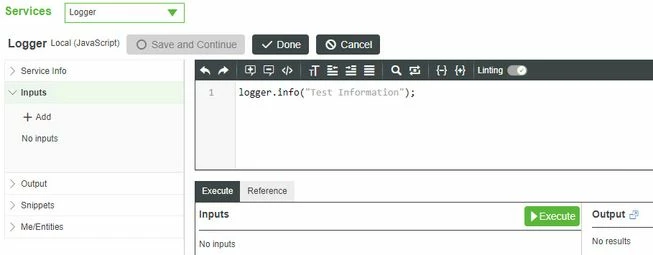
3. Check Monitoring > ScriptLog, I can see the info message
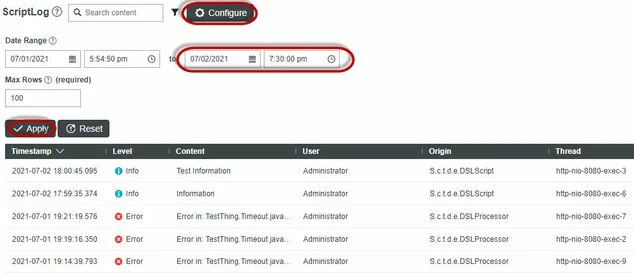
4. Check the script log under storage folder, the info message is also there

If you still don't see the info when you follow the above steps, please check if you enable LoggingSubsystem > Configuration > Enable Script Strack Tracing
Enter your E-mail address. We'll send you an e-mail with instructions to reset your password.