
13-Aquamarine
April 30, 2025
Solved

Model File URL Issue Analytics

  • April 30, 2025
  • 1 reply
  • 631 views

Hi all,


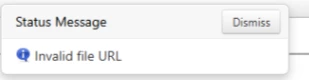
Trying to setup a new analysis model and having an issue with the Model File URL field. I am inputting my URL in the format /Thingworx/FileRepositories/<Repository Name>/<File Name>. It is giving this error popup however. Is there a different format to be used? Or a way to get the exact URL?
 

JK_10744682_0-1746023830120.png


Best answer by nsampat

@JK_10744682 ,


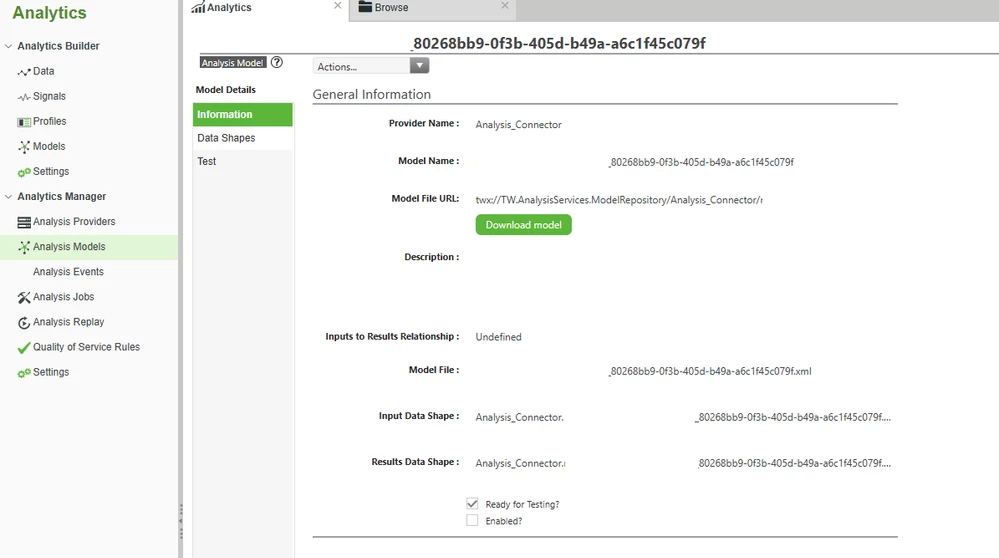
The format for model URL is as follows: twx://<repository_folder_name>/<repository_sub_folder (if applicable)/<model_file>


Depending on which model you are talking about, you can obtain the URL by going into Analytics Manager > Select your desired Model > Click on View > Model Details > Information > Model File URL

Screenshot 2025-04-30 115801.png


Regards,


Neel

1 reply

nsampat17-PeridotAnswer
17-Peridot
April 30, 2025

@JK_10744682 ,


The format for model URL is as follows: twx://<repository_folder_name>/<repository_sub_folder (if applicable)/<model_file>


Depending on which model you are talking about, you can obtain the URL by going into Analytics Manager > Select your desired Model > Click on View > Model Details > Information > Model File URL

Screenshot 2025-04-30 115801.png


Regards,


Neel