

Remote Property Binding Through Rest API
Hi,
I am using TWX 9.1 with manufacturing app and Postgres as persistence provider. I have set up kepserver on another machine. I have done the configuration of remote thing in kepserver.
I am doing below steps in TWX using postman -
1. I am creating a thing using below URL and body
http://XX.XX.XX.XX:8080/Thingworx/Resources/EntityServices/Services/CreateThing
body -
{
"name": "testThing",
"thingTemplateName": "PTC.SCA.SCO.KepserverBasedPhysicalAssetThingTemplate",
"projectName" : "Demo"
}
The thing get created I then enable and restart thing using below URL -
http://XX.XX.XX.XX:8080/Thingworx/Things/testThing/Services/EnableThing
http://XX.XX.XX.XX:8080/Thingworx/Things/testThing/Services/RestartThing
Now I manually create a property from composer called test1 data type string. I also assign IndustrialThing property with the remote thing thing name (used in kepserver)
I then go back to postman and will to bind a tag defined in kepserver to test1 for which I use below URL and body
http://XX.XX.XX.XX:8080/Thingworx/Things/testThing/Services/SetRemotePropertyBinding

The values doesn't get transmitted at all, I verified that datatype is string at both the ends. Now If open up composer and run SetRemotePropertyBinding for the testThing. Manually pass the parameter as input to the service and run it, it works fine (see below screenshot)
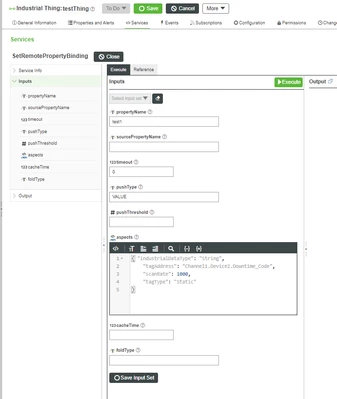

Can some one Please help me on this?
Kind Regards
SO