

Reset DropDown on WindowClosed of Navigation Function
I have the following elements in this scenario running Thingworx 8.5.18:
1. DropDown widget - Used to select a URL(output)
2. Service(infotable output) - feeds the list of items to the DropDown widget above
3. Navigation Function - Takes the output of the DropDown widget and feeds it to a target mashup as a popup.
DropDown widget:
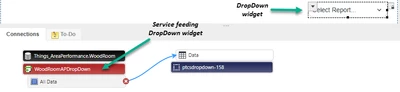
Service (populates the DropDown widget from a infotable with a Report(shown in DropDown widget) row and a URL(passed to the popup target Mashup) row):
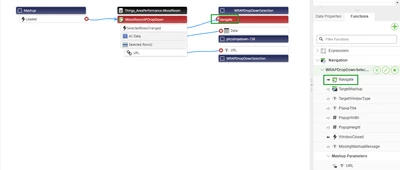
Navigation Function
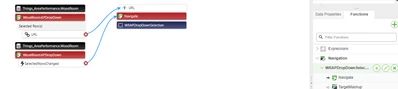
What currently happens - When I close the popup that is generated from the selection of an item in the DropDown the DropDown still shows the item I selected. This is an issue because the DropDown doesn't allow me to reselect that item without selecting another item first.
What I need to have happen - When I close the popup that is generated from the selection of an item in the DropDown I need the list in the DropDown to be reset to its default load state. ie "Select Report..."
What I've tried - I've tried using another service to pass a null string(result = "";) into the DropDown on the WindowClosed event of the Navigation popup Function. This causes another popup to be opened which is blank because I have the Navigate event tied to the SeletedRowsChanged event of my primary service.