
1-Visitor
March 13, 2017
Question

Rest API XML producing empty infotable

  • March 13, 2017
  • 1 reply
  • 4017 views

Hi,

I am trying to execute this REST API call in a javascript service and produce an infotable based on the returned value.

here is the script code:

var params = {

  proxyScheme: undefined /* STRING */,

  headers: undefined /* JSON */,

  ignoreSSLErrors: undefined /* BOOLEAN */,

  useNTLM: undefined /* BOOLEAN */,

  workstation: undefined /* STRING */,

  useProxy: undefined /* BOOLEAN */,

  withCookies: undefined /* BOOLEAN */,

  proxyHost: undefined /* STRING */,

  url: "https://www.imonnit.com/xml/SensorList/bWF0dGhldy5mZWx0b246V2VsY29tZTI1OENhcHVsYSE=" /* STRING */,

  timeout: undefined /* NUMBER */,

  proxyPort: undefined /* INTEGER */,

  password: undefined /* STRING */,

  domain: undefined /* STRING */,

  username: undefined /* STRING */

};

var params = {

  xml: Resources["ContentLoaderFunctions"].GetXML(params) /* XML */

};

// result: INFOTABLE

var result = Resources["InfoTableFunctions"].FromXML(params);

this is the xml produces when the command is in a web browser (couldn't format this correctly so follow this link https://www.imonnit.com/xml/SensorList/bWF0dGhldy5mZWx0b246V2VsY29tZTI1OENhcHVsYSE= )

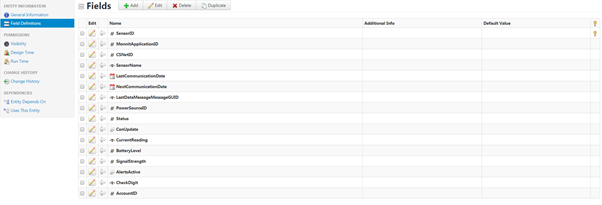
And this is the datashape of the infotable:
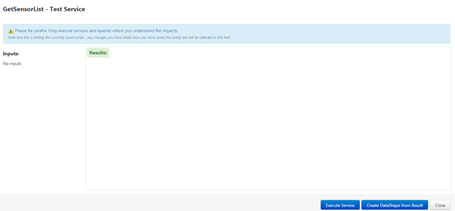
the output i get from this is just nothing as shown here:
Any help is appreciated,

P.S there is also an extension for communicating with monnit sensors however i get the same problem, an empty infotable.

Thanks

1 reply

20-Turquoise
March 13, 2017

To convert an XML string into an InfoTable, it needs to adhere to a very specific format:

<fromXMLTest>

<DataShape>

<FieldDefinitions>

<FieldDefinition baseType="STRING" description="" name="c" ordinal="1"/>

<FieldDefinition baseType="STRING" description="" name="l" ordinal="3"/>

<FieldDefinition baseType="STRING" description="" name="r" ordinal="2"/>

</FieldDefinitions>

</DataShape>

<Rows>

<Row>

<r><![CDATA[data]]></r>

<c><![CDATA[silly]]></c>

<l><![CDATA[some]]></l>

</Row>

</Rows>

</fromXMLTest>


The example above includes a DataShape which you need to tailor to your own, and in the Rows section is some dummy data populating each field. You can have as many <Row> sections as desired, but the <DataShape> portion must be included for the parser to know where the row data should go. The outer tag can be named anything, but there must be an outer tag surrounding everything.

20-Turquoise
March 13, 2017

You may also use this article for reference and datashape manipulations https://support.ptc.com/appserver/cs/view/solution.jsp?n=CS218242&lang=en_US

5-Regular Member
March 14, 2017

Hi Matthew Felton​,

In your xml; SensorId, AccountId etc are attributes of APIsensor tag. So, we need to parse multiple attributes from a single tag.

I used following JavaScript code and was able to read each tag containing all attributes in a single column of the infotable. I suppose getAttribute function could be helpful here. I will check more as I get some more time.

var params = {

  proxyScheme: undefined /* STRING */,

  headers: undefined /* JSON */,

  ignoreSSLErrors: undefined /* BOOLEAN */,

  useNTLM: undefined /* BOOLEAN */,

  workstation: undefined /* STRING */,

  useProxy: undefined /* BOOLEAN */,

  withCookies: undefined /* BOOLEAN */,

  proxyHost: undefined /* STRING */,

  url: "https://www.imonnit.com/xml/SensorList/bWF0dGhldy5mZWx0b246V2VsY29tZTI1OENhcHVsYSE=" /* STRING */,

  timeout: undefined /* NUMBER */,

  proxyPort: undefined /* INTEGER */,

  password: undefined /* STRING */,

  domain: undefined /* STRING */,

  username: undefined /* STRING */

};

// result: XML

var XMLDocument = Resources["ContentLoaderFunctions"].GetXML(params);

//CREATE INFO TABLE FROM DATA SHAPE 

var params = { 

  infoTableName : "InfoTable", 

  dataShapeName : "SensorListTest1" 

}; 


// CreateInfoTableFromDataShape(infoTableName:STRING("InfoTable"), dataShapeName:STRING):INFOTABLE(xmlParserTable) 

var infoTable1 = Resources["InfoTableFunctions"].CreateInfoTableFromDataShape(params); 

var newRow = new Object();


//PARSE XML PUT INTO INFO TABLE 

// iterate through xml and add to info table 

for each (var tag in XMLDocument.Result.APISensorList.APISensor) {

    newRow.APISensor = tag;

    infoTable1.AddRow(newRow); 


// return info table 

var result = infoTable1;