15-Moonstone
May 12, 2025
Solved

ThingWorx Combo chart CSS

  • May 12, 2025
  • 1 reply
  • 1170 views

Hi,


Please help me with css code for combo chart that effects tick labels


using Thingworx 9.6.

Best answer by PEHOWE

Hello @krishnakomal123 .


I asked one of the Subject Matter Experts and they were able to provide direction. 
Please try the following and let me know if it meets your needs.
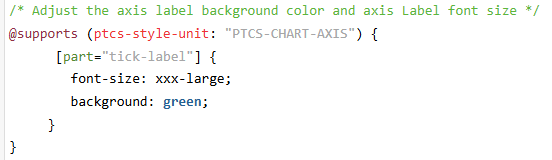

I have placed the same information in the Article - CS439465 - ThingWorx Web Components Customization with CSS

Let me know if you have any problems.


Regards,

Pehowe

1 reply

17-Peridot
May 13, 2025

Hello @krishnakomal123 ,


Can  you please provide more of a description of the issue you are encountering.  Having a screen capture of the issue might be helpful.


You said the ThingWorx Version is 9.6.x
 

 There are several articles which can help with CSS.


There has been a change in how the page content is generated. The steps which were used previously may not work. The second article show how to use the new format for CSS content.


Regards,

Pehowe


15-Moonstone
May 14, 2025

ptcs-chart-combo::part(chart-layout)::part(xaxis)::part(ticks-area)::part(tick-label)::part(label){

    font-family: 'Segoe UI' !important;

    font-size:30px !important;

}


Tried above code but no luck .Similary there should be css code for combobox chart widget to change its x-axis or y-axis tick labels. Please help me with the same

17-Peridot
May 14, 2025

Hello @krishnakomal123 ,

I just want to confirm I am going after the proper item. You are trying to adjust the font on the labels around the edge of the chart. See yellow items