1-Visitor
November 2, 2021
Solved

tomcat key pair alias name & password

  • November 2, 2021
  • 1 reply
  • 2507 views

Hi,

We were not able to find any document about Tomcat Key Pair Alias Name & password. What should be given in that section or is there any document pertaining to this topic?
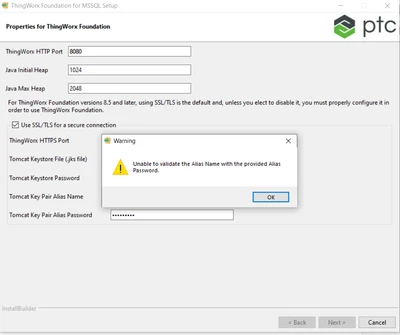
svisveswaraiya_0-1635833759254.png


Thanks in advance,

Shalini V.

Best answer by Mukul_467346

The Alias name and password should match the values for which you created a JKS before running the installer. If you see the instruction here:-https://support.ptc.com/help/thingworx/platform/r9/en/index.html#page/ThingWorx/Help/Installation/thingworxfoundationinstallerforwindows.html#wwID0EC6CR
(Step number 2) you should create a JKS before running the installer, while you create that using keytool command you are providing an alias name and password. while you pick this JKS from the installer window just provide the same value there.

1 reply

1-Visitor
November 2, 2021

The Alias name and password should match the values for which you created a JKS before running the installer. If you see the instruction here:-https://support.ptc.com/help/thingworx/platform/r9/en/index.html#page/ThingWorx/Help/Installation/thingworxfoundationinstallerforwindows.html#wwID0EC6CR
(Step number 2) you should create a JKS before running the installer, while you create that using keytool command you are providing an alias name and password. while you pick this JKS from the installer window just provide the same value there.

6-Contributor
November 3, 2021

Thanks for you reply.  i referred one of the link below 

https://docs.actian.com/integrationmanager/2.0/index.html#page/User/Step_1_3a_Create_a_Keystore_File.htm.  In this they are mentioning we shouldn't use this self certificate in production envioronment.  Do we need to follow different steps for production?  Could you please confirm on this.


MSK_0-1635922033412.png


Thanks

Hema

Community Manager
November 12, 2021

Hi @MSK.


For security reasons, it's never recommended to use a self-signed cert for production or any environment accessible from the public network.  Once you've ordered and received your CA signed cert, you need to import it into the keystore you created.


Here are some articles that may help:


https://tomcat.apache.org/tomcat-9.0-doc/ssl-howto.html

Configuring ThingWorx Platform to use SSL/TLS HTTPS with a Self-Signed Certificate

Configuring ThingWorx Platform to use SSL/TLS HTTPS with a certificate signed by a Certificate Authority (CA)


Please let us know if you have further questions.


Regards.


--Sharon
