1-Visitor
May 15, 2019
Solved

Modify thingworx data from vuforia studio

  • May 15, 2019
  • 1 reply
  • 2255 views

Hi,


Can anyone help me how I am able to modify values in thingworks with vuforia studio? Is it possible? As you see in attached picture only one direction is available.
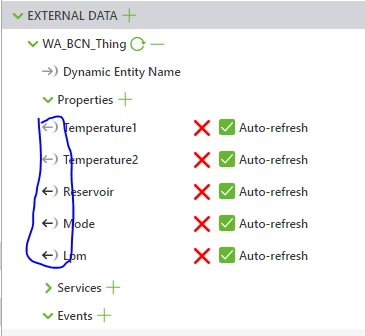
 vuf.PNG


Thanks in advance

Janos

Best answer by RolandRaytchev

Hi @Janos1987 ,


yes is possible.  So far I remember two methods to set data in thingworx

1.) using a thingworx service with argument which will set the data to thingworx thing .

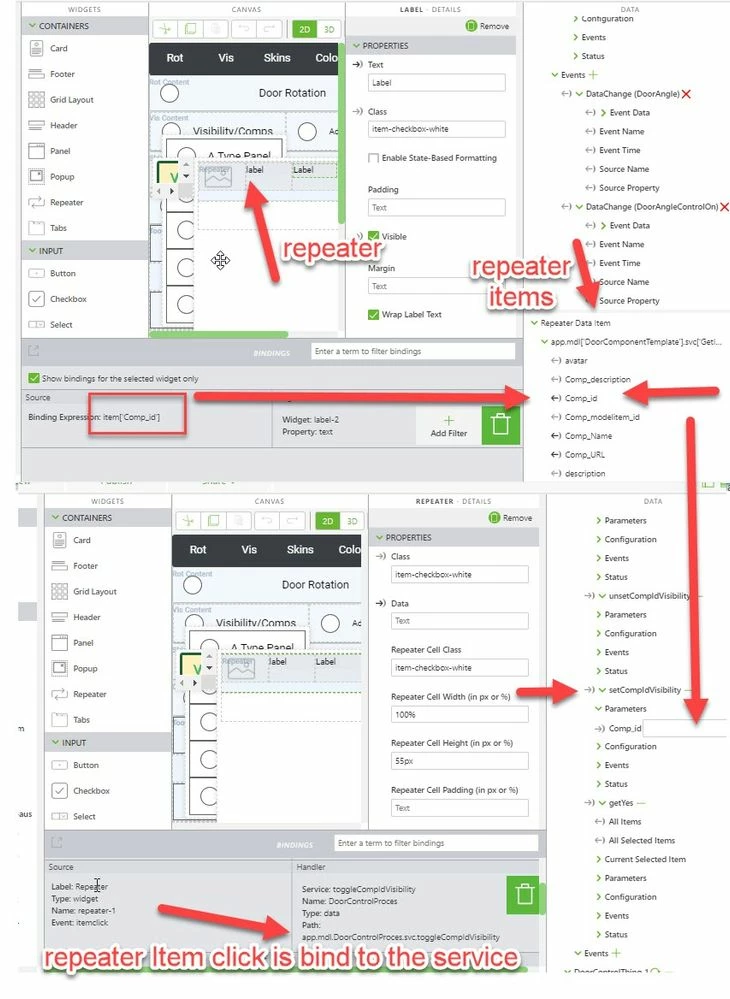
Here is an example with a repeat widget which togle the visibility of component
2019-05-15_15-42-21.jpg

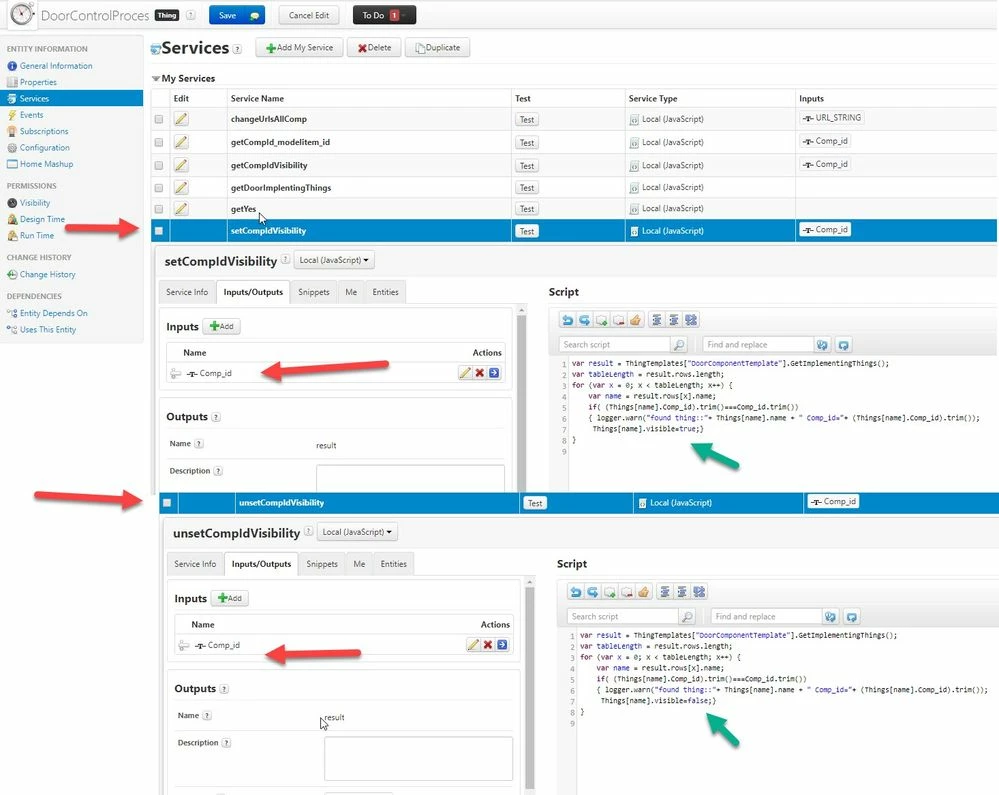
The repeater click event will call the service setCompIdVisibility. The repeater item Comp_id is bind to the method paramater. So when we click the repeater for a selected item it will call the service setCompIdVisibilitysetCompIdVisibility with Comp_id as argument and will change the visibility status in the Thingworx  this is a thing property
2019-05-15_15-53-56.jpg


And in preview mode it looks like:


2019-05-15_15-55-45.jpg


2.) using some Rest API which will set the data.

Here is an example of  similar service but using a REST API call


//////////////////////////////////////////////////////////////////////////////////////
$scope.setCompVis = function(Comp_id,val) {

 if(val==true)
 var serviceStr='setCompIdVisibility';
 else
 var serviceStr='unsetCompIdVisibility';

var req = {
"method":'POST',
"url":'/Thingworx/Things/DoorControlProces/Services/'+serviceStr+'?Appkey="bfXX15Xf-cfnd-5538-98ft-7201d728457" HTTP/1.1',
"Host": 'XXXXXXXXX.studio-trial.thingworx.io:8443',
"Content-Type": 'application/json',
 "AppKey": "bfXX15Xf-cfnd-5538-98ft-7201d728457",
"Cache-Control": 'no-cache',
"Postman-Token": '99e788f6-XXXX-XXXX-555c-b87f451dc144',
 "headers": {
 "authorization": "Basic Og==",
 "content-type": "application/json",
 "AppKey": "bfXX15Xf-cfnd-5538-98ft-7201d728457",
 "cache-control": "no-cache",
 "postman-token": "c1871006-XXXX-0ae1-1002-092221d9dtnf"
 },
 "processData": false,
 "data": "{\n\t\"Comp_id\":\""+Comp_id+"\"\n\t\n}"
};

console.log("$scope.setCompVis");
console.warn(req);

$http(req).then(
function(response) {;}, 
function(response){;}
 );

};//finished $scope.setCompVis
//////////////////////////////////////////////////////////////////////////


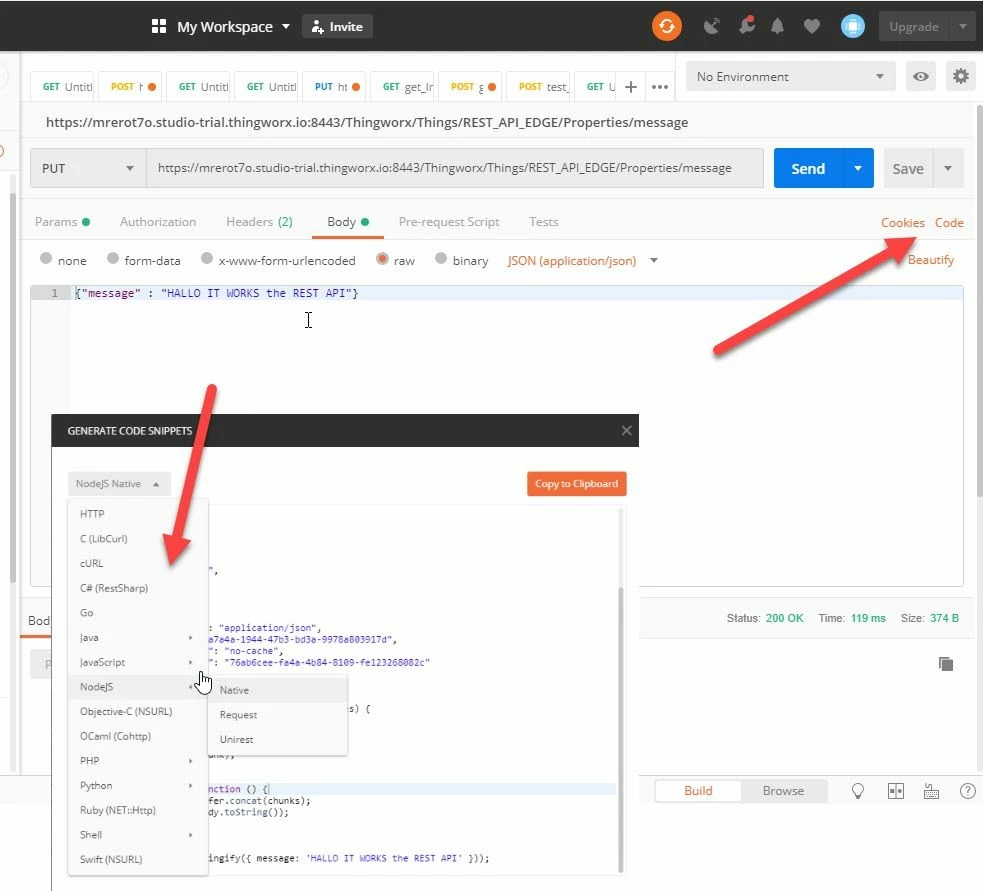
OK , it looks a little complicated but it is easy to generate this code if you use a tool like the Google POSTMAN where first you can test the Rest API request with the user Interface 
 

2019-05-15_16-39-35.jpg

And later you can generate JavaScript or node.Js programming code . The mention sample funciton above  was created using this tool.  Here the JS function setCompVis() has 2 arguments 

val - /true/ false  -> depending on this value it  will call   different services to set  (true to visible -> serviceStr='setCompIdVisibility' )  unset (false to invisible - will call serviceStr='unsetCompIdVisibility')  the visiblity property of component

cmp_id -> this is the component id (syntax what is used for the modelitem widget  property->  Component Occurrence 

So that the simple call of the function:

$scope.test_fnct = function(){
 $scope.setCompVis("/46/390",true);
};


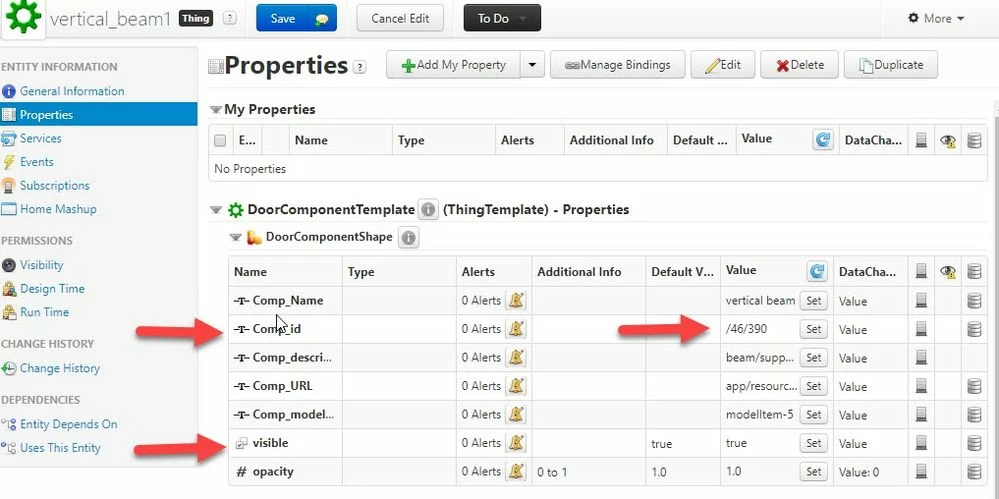
it will call the service  setCompIdVisibility  of  the thing which have property Comp_id ="/46/390" and set the property visible to true. In this case this is  the component "vertical_beam1"
 

2019-05-15_16-51-48.jpg


1 reply

21-Topaz I
May 15, 2019

Hi @Janos1987 ,


yes is possible.  So far I remember two methods to set data in thingworx

1.) using a thingworx service with argument which will set the data to thingworx thing .

Here is an example with a repeat widget which togle the visibility of component

2019-05-15_15-42-21.jpg

The repeater click event will call the service setCompIdVisibility. The repeater item Comp_id is bind to the method paramater. So when we click the repeater for a selected item it will call the service setCompIdVisibilitysetCompIdVisibility with Comp_id as argument and will change the visibility status in the Thingworx  this is a thing property

2019-05-15_15-53-56.jpg


And in preview mode it looks like:


2019-05-15_15-55-45.jpg


2.) using some Rest API which will set the data.

Here is an example of  similar service but using a REST API call


//////////////////////////////////////////////////////////////////////////////////////
$scope.setCompVis = function(Comp_id,val) {

 if(val==true)
 var serviceStr='setCompIdVisibility';
 else
 var serviceStr='unsetCompIdVisibility';

var req = {
"method":'POST',
"url":'/Thingworx/Things/DoorControlProces/Services/'+serviceStr+'?Appkey="bfXX15Xf-cfnd-5538-98ft-7201d728457" HTTP/1.1',
"Host": 'XXXXXXXXX.studio-trial.thingworx.io:8443',
"Content-Type": 'application/json',
 "AppKey": "bfXX15Xf-cfnd-5538-98ft-7201d728457",
"Cache-Control": 'no-cache',
"Postman-Token": '99e788f6-XXXX-XXXX-555c-b87f451dc144',
 "headers": {
 "authorization": "Basic Og==",
 "content-type": "application/json",
 "AppKey": "bfXX15Xf-cfnd-5538-98ft-7201d728457",
 "cache-control": "no-cache",
 "postman-token": "c1871006-XXXX-0ae1-1002-092221d9dtnf"
 },
 "processData": false,
 "data": "{\n\t\"Comp_id\":\""+Comp_id+"\"\n\t\n}"
};

console.log("$scope.setCompVis");
console.warn(req);

$http(req).then(
function(response) {;}, 
function(response){;}
 );

};//finished $scope.setCompVis
//////////////////////////////////////////////////////////////////////////


OK , it looks a little complicated but it is easy to generate this code if you use a tool like the Google POSTMAN where first you can test the Rest API request with the user Interface 


2019-05-15_16-39-35.jpg

And later you can generate JavaScript or node.Js programming code . The mention sample funciton above  was created using this tool.  Here the JS function setCompVis() has 2 arguments 

val - /true/ false  -> depending on this value it  will call   different services to set  (true to visible -> serviceStr='setCompIdVisibility' )  unset (false to invisible - will call serviceStr='unsetCompIdVisibility')  the visiblity property of component

cmp_id -> this is the component id (syntax what is used for the modelitem widget  property->  Component Occurrence 

So that the simple call of the function:

$scope.test_fnct = function(){
 $scope.setCompVis("/46/390",true);
};


it will call the service  setCompIdVisibility  of  the thing which have property Comp_id ="/46/390" and set the property visible to true. In this case this is  the component "vertical_beam1"


2019-05-15_16-51-48.jpg


Janos19871-VisitorAuthor
1-Visitor
May 16, 2019

Hi @RolandRaytchev ,


many thanks it helped me a lot. I used the first instruction of yours. I run a service with Vuforia studio and it overwrites the value on the thingworx. It is so easy but i am a beginner :). Thanks a lot again.


Janos