4-Participant
May 24, 2023
Solved

Unable to add "Reviewer" tab on the "Select Participants" window of a Promotion Request

  • May 24, 2023
  • 1 reply
  • 3689 views

Hello Everyone,


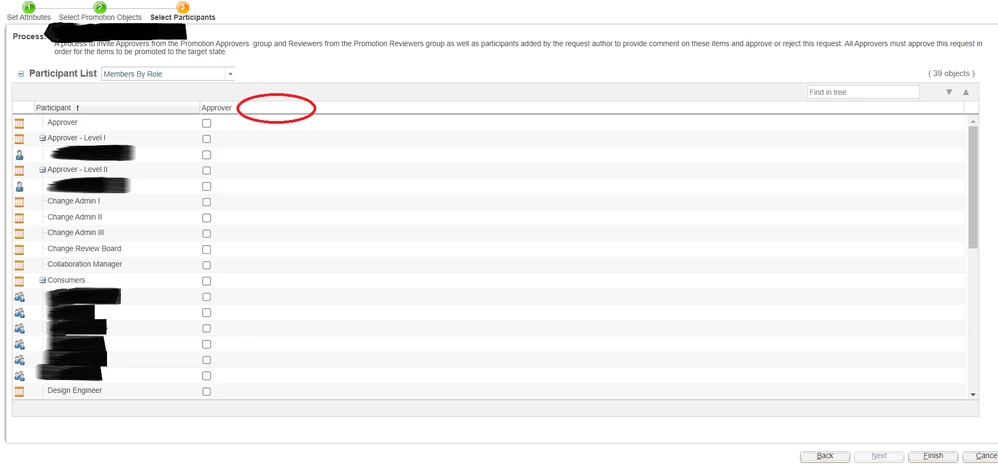
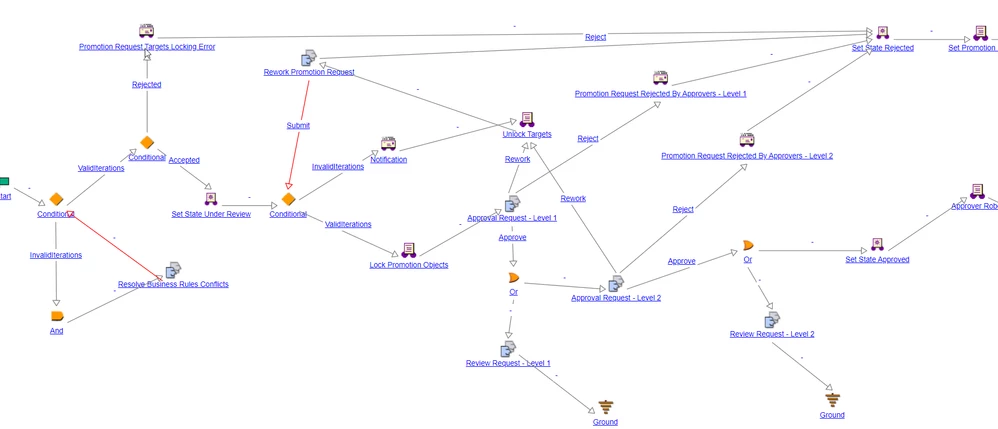
We are trying to implement a "Staggered" Approval Promotion process in Windchill. Apart from "Approvers", the workflow must also include "Reviewers" to be aware of the objects being promoted, but not need to perform any actions. I have added a couple of "Review" tasks similar to what was available in the OOTB "Two Level" Approval Process. However, even after adding all the necessary participants for the respective "Review Tasks", I am unable to view the "Reviewer" column in the "Select Participants" window of a Promotion Request.


How could I achieve this?

BWorkflowWorkflowNew_Promotion_Request.pngBest Regards,
Irfan

Best answer by HelesicPetr

Hello @MIK_203 

I can see that the users are already selected. 

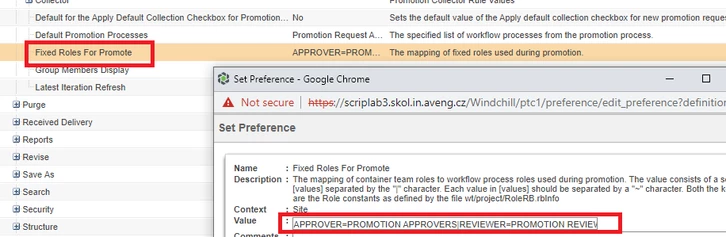
This means that configuration in the Preference Management the "Fixed Roles For Promote " is set 


HelesicPetr_0-1685969675022.png

If the preference is set then the roles are preselected and you can not change it.


PetrH


1 reply

HelesicPetr
22-Sapphire II
22-Sapphire II
May 24, 2023

Hello @MIK_203 

Where the "reviewer" role is defined? in which Task? If the "reviewer" role is not used in any task, then it can not be shown in the table  


HelesicPetr_0-1684917430933.png


PetrH

PetrH
MIK_2034-ParticipantAuthor
4-Participant
May 24, 2023

Hello @HelesicPetr ,


Both "Review Tasks" as you see in the Workflow include the "Reviewer" & "Review Manager" as participants.

Attached a snapshot for reference.


BR, Irfan

Task_Participants.png

HelesicPetr
22-Sapphire II
22-Sapphire II
May 24, 2023

Hi @MIK_203 

Then do you really use the correct workflow? 

In the Process I can not see if you use the correct FW process or another one. Check it. 


Also you need to check if there is not same workflow template on lower level that can rewrite the upper wf. 

For example, you defined WF template on the organization, but you also try to create and change same wf on the site level 

 change on site lvl can not be applied because it can be rewrite by org level template 


Don't forget check in wf template

PetrH

PetrH