
1-Visitor
January 24, 2018
Solved

Manufacturing Product Structure Explorer

  • January 24, 2018
  • 1 reply
  • 2522 views

I'm having a problem with Manufacturing Product Structure Explorer. 
Windchill 11 M030 (on the Cloud), Windows 10, Internet Explorer 11,  WGM 11 M030, Inventor 2017 Pro. fresh install of Java 1.8.0 161 ( Firefox and Chrome do not support Java per IT)


So the situation is, when I attempt to "Open in Manufacturing Product Structure Explorer" the system wants to install a Java applet (or so it appears).  I've installed updated Java, make sure the permissions are there, and allow the cloud server permission as best I can figure out.  It still will not open. I've looked for blocked popups and can't seem to find any. I've specifically allowed popups from every site that seems to be involved with this issue.
Any ideas?  Thx in advance
Best answer by JHall

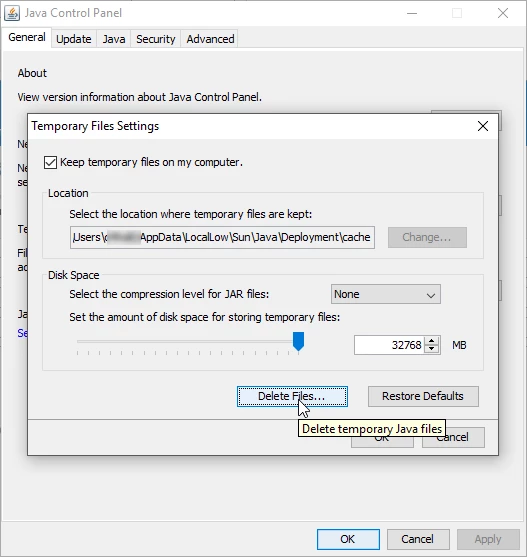
One of our other offices had this error also, and they needed to purge the cache of their JAVA installation.


I found the answer by vostapenko in this thread: https://community.ptc.com/t5/Windchill-Questions/Java-Error/m-p/386884/highlight/true#M45303

First, befor installing new Java, You must clean cache of java app.

Start -> JAVA-> Java Control Panel -> General- >Setings -> Delete Files ...-> All check box -> Ok


cache.png

1 reply

JHall1-VisitorAuthor
1-Visitor
January 24, 2018

Ok, here is the solution.  Install Java, then go into Security in the Java app's Control panel.  Added our cloud site to the exceptions list THEN be certain to shift Security Level from Very High to High.  Now it works!  

Java.png

JHall1-VisitorAuthorAnswer
1-Visitor
January 29, 2018

One of our other offices had this error also, and they needed to purge the cache of their JAVA installation.


I found the answer by vostapenko in this thread: https://community.ptc.com/t5/Windchill-Questions/Java-Error/m-p/386884/highlight/true#M45303

First, befor installing new Java, You must clean cache of java app.

Start -> JAVA-> Java Control Panel -> General- >Setings -> Delete Files ...-> All check box -> Ok


cache.png