4-Participant
January 28, 2025
Solved

OIR - NUMBER GENERATOR

  • January 28, 2025
  • 1 reply
  • 3213 views

I am using Windchill PDMLink Release 12.1 and Datecode with CPS 12.1.0.1

How to set a different number ( concatenation of attributes) according to a different IBA value ?

Best answer by HelesicPetr

Hi @FL_12115481 

You have wrong test element.

Because there are two different types - string and Boolean the calculation can not be done by this Test method 

You have to use the StringEqual test and it will work as you need

example>


<VarDef id="GeneratedNumberConfigurable" algorithm="com.ptc.windchill.enterprise.revisionControlled.server.impl.NumberGenerator">
	<Attr id="STRINGINPUT"/>
	<Attr id="RNUMINPUT"/>
	<Arg>{GEN:wt.enterprise.SequenceGenerator:WTDOCUMENTID_seq:3:0}</Arg>
</VarDef>

<!-- set the number to a generated number -->
<AttrValue id="number" algorithm="com.ptc.windchill.enterprise.revisionControlled.server.impl.NumberGenerator">
	<Arg>30W</Arg>
 <!-- add a V prefix for variant parts -->
 <Value algorithm="wt.rule.algorithm.BooleanBranch">
	 <Value algorithm="wt.rule.algorithm.StringEqualsTest">
		<Attr id="UTC_CONFIGURABLE"/>
		<Arg>true</Arg>
	 </Value>
		<VarRef id="GeneratedNumberConfigurable" />
		<Arg>{GEN:wt.enterprise.SequenceGenerator:WTPARTID_seq:10:0}</Arg>
 </Value>
 <!-- the sequence -->
 <Arg></Arg>
</AttrValue>


The real number input also works
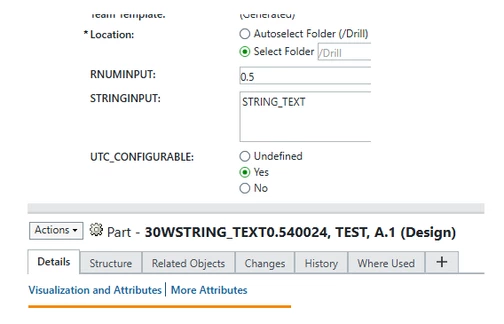
HelesicPetr_0-1738331226424.png


PS: the error is clear. You compare boolean type value true with string value "true" and the method can not do that.

That is why the method throws the error "there are two different type arguments". 

PetrH

1 reply

13-Aquamarine
January 28, 2025
In this example, I read the value of an IBA named Document_Type and set the prefix for two different values, 
If the value is not one of those two, I don't prefix.
 
 
<!-- generate the number -->
   <AttrValue id="number" algorithm="com.ptc.windchill.enterprise.revisionControlled.server.impl.NumberGenerator">
   <Value algorithm="wt.rule.algorithm.CaseBranch">
   
<Value algorithm="wt.rule.algorithm.EqualsTest">        
<Attr id="IBA|Document_Type"/>
<Arg>Bill_of_Material</Arg>
</Value>
<Arg>BOM-</Arg>
 
  <Value algorithm="wt.rule.algorithm.EqualsTest">        
<Attr id="IBA|Document_Type"/>
<Arg>Deviation</Arg>
</Value>
<Arg>DEV-</Arg>
 
<Arg></Arg>
   </Value>
   <Arg>{GEN:wt.enterprise.SequenceGenerator:WTDOCUMENTID_seq:10:0}</Arg>  
   </AttrValue>
4-Participant
January 29, 2025

Hello mwaite, thanks a lot for your answer.

The problem I am facing is how to combine multiple attributes in the EqualsTest algorithm. If I try to insert more than one ARG Tag the system gives me an error. Apparently with the boolean branch algorithm you can just set a preferix or a different progressive number.

Below an example to make it more clear :


<VarDef id="GeneratedNumberConfigurable" algorithm="com.ptc.windchill.enterprise.revisionControlled.server.impl.NumberGenerator">
     <Attr id="IBA|UTC_CODICESIMILE"/>
     <Attr id="IBA|UTC_MOD"/>
     <Arg>{GEN:wt.enterprise.SequenceGenerator:WTDOCUMENTID_seq:3:0}</Arg>
</VarDef>
 
               <!-- set the number to a generated number -->
               <AttrValue id="number" algorithm="com.ptc.windchill.enterprise.revisionControlled.server.impl.NumberGenerator">
                  <Arg>30W</Arg>
                  <!-- add a V prefix for variant parts -->
                  <Value algorithm="wt.rule.algorithm.BooleanBranch">
                     <Value algorithm="wt.rule.algorithm.EqualsTest">
                        <Attr id="IBA|UTC_CONFIGURABLE"/>
                        <Arg>true</Arg>
                     </Value>
                       <VarDef id="GeneratedNumberConfigurbale"/>
 
                     <Arg>{GEN:wt.enterprise.SequenceGenerator:WTPARTID_seq:10:0}</Arg>
                  </Value>
                  <!-- the sequence -->
                  <Arg></Arg>
               </AttrValue>


4-Participant
January 30, 2025

If I use <Attr id ="UTC_CONFIGURABLE"/> instead o <Attr id ="IBA|........ that's the error:

FL_12115481_0-1738227888557.png

Caused by: (wt.rule.ruleResource/310) wt.rule.algorithm.InvalidAlgorithmArgumentException: Two arguments passed in are of different type.
at wt.rule.algorithm.EqualsTest.calculate(EqualsTest.java:119)
at wt.rule.algorithm.RuleAlgorithmHelper.calculate(RuleAlgorithmHelper.java:116)
at wt.rule.algorithm.RuleAlgorithmHelper.calculate(RuleAlgorithmHelper.java:74)
at com.ptc.core.rule.server.delegate.init.Utils.getValue(Utils.java:773)
at com.ptc.core.rule.server.delegate.init.Utils.getArgs(Utils.java:800)
at com.ptc.core.rule.server.delegate.init.Utils.getValue(Utils.java:773)
at com.ptc.core.rule.server.delegate.init.Utils.getArgs(Utils.java:800).


Are you sure is it possibile to insert the value of an attribute when you use the Boolean Branch algorithm?