1-Visitor
December 23, 2016
Solved

Help!Help!I need to parse this xml,anyone can help me?

  • December 23, 2016
  • 3 replies
  • 6055 views

Dear  all,

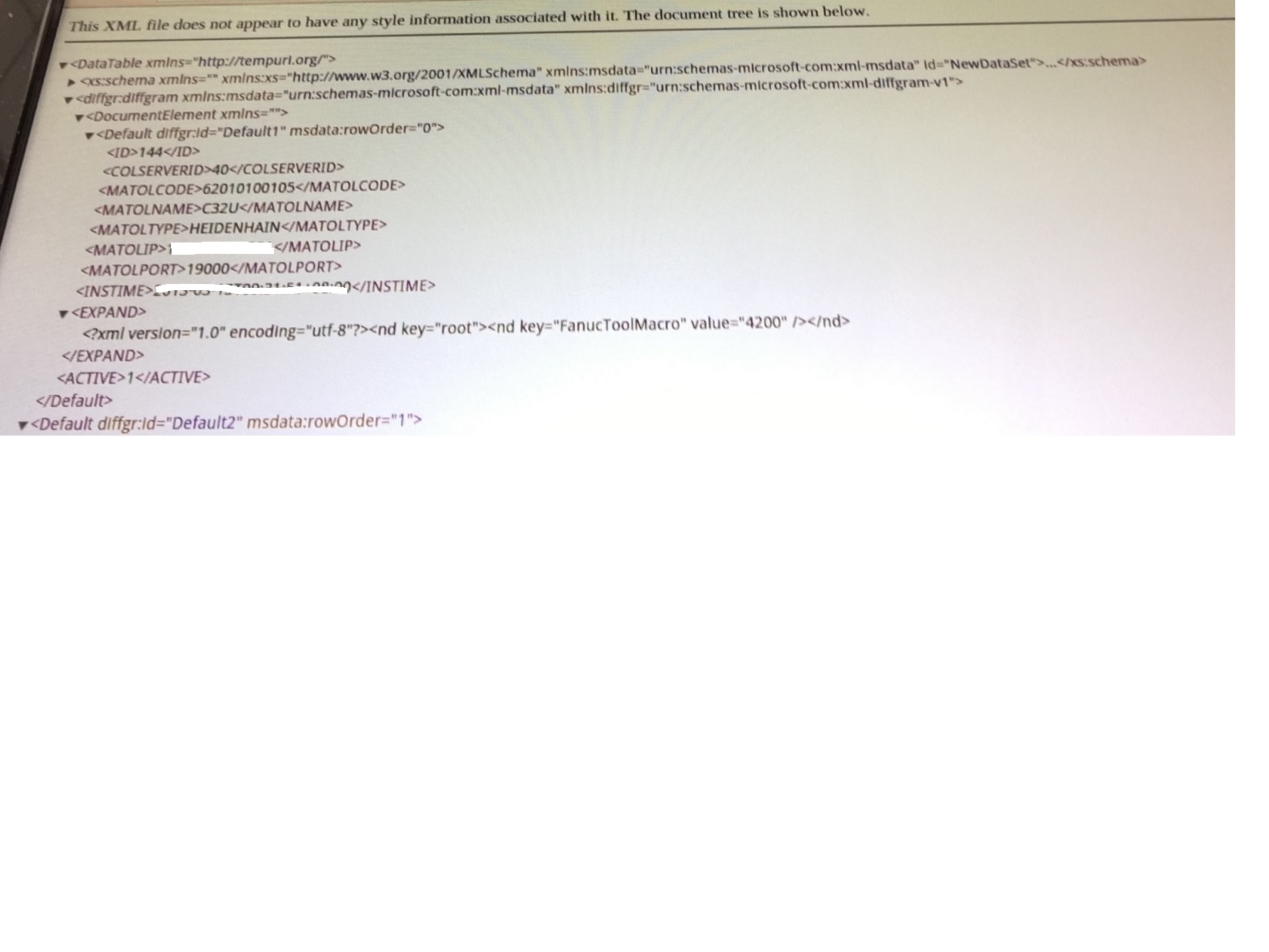
I need to parse the below XML ,Please  teach me how to parse it,thanks.

1.jpg

    Best answer by PaiChung

    generally you can use .*:: to escape name spaces

    so try MyXMLContent.*::.*::.ID

    or some length of that.

    3 replies

    16-Pearl
    December 27, 2016

    What specifically is your use case on this?

    With what and where do you want to parse it / what should be the final goal?

    向郭_011-VisitorAuthor
    1-Visitor
    December 29, 2016

    Dear Michael Neumann,

    I need to change the XML to Infotable in Thingworx,but with the getXML() can't parse it.

    Do you have the experise to parse it ? If so ,please tell me how to parse it, thanks.

    16-Pearl
    December 29, 2016

    The getXML() will just return plain XML - so this needs to be recoded into an InfoTable.
    For this you will need to create a DataShape that holds the items you're interested in in the XML document.

    Let's take the Community Stats as examle...

    XML is here: https://community.thingworx.com/community/feeds/stats?community=2105

    I'm interested in the channel.item titles, links and descriptions.

    For this, create a DataShape "xmlParserTable" and in your service define the output Base Type as INFOTABLE with DataShape xmlParserTable.

    I'm using this as my code to a) read the xml b) define my InfoTable and c) put XML elements into the InfoTable to d) return the InfoTable

    // define XML source

    var params = {

      ignoreSSLErrors: true,

      url: "https://community.thingworx.com/community/feeds/stats?community=2105",

    };

    // result: XML

    var xmlDocument = Resources["ContentLoaderFunctions"].GetXML(params);

    // create info table from data shape

    var params = {

      infoTableName : "InfoTable",

      dataShapeName : "xmlParserTable"

    };

    // CreateInfoTableFromDataShape(infoTableName:STRING("InfoTable"), dataShapeName:STRING):INFOTABLE(xmlParserTable)

    var infoTable = Resources["InfoTableFunctions"].CreateInfoTableFromDataShape(params);

    // iterate through xml and add to info table

    for each (var tagName in xmlDocument.channel.item) {

        var newRow = Object();

        newRow.title = tagName.title;

        newRow.link = tagName.link;

        newRow.description = tagName.description;


        infoTable.AddRow(newRow);


    }

    // return info table

    var result = infoTable

    I hope this helps...

    At least it should give you a start on how to read and interpret the XML structure putting it into the InfoTable

    Cheers,

    /Michael

    16-Pearl
    December 30, 2016

    For further references I've also updated CS218242 with what I've described in my previous post.

    That should make it easier to find in the future...

    15-Moonstone
    March 18, 2019

     I used below SOAP url and whatever xml response I got I parsed using below code.


    http://www.holidaywebservice.com/HolidayService_v2/HolidayService2.asmx/GetCountriesAvailable

    (UnitedStates , 2019, 1)


    var contentEnvelope ='<?xml version="1.0" encoding="utf-8"?>\
    <soap:Envelope xmlns:xsi="http://www.w3.org/2001/XMLSchema-instance" xmlns:xsd="http://www.w3.org/2001/XMLSchema" xmlns:soap="http://schemas.xmlsoap.org/soap/envelope/">\
    <soap:Body>\
    <GetHolidaysForMonth xmlns="http://www.holidaywebservice.com/HolidayService_v2/">\
    <countryCode>'+CountryCode+'</countryCode>\
    <year>'+Year+'</year>\
    <month>'+Month+'</month>\
    </GetHolidaysForMonth>\
    </soap:Body>\
    </soap:Envelope>';

    var params = {
    proxyScheme: undefined /* STRING */,
    headers: undefined /* JSON */,
    ignoreSSLErrors: undefined /* BOOLEAN */,
    useNTLM: undefined /* BOOLEAN */,
    workstation: undefined /* STRING */,
    useProxy: undefined /* BOOLEAN */,
    withCookies: undefined /* BOOLEAN */,
    proxyHost: undefined /* STRING */,
    content: contentEnvelope /* XML */,
    url: "http://www.holidaywebservice.com//HolidayService_v2/HolidayService2.asmx?wsdl",  /* STRING */,
    timeout: undefined /* NUMBER */,
    proxyPort: undefined /* INTEGER */,
    password: undefined /* STRING */,
    domain: undefined /* STRING */,
    username: undefined /* STRING */
    };

    // result: XML
    var xmlPage = Resources["ContentLoaderFunctions"].PostXML(params);

    var params_Hol = {
    infoTableName: "holidayResult" /* STRING */,
    dataShapeName: "HolidayDataShape_BABASHYAM" /* DATASHAPENAME */
    };

    // result: INFOTABLE
    var result = Resources["InfoTableFunctions"].CreateInfoTableFromDataShape(params_Hol);
    var xmlDoc = xmlPage.*::Body.*::GetHolidaysForMonthResponse.*::GetHolidaysForMonthResult;
    // HolidayDataShape_BABASHYAM entry object
    //for each (var tag in xmlPage.*::Body.*::GetHolidaysForMonthResponse.*::GetHolidaysForMonthResult) {
    for each (var tag in xmlDoc.*::Holiday){
    var newEntry = new Object();
    newEntry.BankHoliday = tag.*::BankHoliday; // STRING
    newEntry.HolidayCode = tag.*::HolidayCode; // STRING
    newEntry.HolidayType = tag.*::HolidayType; // STRING
    newEntry.Country =tag.*::Country; // STRING
    newEntry.Descriptor = tag.*::Descriptor; // STRING
    newEntry.DateType = tag.*::DateType; // STRING
    newEntry.Date =tag.*::Date; // DATETIME
    newEntry.RelatedHolidayCode = tag.*::RelatedHolidayCode; // STRING
    result.AddRow(newEntry);
    }