
10-Marble
October 19, 2023
Solved

How does one use .toLocaleDateString in services?

  • October 19, 2023
  • 3 replies
  • 4235 views

Hey all. I'm currently trying to work on localization so users from different countries will see dates in their proper format. I want to attach a location code to a profile and use that as a binding, so I tested with a very simple function to see if this approach would work. Below I've written some code that when I output to a div, outputs exactly as I expect in a quick demo React project when pushed to a div.

Code

pjbiocco_1-1697749876751.png

Output

pjbiocco_2-1697749960556.png

However, when I do this in Thingworx services, it fails to do this, and provides a completely different format. Does anyone know what is going on here? Am I making some sort of settings mistake?
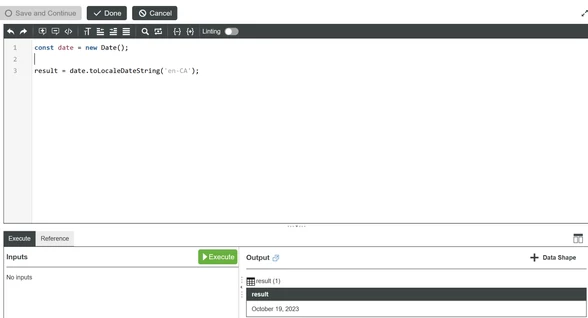
pjbiocco_3-1697750057164.png


Best answer by PaiChung

If it is for mashups use: https://support.ptc.com/help/thingworx/platform/r9/en/index.html#page/ThingWorx/Help/Mashup_Builder/Widgets/FormattingDateAndTimeForWidgets.html#wwID0EMQAMB

Else I've seen the toLocaleDateString and toLocaleDateTimeString work properly from what I recall for use in the back-end.

Browser itself will already take care of the offset.

3 replies

22-Sapphire I
October 23, 2023

Try casting it toString and set the output to be String?

Or are you specifically trying to get the 2023-10-19 format, I think you might be able to use the format function?

pjbiocco10-MarbleAuthor
10-Marble
October 26, 2023

Apologies for being a tad slow, as I'm technically off this week. I as specifically aiming to change the format based on the location. This will be accessible in multiple languages, and countries. So we want it to have one format for the US, another for the UK, another for Germany, and say if we were to introduce this to another language, we would like to be able to use the proper structure.


Specifically, we want the format to be changed just as it would be if we were using date.toLocaleDateString() as according to the mdn web docs located here.


pjbiocco_0-1698355465613.png


To be clear, the screenshot already shows a string being printed out, not a DateTime, as with a DateTime object, the print out results in an error saying that strings cannot be converted to DateTimes.


PaiChung22-Sapphire IAnswer
22-Sapphire I
October 27, 2023

If it is for mashups use: https://support.ptc.com/help/thingworx/platform/r9/en/index.html#page/ThingWorx/Help/Mashup_Builder/Widgets/FormattingDateAndTimeForWidgets.html#wwID0EMQAMB

Else I've seen the toLocaleDateString and toLocaleDateTimeString work properly from what I recall for use in the back-end.

Browser itself will already take care of the offset.

17-Peridot
October 23, 2023

@pjbiocco , The current recommendation is to set the ThingWorx server to UTC.  When you are getting or sending a date field the Mashup will convert the local time to UTC for storage in the database. The reverse happens when the date information is extracted from the database it is adjusted by the time zone information in the browser to local time.

In you case I am not sure if format is adjusted for the local display of date time information. 
If you are trying to get around the mashup adjusting date time information based on the browser , as @PaiChung , stated creating a date time value which is stored as a string will not be adjusted going to/from the display. 


Hope that helps. If you have more questions please post back.


pjbiocco10-MarbleAuthor
10-Marble
October 26, 2023

As far as I am aware, it is already the case that UTC is the setting of our server, and we are already converting to local time. However, this is less about time adjustment for time zones, and more international formatting. See the reply to PaiChung for clarification.

16-Pearl
November 20, 2023

I do not accept the response from @PaiChung as an answer. I have the same issue, please someone explain to me the result for the following code:

const event = new Date(Date.UTC(2012, 11, 20, 3, 0, 0));
const options = {
 weekday: 'long',
 year: 'numeric',
 month: 'long',
 day: 'numeric',
};

let result = [];

result.push(event.toLocaleDateString('de-DE', options));
// Expected output (varies according to local timezone): Donnerstag, 20. Dezember 2012

result.push(event.toLocaleDateString('ar-EG', options));
// Expected output (varies according to local timezone): الخميس، ٢٠ ديسمبر، ٢٠١٢

result.push(event.toLocaleDateString(undefined, options));
// Expected output (varies according to local timezone and default locale): Thursday, December 20, 2012

Output:

["December 20, 2012","December 20, 2012","December 20, 2012"]


The code is taken and slightly adjusted from official documentation.


Server running in UTC, Thingworx 9.3.9. .


Thank you
Benny

22-Sapphire I
November 20, 2023

I'm not 100% sure, but are you casting the result to string before sending it to 'output' to 'lock' in the result without any other TWX/Browser conversions to occur?

16-Pearl
November 20, 2023

Thank you for you response, @PaiChung . But I don't get your question. I am talking about back end Services, not Mashups, in case that is the misunderstanding here.