
1-Visitor
August 23, 2019
Solved

Changing x-axis and y-axis of XY chart widget

  • August 23, 2019
  • 2 replies
  • 3115 views

Hi all,

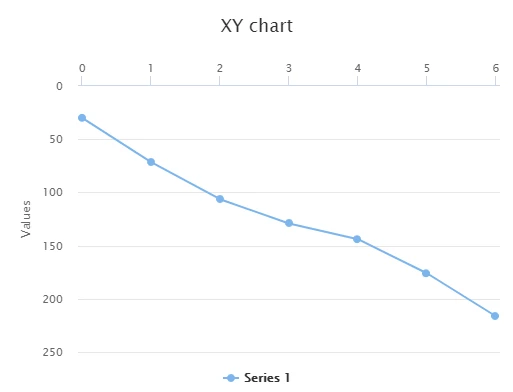
I have created a new XY chart widget (similar to the existing XY chart widget) in ThingWorx and I want the x-axis to be on the top of the chart so that the intersection of the x-axis with the y-axis is in the top left corner instead of the bottom left corner. The x-axis values should increase from left to right and the y-axis values should increase from top to bottom. I have no idea how to do this with my code, thus I have attached the necessary files for reference. The final result should look as shown below. Any help will be greatly appreciated!
Capture.PNG

Best answer by Constantine

@kahmeng96 It's a part of ThingWorx core, not supposed to be customized. Thanks to JavaScript's dynamic nature, you might be able to analyze and tamper with it in runtime, but this will produce results which are poorly maintainable, error-prone, will break something else that you don't expect, and almost certainly won't be supported by PTC.


Like I wrote earlier, it is a lot of effort and risk, and most probably doesn't make much sense from the business perspective. If I were you, I would create a feature request with PTC, and explained to the users that they may get it eventually, but not now.


/ Constantine

2 replies

17-Peridot
August 23, 2019

Hello @kahmeng96 

People who look at a graph expect lowest values to be lower and left while higher values to be up and to the right.

What is the reason for wanting the reverse the direction?


kahmeng961-VisitorAuthor
1-Visitor
August 26, 2019

Hi @PEHOWE

Apparently it's a requirement for the XY chart to display the graph with the axes which I have described. Do you have any ideas on how to meet my requirements?

18-Opal
August 26, 2019

Hello,


If you look through the JavaScript code in the ZIP file you attached, you'll see that this widget merely configures the chart rendering library called "TW.ChartLibrary", which with more than 6000 lines of code is quite a sizable part of the core platform (at least in 7.4)


Although customizing it is technically possible, IMHO it requires pretty strong JavaScript skills (or sheer luck), and the amount of effort that you have to put into doing it will most probably outweigh the need for this requirement.


Regards,
Constantine

kahmeng961-VisitorAuthor
1-Visitor
August 26, 2019

Hi @Constantine,


Thanks for the reply. However, I am unable to find the TW.ChartLibrary package as I downloaded the trial version of ThingWorx 8.4 thus I am unable to edit the ChartLibrary package. Is the package available anywhere online or do I have download another version of ThingWorx? 

18-Opal
August 26, 2019

@kahmeng96 It's a part of ThingWorx core, not supposed to be customized. Thanks to JavaScript's dynamic nature, you might be able to analyze and tamper with it in runtime, but this will produce results which are poorly maintainable, error-prone, will break something else that you don't expect, and almost certainly won't be supported by PTC.


Like I wrote earlier, it is a lot of effort and risk, and most probably doesn't make much sense from the business perspective. If I were you, I would create a feature request with PTC, and explained to the users that they may get it eventually, but not now.


/ Constantine