14-Alexandrite
September 9, 2022
Solved

3D-List widget reload

  • September 9, 2022
  • 1 reply
  • 4103 views

Dear community, I've added to Studio some custom widgets from here https://github.com/steveghee/OCTO_Studio_extensions .

In particular, I find very interesting the 3D-List
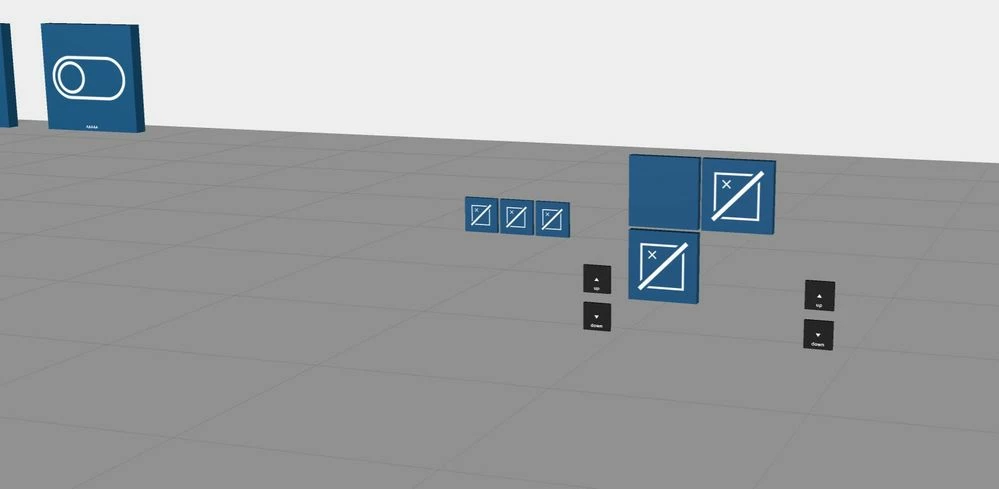
Cattura.JPG

We configured a Thing in hingworx to send to this widget the list of models that are saved in the server.
i can then load a specific model on fly.

My issue is that I want to also change the path where I look for different models. To do this there's a custom parameter to be filled.

What I can do is change this parameter during the experience, but the widget is loaded only at the start at the experience so it'll look only in the path defined when the experience is launched.
What I'm looking for is a way to reload the whole widget sending again the request to thingworx for new data.
I tried the "Reset" and "Refresh" services but it doesn't seem to work
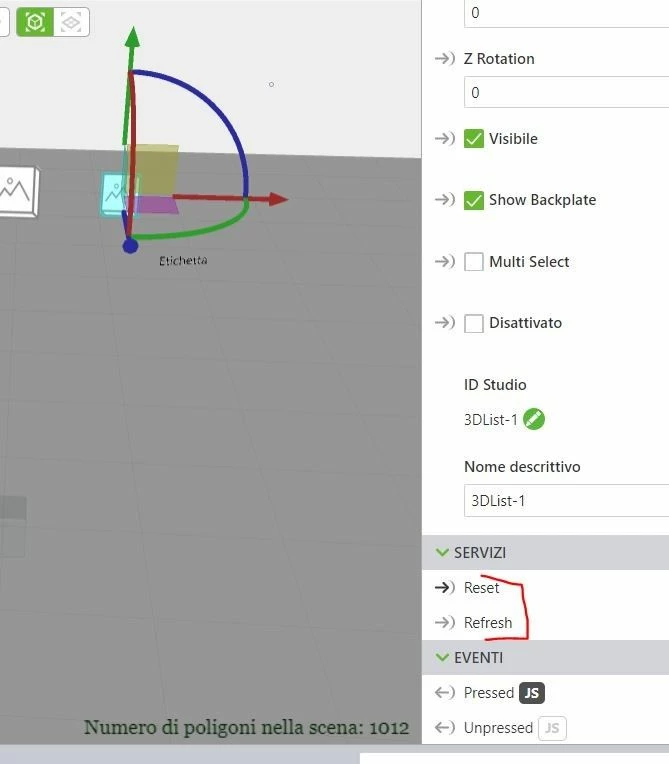
Cattura2.JPG

Best answer by RolandRaytchev

to point 2.)

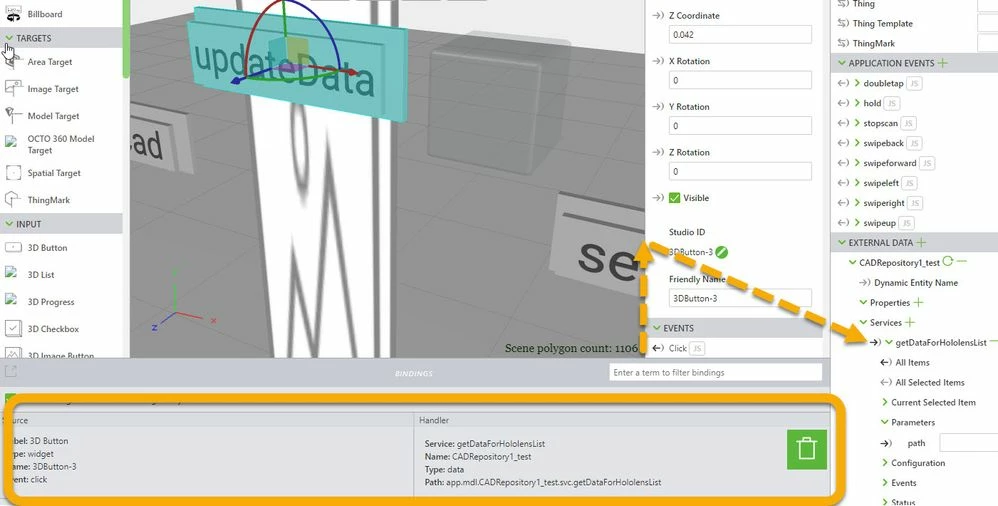
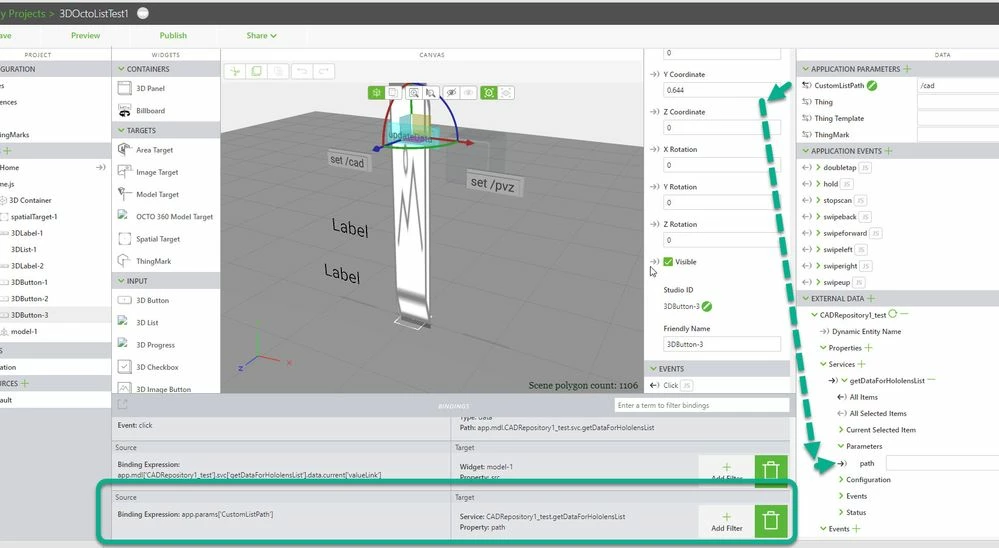
the usage is according to picture:

2022-10-11_17-07-23.jpg

path parameter is linked to app parameter CustomListPath - when we change it then we will change the path service parameter.

We need also to call the service  e.g. here getDataForHololensList. The one possible way is to click on button where the click event is linked do the service (explicit call)

2022-10-11_17-10-00.jpg

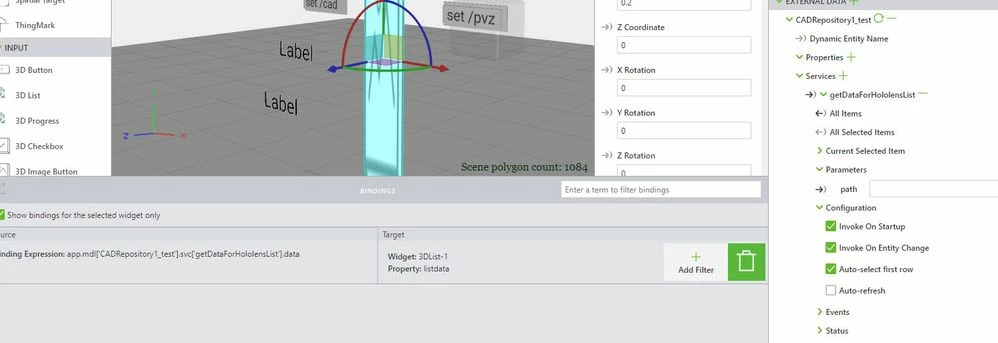
or we can use the select event (implicit call) because the 3DList is linked to all Items - the results of the service getDataForHololensList(). and in the configuration of this service we will set that it should be called on  entity change- 2022-10-11_17-13-47.jpg

I think the mechanism is that both settings  will update the service with the current path when we click on Item in the 3dlist /item  selection in the 3D list. 

1 reply

21-Topaz I
September 14, 2022

Hi @AndreaT ,

possibly you can clarify this points of your quesiton

We configured a Thing in hingworx to send to this widget the list of models that are saved in the server.
i can then load a specific model on fly.
For me is unfortunately not clear how was this (above) implemented. So the question is about the OCTO 3D List widget which has properties relevant for DATA : "Data" and "Display Field"

2022-09-14_13-34-57.jpg

Are these properties pointing to models paths? Could you please, clarify or possibly provide more details about the values of these properties.


My issue is that I want to also change the path where I look for different models.

Is the list containing the path to Thingworx CAD repositories?

Thanks


So according an update on load - think some widget will update when you load the view and not the project. So possibly you can try to navigate to dummy view and then reload again the View with the 3D List element  e.g.

//======================= twxViewCtrl.goTest(); does not work any more
$scope.goTest=function() { 
console.warn("goTest");
 $scope.app.fn.navigate("TEST");
//or $scope.navigate()
 $scope.$applyAsync();
 };
$scope.$on('app-fn-navigate', function(evt, arg) {
console.log("app-fn-navigate :"+arg);
 
});

and then in the  TEST.js view

//======================= 
$scope.goHome=function() {
$scope.navigate('Home');
 $scope.$applyAsync();
console.warn("goHome"); };
$scope.$on('app-fn-navigate', function(evt, arg) {
console.log("app-fn-navigate :"+arg);
});
////// go back to home
$timeout($scope.goHome,600);

 I did test this construct for other widgets and was working but not sure if this will work in your case for the 3DList Octo extensions

AndreaT14-AlexandriteAuthor
14-Alexandrite
September 16, 2022

Hi @RolandRaytchev  and thanks for the suggestion.

The view change method, althought, doesn't seem to work.


I'll answer your questions:


1- In the Data field, as you can see in the associations picture, I get the data from the twx service.

Basically a list of model paths is passed to the 3d-list and in the view I see as many buttons as list items (cad models saved in twx in that path),

Display field isn't used.


2- In thingworx we loaded some models into a specific path.

So what happens when I click on an element of the list is that it calls the model and loads that model and I can keep changing 3D models just by selecting each one from that list widget.


All the associations in the experience

associations.JPG


This is the code in the Thing created in thingworx. Once the request is sent to the Service "SIT.VuforiaHelper.thing" I ask for the data

service_thingworx.JPG


var params = {
	infoTableName : "InfoTable",
	dataShapeName : "SIT_HololensList.dataShape"
};

// CreateInfoTableFromDataShape(infoTableName:STRING("InfoTable"), dataShapeName:STRING):INFOTABLE(SIT_HololensList.dataShape)
var result = Resources["InfoTableFunctions"].CreateInfoTableFromDataShape(params);
//
//result.AddRow({src: "/Thingworx/MediaEntities/SIT.testImage.media", ID: "id", Name: "Name", Number: 0, srcnotpressed: "/Thingworx/MediaEntities/SIT.imagetest2.media", text: "text", value: "value", view: "Manut001"});
//result.AddRow({src: "/Thingworx/MediaEntities/SIT.imagetest2.media", ID: "id1", Name: "Name1", view: "Manut001"});
//result.AddRow({src: "src2", ID: "id2", Name: "Name2", view: "Manut002"});
//
//
var repositoryName = "SystemRepository";

try{
 // result: INFOTABLE dataShape: "FileSystemFile"
 var files = Things[repositoryName].GetFileListing({
 path: "/SIT" + folderName /* STRING */,
 nameMask: undefined /* STRING */
 });

 var order = 0;
 var tableLength = files.rows.length;
 
 for (var x = 0; x < tableLength; x++) {
 var row = files.rows[x];
 
		result.AddRow({src: "/Thingworx/MediaEntities/SIT.testImage.media3", 
 ID: order++, 
 Name: row.name, 
 Number: 0, 
 srcnotpressed: "/Thingworx/MediaEntities/SIT.imagetest2.media",
 text: "text",
 value: "/Thingworx/FileRepositories/" + repositoryName + row.path,
 view: "Manut001"});
 
 }

}catch(err){
 logger.error(err);
 var newEntry = {
 text: undefined, // STRING
 ID: 0, // STRING [Primary Key]
 Name: "ERROR in TW: " + err // STRING
 };
 result.AddRow(newEntry);
}


I also created an App parameter because at the time I didn't know how to change directly the variable "folderName" so I used this workaround to change the "customPath" value that then changes "folderName" value and also is displayed in a label.


Does this makes it a bit more clear?

Thank you very much

21-Topaz I
September 16, 2022

Hi @AndreaT ,

thanks for the feedback and the clarification. So far I understand here your usage is of service "getDataForHoloLensList" which returns a InfoTable with dataList containing some folders/paths of the Systemrepository- and this returned InfoTable which  should update the 3DList when you use different folder parameters . Right?

So the problem in your case is that with this service ( according to the  shown bindings in the provided picture)  will fill the  list only on  starttime of the  project when the project is loaded and the display will not  update any more the Octo 3Dlist widget when we call the service later? Right?

Is this problem specific for the usage  of 3Dlist element only - means the data is updated properly  but the 3Dlist does not update the display or is in this case the problem with the returned data - means the data is not changed? This could be checked -  if the returned data will  update when  the data is printed to the console log or to default 3d label (not part of the OCTO) - (e.g. with filter which will stringily it  e.g. "return JSON.stringify(value); "    or "return JSON.stringify(value.rows[0]"  etc.

Thanks