

15-Moonstone
May 23, 2022
Solved

Hide model and isolate model item

  • May 23, 2022
  • 2 replies
  • 2641 views

Hello, 

I can't find an efficient method just to hide the entire model except for certain model items.

I want to perform this task without setting model items in Vuforia Studio, but only using JS.

Any advice?

thank you
Best answer by RolandRaytchev

Ok, no problem.

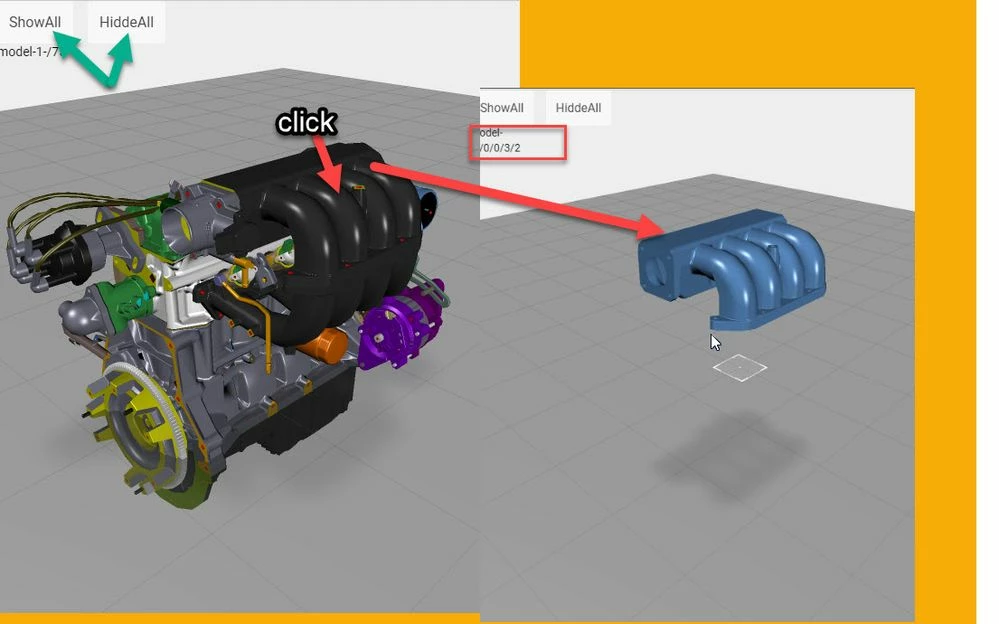
Here an example attached. Please, click on an item:

2022-05-31_18-06-33.jpg

Here it will hide all items and display only the selected one (with userpick event).

Please, let  me know if it is clear now. Thanks!

2 replies

21-Topaz I
May 23, 2022

Hi @GianVal ,

I used some thing like make all invisible and the make visible only the desired items. Used the functions:

//================================
$scope.setVisibilityMdlItemWdgs=function(str,value){
 
 var wdgs=$scope.app.view.Home.wdg; 
 for(wdg in wdgs)
 { 
 if(PRINT_MODE) console.warn(wdgs[wdg]);
 
 if(hasWdgProp(wdgs[wdg],'idpath')) 
 { 
 
 if( wdg.indexOf(str) !=-1) 
 { 
 if(PRINT_MODE) console.log("FOUND<"+str+"> and set= "+value+":: to mItem ->"+wdgs[wdg]['widgetName']+">>>");
 $scope.setWidgetProp(wdg,'visible',value); 
 $scope.$applyAsync();
 }
 else 
 if(PRINT_MODE) console.log("NOT FOUND<"+str+"> NOT SET= "+value+" to ::"+wdgs[wdg]['widgetName']+" <<<< "); 
 
 } //end of wdg contains idpath
 }//end of for wdg in wdgs
 
};
//==============setVisibility for wdg/ value true or false/=
$scope.setVisibilityMdlItemWdg=function(wdg,value){
$scope.setWidgetProp(wdg,'visible',value); $scope.$applyAsync();};
//================================================================

  and later in the code called something like this

$timeout(()=>{
 $scope.setVisibilityMdlItemWdgs('all',false);
 $scope.setVisibilityMdlItemWdgs('cut',true);
 $scope.setVisibilityMdlItemWdgs('inner',true);
},800)

example code will hide all modelItem widgets containing all strings. and will make visible all modelItem -  widgets having the string inner and cut.

Ok this is a version which need a string as selector - but you could modify the function without selector so means to select all modeIItem widgets

//================================
$scope.setVisibilityMdlItemWdgs=function(value){
 
 var wdgs=$scope.app.view.Home.wdg; 
 for(wdg in wdgs)
 { 
 if(hasWdgProp(wdgs[wdg],'idpath')) 
 { 
 $scope.setWidgetProp(wdg,'visible',value); 
 $scope.$applyAsync();
 } //end of wdg contains idpath
 }//end of for wdg in wdgs
 
};
 

Here I have already defined some widgets.

Or do you want to do this without explicit of modelwidget defintions? IN this case it will be  a little more difficult we  need to use the meta data API to select all modelItems to a modelWidget and set the properties of them to hidden =true. respectively to false.  If this is required I could check it if I have an example.

21-Topaz I
May 23, 2022

Hi @GianVal ,

according to my  last post - and the mentioned there strategy - to make all component items hidden and then make only  the desired items visible. I the last post the example showed how it works with explicit defined model Item widgets. If you have an modelWidget without  explicit definition of modelItem widgets then you can use  the following sample code to make all items invisible /hidden . Later you can make visible only the desired items.

/////////////////////////////////////////////////////// 
$scope.app.HiddeCustomSel= function(){
let pathDepth=4
let modelWidget='model-1'
let hidden = true
 $scope.app.testCustomSelection(modelWidget,$scope.app.whereFunc,$scope.app.selectFunc,pathDepth,hidden)
 
}

//========================== app.testCustomSelection
 
$scope.app.testCustomSelection= function(modelId,whereFunc,selectFunc,pathDepth,hidden) {
 BPRN("app.testCustomSelection()");
 $scope.app.testCustomSelection.modelId=modelId;
 $scope.app.testCustomSelection.pathDepth=pathDepth
 $scope.app.testCustomSelection.hidden=hidden
 var metaDATA= PTC.Metadata.fromId(modelId)
 .then(function(meta) {let data= meta.findCustom(whereFunc,selectFunc);
 console.warn(data);})
 
 
}
//-------------------------------------------------
//-------------------------------------------------
//========================== app.testCustomSelection

$scope.app.whereFunc = function(idpath) {
 // scope var `this` is the metadata instance
 const depth = this.get(idpath, 'Part Depth')
 const name = this.get(idpath, 'Display Name')
 return parseFloat(depth) > $scope.app.testCustomSelection.pathDepth || 
 (name && name.search('PRT') >= 0)
 }
//-------------------------------------------------
$scope.app.selectFunc = function(idpath) {
 const name = this.get(idpath, 'Display Name')
 console.log("app.selectFunc["+$scope.app.testCustomSelection.modelId+"] idpath=" 
 +idpath+ " >>>Name: "+name);
 $scope.currentSelection= $scope.app.testCustomSelection.modelId +"-"+ idpath
 tml3dRenderer.setProperties($scope.currentSelection, { hidden:JSON.parse($scope.app.testCustomSelection.hidden) } ); 
 
 return this.get(idpath, 'Display Name');}

////////////////////////////////////////////////////////

This will customer function and will check all items from type parts in the model-1 widget with maximum 4 level deep.

2022-05-23_18-16-02.jpg

GianVal15-MoonstoneAuthor
15-Moonstone
May 25, 2022

Sorry, I suppose there is some typo or mistake in your code. Can you please check?

thank you

GianVal_0-1653469851459.png


21-Topaz I
May 25, 2022

Hi @GianVal , I am sorry yes it contains some code which is not required, cleaned it up

/////////////////////////////////////////////////////// 
$scope.app.HiddeCustomSel= function(){
let pathDepth=4
let modelWidget='model-1'
let hidden = true
 $scope.app.testCustomSelection(modelWidget,$scope.app.whereFunc,$scope.app.selectFunc,pathDepth,hidden)
 
}

//========================== app.testCustomSelection 
$scope.app.testCustomSelection= function(modelId,whereFunc,selectFunc,pathDepth,hidden) {
 $scope.app.testCustomSelection.modelId=modelId;
 $scope.app.testCustomSelection.pathDepth=pathDepth
 $scope.app.testCustomSelection.hidden=hidden
 var metaDATA= PTC.Metadata.fromId(modelId)
 .then(function(meta) {let data= meta.findCustom(whereFunc,selectFunc);
 })
 
}
//-------------------------------------------------
//-------------------------------------------------
//========================== app.testCustomSelection

$scope.app.whereFunc = function(idpath) {
 // scope var `this` is the metadata instance
 const depth = this.get(idpath, 'Part Depth')
 const name = this.get(idpath, 'Display Name')
 return parseFloat(depth) > $scope.app.testCustomSelection.pathDepth || 
 (name && name.search('PRT') >= 0)
 }
//-------------------------------------------------
$scope.app.selectFunc = function(idpath) {
 const name = this.get(idpath, 'Display Name')
 console.log("app.selectFunc["+$scope.app.testCustomSelection.modelId+"] idpath=" 
 +idpath+ " >>>Name: "+name);
 $scope.currentSelection= $scope.app.testCustomSelection.modelId +"-"+ idpath
 tml3dRenderer.setProperties($scope.currentSelection, { hidden:JSON.parse($scope.app.testCustomSelection.hidden) } ); 
 
 return this.get(idpath, 'Display Name');}

////////////////////////////////////////////////////////

This code was tested in the project (it is another topic but I tested the button CustomSel there in the Home.json view) https://community.ptc.com/sejnu66972/attachments/sejnu66972/studio/10896/1/eulerTransformRotationCommunity_V03.zip