
15-Moonstone
June 20, 2023
Question

How to make offset inside sketch parametric stable?

  • June 20, 2023
  • 4 replies
  • 7193 views

I would like to be able to offset a curve enclosure inside of a sketch and observe the change's relation to the geometry outside of the sketch.


Is there any way inside of a sketch to use the offset option and have the offset recognized as a offset instead of the resulting geometric features created from the offset?


Below is my simple sketch prior to the offset.
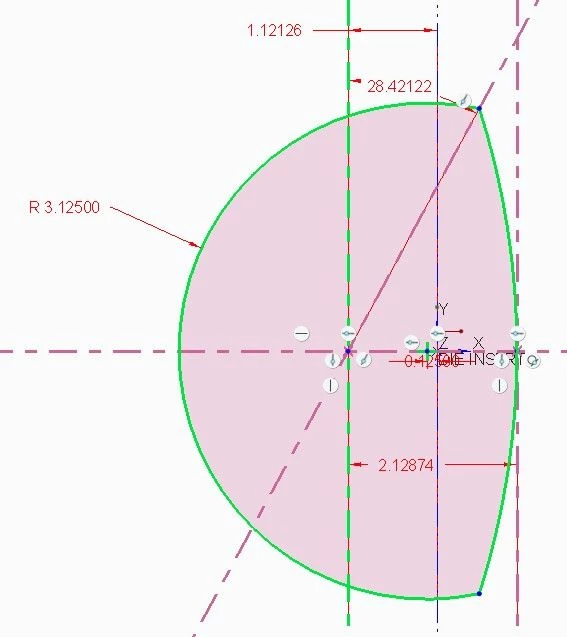
before offset.jpg

Below is the application of the offset.  Notice that the offset is recognized as 2 weak radii shown in light blue.  This applies as it should.
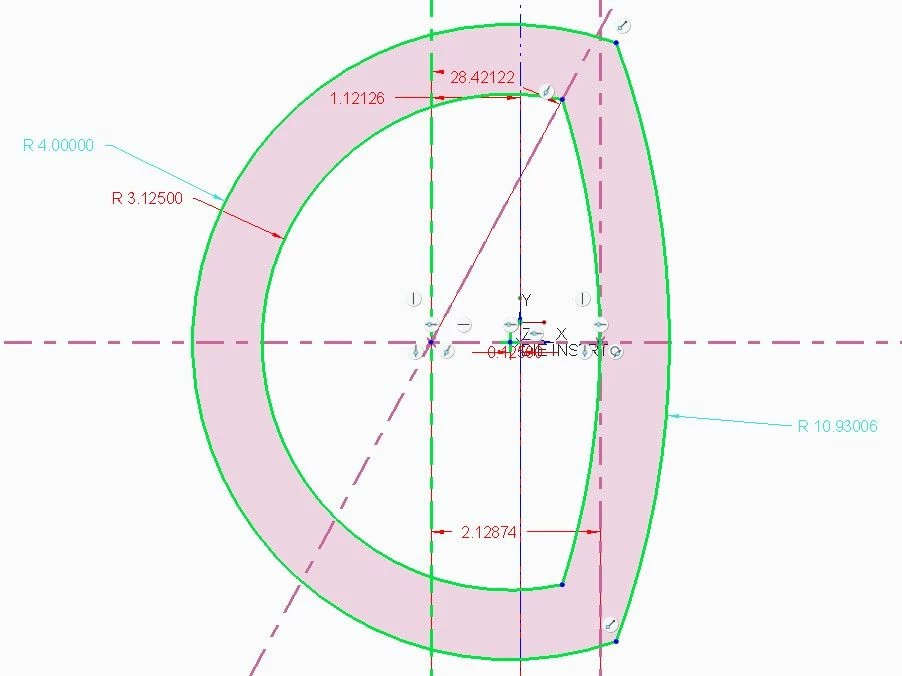
after offset.jpg

The problem is that if I modify any of the strong dimensions the needed offset is no longer uniform.  (Below I modified the angle value).
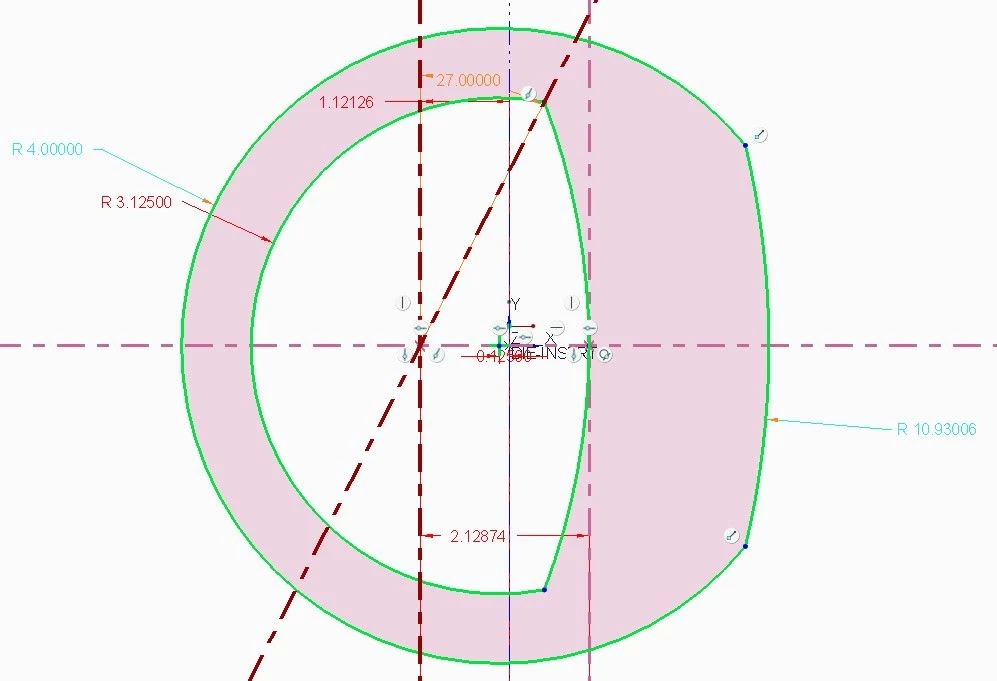
after modification.jpg

Perhaps in this specific example it would be possible to modify the constraints to get the needed offset with the change, but in a more complicated sketch I would like the option to have my offset features retained as a offset as I have intentions of having this update appropriately with the downstream extrude within a family table.


4 replies

tbraxton
22-Sapphire II
22-Sapphire II
June 20, 2023

Getting the sketch constraints to support this is the trick. This is not the only way to get a solution, one example.

This example Creo 7 model enclosed will support your goal but does not use the offset function exclusively. There is a part parameter SK_OFST1 that is used to define the offset value and this parameter is used in feature relations driving the sketch along with constraints that ensure the offset behavior is enforced. These are datum points at the midpoint of each arc being offset with a linear distance between them. These linear strong dims control the offset within the sketch via the feature relations. The user can change the offset parameter value and regenerate the model without entering sketch mode.


tbraxton_0-1687271442296.png


pimm15-MoonstoneAuthor
15-Moonstone
June 20, 2023

Tbraxton:


Even though this doesn't solve a true offset it is quite helpful.


The only way that I have been using relations is where one feature in a sketch gets assigned a name and is referenced in another sketch.


This idea uses the relation table.


relation.jpg

I could see that both .850 dimensions in your sketch were relation driven.


I am new to this style of relation so I have a couple questions.

1) To build the cooperative number between d9 and d10 do you just build this relationship by typing in these names and the = sign?

2) Is the SK_OFST1 value actually functional or is it just a name that could be used downstream in a family table to give name definition to the needed offset value?


Thank you,

Paul

tbraxton
22-Sapphire II
22-Sapphire II
June 20, 2023

1) The feature relations for d9 & d10 were manually typed in the relations editor including the = sign.

2) SK_OFST1 is a model parameter and is functional it is used in the relations to set the offset value. You can see this parameter using the parameter editor by using: Tools-> Parameters.

19-Tanzanite
June 20, 2023

I tend to use perpendicular construction line segments + the equal length constraint in order to implement the design intent in these cases:

pausob_0-1687278138419.png pausob_1-1687278156487.png

pausob_2-1687278169901.png


pimm15-MoonstoneAuthor
15-Moonstone
June 20, 2023

It appears that there are a number of good ways to maintain equal size offset in my given circumstance.


It would be nice if there also was a way within a sketch to just automatically carry the offset values driven by the offset value that was assigned to a given profile.

tbraxton
22-Sapphire II
22-Sapphire II
June 20, 2023

Here is an alternate solution using two sketch features and the offset loop functionality. This does not require any relations or parameters and allows for modifying the offset value without entering sketch mode. This is the simplest implementation I can think of to capture the design intent. Sketch 2 is offset from sketch 1. The offset is controlled by a single dimension in sketch 2.


Creo 7 model enclosed for reference


tbraxton_0-1687278919775.png


pimm15-MoonstoneAuthor
15-Moonstone
June 20, 2023

Perhaps in the above instance you could use a shell command with your extrude to maintain the needed offset.

tbraxton
22-Sapphire II
22-Sapphire II
June 20, 2023

Sorry, I do not follow your comment in the context of the alternate solution. There is no 3D geometry in the example part, only 2-D planar curves. If you are asking about a scenario where you are using this offset to control thickness in a 3D model then my answer may be quite different on how to capture the design intent.

pimm15-MoonstoneAuthor
15-Moonstone
June 26, 2023

As a summary to my original question:  How to make offset inside sketch parametric stable?


Even though it is possible to work around this, it isn't possible to parametrically hold the geometry as an offset value within a sketch.  (Each segment of the offset has it's own independently determined parametric value).  This means that if you want to observe the downstream effect of the offset within a sketch within the model tree that you can't change the offset value inside of the sketch without 1st destroying the outer offset the next time you enter the sketch.


It would be wished that it would be possible to at least have an option to keep the offset geometry within the sketch as a complete offset value that could be changed with just changing the original offset value.

Dale_Rosema
23-Emerald III
23-Emerald III
June 26, 2023

If want your wishes to come true, you could start by adding a product suggestion:


https://community.ptc.com/t5/Creo-Parametric-Ideas/idb-p/creoparametric