
4-Participant
July 28, 2025
Solved

CREO Toolkit applications compatibility with C++/CLI code

  • July 28, 2025
  • 3 replies
  • 1556 views

Hello,

I have created a small C++/CLI library which make calls to a C# DLL, this library works fine if I call it from any other C++ project, but it does not work if I call it from my Toolkit application (based on Creo Toolkit 10.0.6.0).

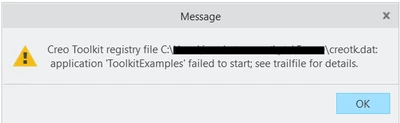
The application compiles and links fine, but it fails to start from the Auxiliary Applications menu:
 

IB_10798296_1-1753721625063.png


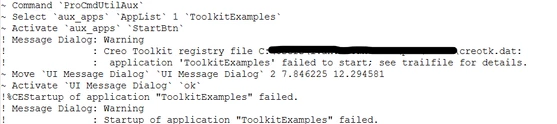
Checking that trailfile info, I only can see these lines related to my app not saying any clue about the possible root cause error:
 

IB_10798296_2-1753722263526.png


What I'm thinking is that Creo doesn't support Toolkit apps involved with C++/CLI code, but I would like to confirm that, do some of you have experience this?


Thanks.



Best answer by RPN

Make sure that dependent libraries can be loaded, for this you may have to adjust the path variable. You can do this in the psf file. As far I know there are no limitations.

3 replies

24-Ruby III
July 29, 2025
4-Participant
July 31, 2025

Thanks Vladimir, the second post had the solution. I implemented some other suggestions described there like:

  • Change to the same character set as the caller application (I had assigned a different one)
  • Change to the same CRT (this wasn't possible since the dll needs to support /CLR and this option is not compatible with the CRT defined for the caller application)

But what it really worked was to include the location of the dll in the PATH variable, I did that modifying the psf file.

RPN18-OpalAnswer
18-Opal
July 29, 2025

Make sure that dependent libraries can be loaded, for this you may have to adjust the path variable. You can do this in the psf file. As far I know there are no limitations.

4-Participant
July 31, 2025

Thanks, this resolved the issue! I did exactly what you mentioned. My problem was that I was considering the libraries would be found implicitly if those are located in same directory of the caller application.

14-Alexandrite
July 30, 2025

You should create toolkit using VB API in C# itself ?  In this case no need to call from C++ -> C#.


Also not sure name mangling happens on C# as well, You can check this also.


4-Participant
July 31, 2025

Hey Syalagudri, my situation is that I'm updating an already existing application which is done in pure C++, that is why I'm creating a C++/CLI wrapper to communicate the current C++ app with the C# library.


Thanks!