7-Bedrock
August 2, 2023
Solved

Creo Toolkit startup errors

  • August 2, 2023
  • 2 replies
  • 4801 views

Hello everybody,


I come to you today because I had a problem just after installed 3D connection app, always when I start Creo 7 I get these two windows:
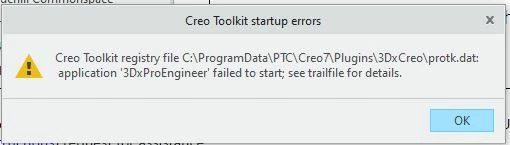
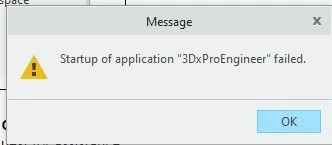
2023-08-02 14_27_19-Window.jpg2023-08-02 14_27_26-Window.jpg


How did you manage to solve this error.

Thank you in advance.



Best answer by JH_10674545

Thank you for your advice, at end what it solve my issue was: 


1. Copy the file “C:\ProgramData\PTC\«Creo Version»\Plugins\3DxProEngineer\protk.dat” to “C:\Program Files\PTC\«Creo Version»\Common Files\«datecode»\text”

2. Delete the folder “3DxProEngineer” in “C:\ProgramData\PTC\«Creo Version»\Plugins”


Greetings 


2 replies

24-Ruby III
August 2, 2023

Hi,

open protk.dat file mentioned on first picture in Notepad and verify validity of all paths.

7-Bedrock
August 2, 2023

the path is correct2023-08-02 15_45_58-Window.jpg

24-Ruby III
August 2, 2023

@JH_10674545 wrote:

the path is correct2023-08-02 15_45_58-Window.jpg


I give up. No other idea.

15-Moonstone
August 2, 2023

There are several reasons and I'm not sure based on these errors.

  • Make sure CreoAgent is running. If you are using Windchill then it most likely is, The Agent/Platform is the communication tool for connecting Creo to many things including Windchill, toolkit applications, web in the embedded browser, etc. Can you reach a website in the embedded browser?
  • Take a look in the windows explorer/file manager to make sure that the path to the protk.dat is correct.
  • We had an issue in the last 6-9 months where some toolkit apps complained that they were not locked correctly. It had something to do with JAVA toolkit API I think. I think it had to do with some changes to PTC's toolkit licensing and 3Dconnection hadn't updated their app. Some of our internal folks that do toolkit development help us lock the app. I don't think it is your problem because your screen caps don't mention the toolkit licensing, just odd that this is one of the apps we had trouble with.
JH_106745457-BedrockAuthorAnswer
7-Bedrock
August 4, 2023

Thank you for your advice, at end what it solve my issue was: 


1. Copy the file “C:\ProgramData\PTC\«Creo Version»\Plugins\3DxProEngineer\protk.dat” to “C:\Program Files\PTC\«Creo Version»\Common Files\«datecode»\text”

2. Delete the folder “3DxProEngineer” in “C:\ProgramData\PTC\«Creo Version»\Plugins”


Greetings