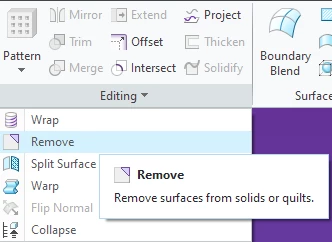
How to delete quilts?
My task:
I need to model a part with multiple interfaces to an assembly. In order to do it, I created a shrinkwrap feature in my part, and brought the quilts of all solid bodies that I needed to interface with (shrinkwrap option "Autocollect all solid surfaces") . I also added more "helper" surface features to model my part. Once the geometry of my solid part is ready, I need to delete all those temporary "helper" quilts.
Best solution I found:
I have used the features "Thicken" and "Solidify" to create many independent solid bodies (one solid out of each quild), and eventually used feature "Remove body" to remove all solid bodies (those solids made out of quilds), only leaving one solid body which is the main geometry of the part.
The question:
I presume there is a better way to delete the quilds, but I couldn't find it. I also couldn't find many people asking about this problem, so I may be approaching this wrongly on the first place. Can somebody please recommend a "proper" way to delete quilds?
(for Solidworks-speaking people - I was expecting to find a similar command to "Delete bodies" where I would be able to select all quilds and delete them all in a single feature, but I couldn't find anything similar)
PS: the only fairly relevant link I found is this:
But this thread is more than 10 years old so presumably there are newer features not mentioned there.
I am using Creo 9
Many thanks for an advice!