
15-Moonstone
January 26, 2024
Question

Weld / welding symbols - how to improve

  • January 26, 2024
  • 2 replies
  • 3402 views

Has anyone found a solution for making better welding symbols in Creo? The default symbols are STILL in Creo 10 just horrible.

It seems that the symbol definitions don't support lines changing length automatically. So that results in either too long or too short elbows for the symbol.

I think that is why the default symbol is defined with the maximum reasonable length of the weld note, which makes it useless when you want to just give a simple weld note:
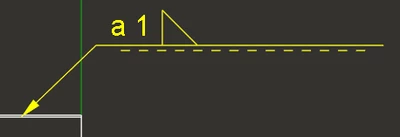
NPyn_0-1706253567732.png

I found out that you can use grouping in symbol definition to hide or show parts of the elbow depending on whether the length of the weld and/or intermittency is enabled:
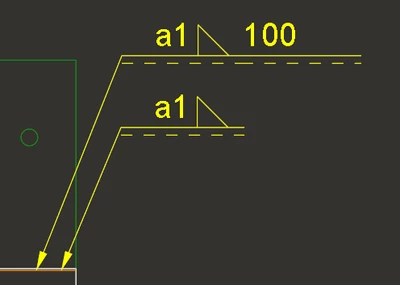
NPyn_1-1706253936390.png

But this solution does not work when the leader is on the other side, because you cant make the leader origin to change position depending on grouping:
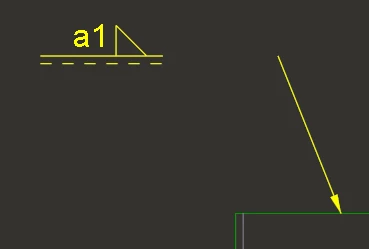
NPyn_2-1706254047220.png


Has anyone managed to somehow create a GOOD welding symbol in Creo with modifiable elbow length?

Or is the only solution to just create different symbols for different amounts of information: One symbol for simple note with just the weld depth, one symbol with weld length also and one symbol with intermittency.

And another issue I have is with the symbols created by the Welding application in Creo. Here is what kind of weld notes it creates OOTB:
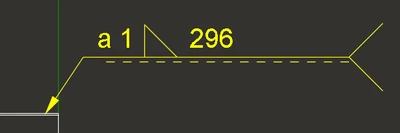
NPyn_3-1706254714537.png

Apparently you can define what symbol the application uses for the weld notes so I could create a custom symbol with shorter elbow. But there I run into the same problem as before. I cannot define the length of the elbow to change according to information showed without breaking the symbol when the leader origin is on the other side of the symbol.


Can I somehow use multiple different symbols in Welding? So that I could tell one weld note to use a simple symbol with a short elbow and one note to use longer elbow so the length or intermittency can fit.


Here are also few Ideas related to this problem, please vote them so maybe PTC will at some point bother to update the welding symbol function:

https://community.ptc.com/t5/Creo-Parametric-Ideas/Improve-the-insertion-of-welding-symbol-in-drawing-with-a/idi-p/648226
https://community.ptc.com/t5/Creo-Parametric-Ideas/ISO-Welding-Symbols-too-long-horiz-line/idi-p/777643


2 replies

4-Participant
February 6, 2024

The 3d weld tool annotations seem to apply this in some means. It will apply a bounding box around each attribute and build the symbol from left to right based on the length of text. 


Currently, it is quite tedious to modify the groups within the weld symbol and move things around based on left or right leader and changing the length of the weld symbol. You only have two origins based on left or right leader, so all your groups have to build off of that. This limits how you can build up your symbol and what is optional or not. 

N-Pyn15-MoonstoneAuthor
15-Moonstone
April 2, 2024

Do you know if there is any way to remove the long tail from the Welding tool default annotations? Using Welding and the annotations in it would be an okayish workaround if I could get rid of that tail.


4-Participant
April 2, 2024

From what I've seen, this should be possible if you are familiar with the symbol definition tool. 


  1. Redefine the symbols to delete the tail (you must save to a different file name/path)
    1. Annotations > Define Symbol > Redefine > Select from Path
    2. This will open a sketcher like window where you can delete the tail and related notes (there may be duplicates on left and right, I don't remember)
    3. Complete this and write the new symbol out to a local file location
  2. Place the redefined symbols in the install path symbol libary (with the original names)
    "....\Common Files\symbols\library_syms\weldsymlib\iso_weld\iso_fillet.sym"
  3. Restart Creo so that it pulls in the changed symbols
Community Manager
April 9, 2024

Hello @N-Pyn


It looks like you have some responses from some community members on your topic. If any of these replies helped you solve your question please mark the appropriate reply as the Accepted Solution. 

Of course, if you have more to share on your issue, please let the Community know so other community members can continue to help you.

Thanks,
Community Moderation Team.