
Solved
Shape widget borders seem to be truncated : How to solve ?
Hello everybody,
When using the shape widget, the borders seem to be truncated (see example below).
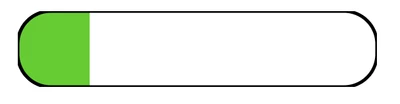
Is it possible to use css to modify this appearance ?
Best regards
Hervé

Hello everybody,
When using the shape widget, the borders seem to be truncated (see example below).
Is it possible to use css to modify this appearance ?
Best regards
Hervé
Hi Hervé
Indeed the previous css would apply to all the rect in the page and so it does impact the dynamic filling, and it woudl also impact other shape in the same page.
To make it less impacting, you can try the following:
1) Enter a value for the CustomClass attribtue of the shape widget, for example cmoshape (can be anything)
2) modify the css to apply to .cmoshape > .widget-shape-container > svg > rect instead of only rect. For example:
.cmoshape > .widget-shape-container > svg > rect {
width: 180px !important;
height: 35px !important;
x: 2px !important;
y: 2px !important;
}
Hope this helps
Christophe
Enter your E-mail address. We'll send you an e-mail with instructions to reset your password.