
5-Regular Member
September 21, 2015

Part II Enhancements on Windows Explorer Integration for Windchill Desktop Integration 10.2

  • September 21, 2015
  • 33 replies
  • 16008 views

In my last blog post Productivity Enhancements on Windows Explorer Integration for Windchill Desktop Integration 10.2, Part I I discussed the possibilities and enhancements around the Windchill Documents system folder in the Windows Explorer.

This blog will show you how easy it is to display Windchill Meta data information in the Windows Explorer Integration.

I will also discuss the integrated Windchill search and how leverage the Windchill Index Search functionality.


View Windchill Information


Windchill metadata information of your documents can be displayed in the Windows Explorer without opening a browser to access the Windchill web application. Even applying filters is possible.

To do so, you have to navigate from the Windchill Documents node to the context that you are interested. On the right hand pane you will see the stored documents.

You may add or remove attributes by right-clicking a Windows Explorer column heading to see a drop down menu of additional columns available.
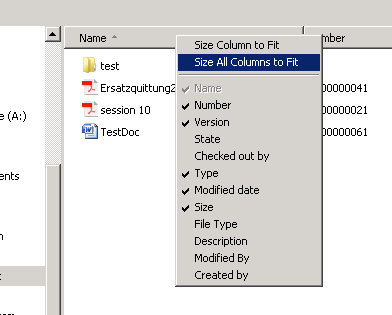
 

Columns.png


Is the attribute still not available in the out of the box list?

No problem, since Windchill 10.2 F000 you can select Windchill folder views to add columns that appear in the list. With Windchill 10.2 M010 even the filters on these views will affect the data displayed in the object list.
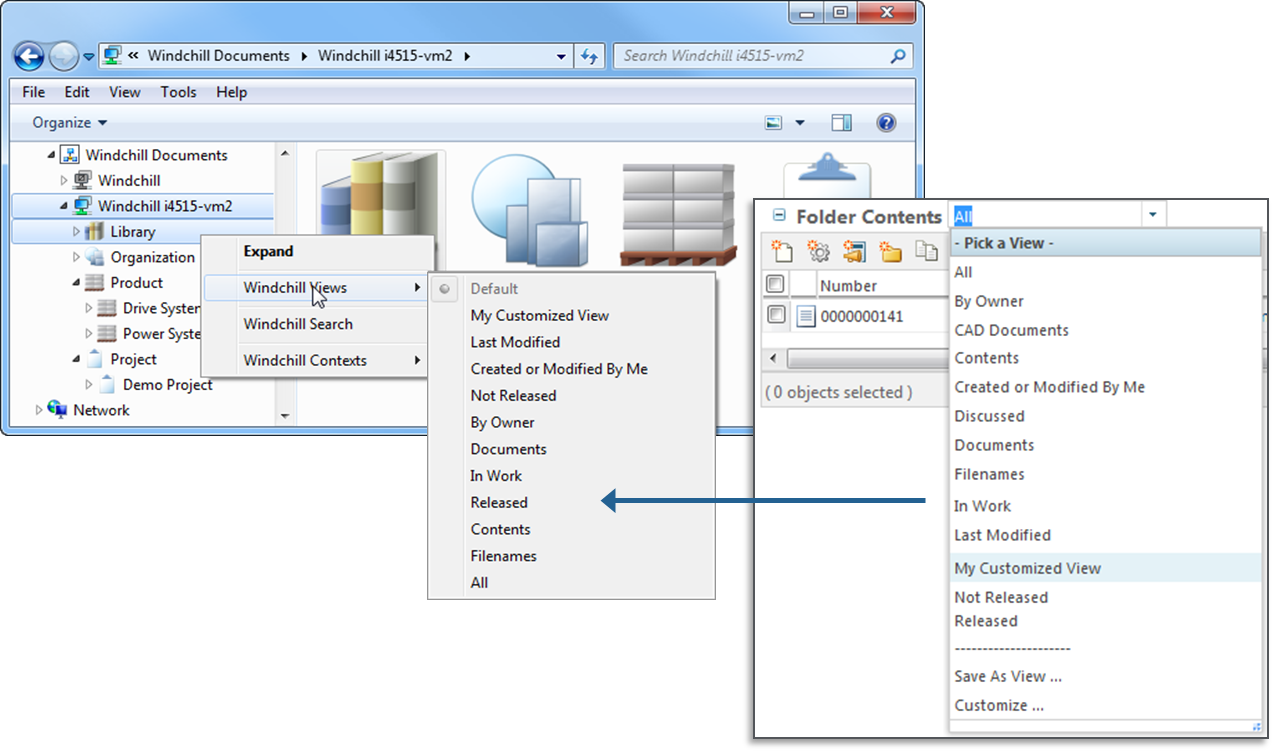
 

ExplorerTableViews.png

This allows you to configure which documents will be show in the folder. E.g. if you only want to display the latest document version, then apply filter settings on the Windchill table view (in the Set Filter step select Revision and Version attributes and set them to Latest).


Folder Search for Windows Explorer


All the features that I showed until now required that you exactly know where the documents are located in your Windchill system but this unfortunately is not always the case. While manual navigating through the folder structure is cumbersome and annoying to find a document, there is a simpler way to find your documents.

Starting in Windchill PDM Link 10.2 F000 you can search for any Windchill document using the Windchill Search action. This is a quick and easy way to search for your documents inside of the Windows Explorer Integration without the need to open the Windchill web application.

The search can be initiated from context, container or folder level within the Windchill Documents node. This will allow you to search by Name or Number on this context level and all sub-contexts.
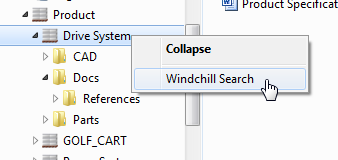
 

Click Search.png


Please note that the search is case-insensitive and wildcards are allowed. Add asterisk (*) as a wildcard character to indicate that one or more characters can appear in that position.
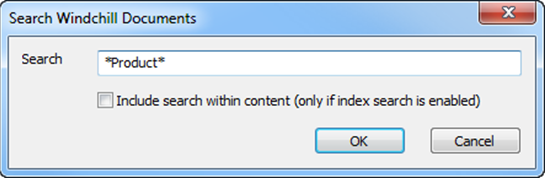
 

Search.png


For Windchill systems with Index Search enabled, even document content will be taken into account when calculating the results if the option “Include search within content (only if index search is enabled)” is selected.

The native Windows Explorer search field (in the top right corner of the Windows Explorer) can also be used to perform a search but this will yield slightly different results. The search will only be performed on the current folder / context and not on any sub-context.

In case you are also interested in the location of document in the folder structure, you can use the right mouse button menu to select “Open File Location”. This will open the Windchill context or folder in which the object is stored.


Conclusion


This was the last part of my post about productivity enhancements on Windows Explorer Integration.

I hope that you liked this brief tour on the Windows Explorer Integration if you are interested in more details, you’ll find further information in the Windchill Help Center.

Thank you also for your many comments on part I.

As always let me and the community here about your thoughts and questions:


  • What do you like about the Windows Explorer Integration and what do you think is missing?

  • In which scenarios you are using the Windchill Explorer Integration?

33 replies

16-Pearl
October 8, 2015

One more note...is it possible to have an "included" list of Contexts instead of an "excluded"?  We have over 500 contexts.   Maybe it's as easy as changing the text from excluded to included. 

wvs.jobs.publishFilter.excludedContextNameForPublication=PRODUCT3,LIBRARY1

5-Regular Member
October 9, 2015

Bill Ryan wrote:

Gary, may need some clarification on these two lines from the document:

Line 1) - by forcing the republishing for existing default representations, or not

Line 2) - Note: The Publish_EPMDoc_WithCSVFile schedule method deletes the existing Representation (along with any Annotation Sets) before publishing a new Representation

What happens if I'm NOT forcing the republishing of existing default representations and using the publish_epmdoc_withcsvfile function?  I don't want to lose annotation sets on assemblies that are already published with a default representation.  Do I need to make sure assemlbies with a default representation are not inlcuded in the CSV file for this scenario?

This is YSH's response:

Publish_EPMDoc_WithCSVFile UI scheduler method only use wvs.jobs.publishFilter.withCSV parameter and do not get any other parameter value in additionalEPMDocJobs.properties. It is hard-corded in AdditionalEPMDocJobs.java source as below.

AdditionalEPMDocJobs.java source 794 ~ 814 lines:

----------------------------------------------------------------------------------------------8<-----------------------------------------------------------------------------------------------------------------------------

/**

* Attempts to publish a Representable generating a Representation

*

* @param     viewableLink    If true and the data has already been published, the viewable data will be passed back to allow access by getViewableLink

* @param     forceRepublish  Overwrites an existing representation should one already exist

* @param     objectReference Reference of the Representable to be published

* @param     configReference Reference of the EPM Config Spec, if null, latest is used.

* @param     partConfigReference Reference of the Part Config Spec, if null, latest is used.

* @param     defaultRep      Should the created representation be the default or not.  The first representation in always default.

* @param     repName Name of The representation to be created

* @param     repDescription  Description of the representation to be created

* @param     structureType   The type of structure walk to be performed

* @param     actionString string representation of the action XML file contents

* @param     jobSource       int of source that submitted the job, 0=unknown, 1=manual, 2=checkin, 3=schedule

*

* @return    boolean true if successful

*

public boolean doPublish(boolean viewableLink, boolean forceRepublish, String objectReference, String configReference, String partConfigReference,

boolean defaultRep, String repName, String repDescription, int structureType, String actionString, int jobSource)

**/

result = pub.doPublish(false, true, objRef, (ConfigSpec) null, (ConfigSpec) null, true, null, null,

Publisher.EPM, null, 3);

----------------------------------------------------------------------------------------------8<-----------------------------------------------------------------------------------------------------------------------------

Publish_EPMDoc_WithCSVFile UI scheduler method is hard-coded with below values:

viewableLink : false

forceRepublish : true

objectReference: Retrieved from CVS file

configReference: null

partConfigReference: null

defaultRep: true

repName: null

repDescription : null

structureType: Publisher.EPM

jobSource: 3

And,

Publish_EPMDoc_WithCSVFile schedule method will delete the existing Representation (along with any Annotation Sets) before publishing a new Representation. It will remove previously published Representation and it’s annotation. Both Representation and it’s Annotation should be removed together.

If customer comments out below lines in AdditionalEPMDocJobs.java source (787 ~ 791 lines). Then, the Publish_EPMDoc_WithCSVFile schedule method will force republish the CAD model and will not remove previously created Representation and its annotation set. i.e. Customer will see 2 Representation in the CAD Document.

Comment out these line in AdditionalEPMDocJobs.java source (787 ~ 791 lines):

     /**

     try {

      deleteRepresentation(epm);

      } catch (WTException e) {

      throw e;

      }

     **/

Force to republish Result: 2 Representations

RepList.png

5-Regular Member
October 9, 2015

Bill Ryan wrote:

One more note...is it possible to have an "included" list of Contexts instead of an "excluded"?  We have over 500 contexts.  Maybe it's as easy as changing the text from excluded to included. 

wvs.jobs.publishFilter.excludedContextNameForPublication=PRODUCT3,LIBRARY1

YSH's Response:

Below lines (286 ~ 299 lines) in AdditionalEPMDocJobs.java source. If customer change SearchCondition.NOT_EQUAL to be SearchCondition.EQUAL, then it will have an "included" list of Contexts instead of an "excluded"

-----------------------------------------------8<------------------------------------------------

// excluded context from publication

   String[] excludedContextNameForPublication = getjobsprops.getExcludedContextNameForPublication();

   if (excludedContextNameForPublication != null){

      for (int i=0; i<excludedContextNameForPublication.length; i++){

         WTContainer wtc = findContainer(excludedContextNameForPublication[i]);

         if (wtc == null) getjobsprops.PrintOut("WTContainer excluded " + excludedContextNameForPublication[i] + " not found or not used");

         else {

            getjobsprops.PrintOut("found container: " + wtc.getIdentity()); //wt.pdmlink.PDMLinkProduct:291527

            qs.appendAnd();

            // idA3containerReference ObjectReference.KEY

            qs.appendWhere(new SearchCondition(EPMDocument.class, WTContained.CONTAINER_REFERENCE + ".key.id" , SearchCondition.NOT_EQUAL, PersistenceHelper.getObjectIdentifier(wtc).getId()));

         }

      }

   }

-----------------------------------------------8<------------------------------------------------


i.e. Change this:

qs.appendWhere(new SearchCondition(EPMDocument.class, WTContained.CONTAINER_REFERENCE + ".key.id" , SearchCondition.NOT_EQUAL, PersistenceHelper.getObjectIdentifier(wtc).getId()));


to be this:

qs.appendWhere(new SearchCondition(EPMDocument.class, WTContained.CONTAINER_REFERENCE + ".key.id" , SearchCondition.EQUAL, PersistenceHelper.getObjectIdentifier(wtc).getId()));

16-Pearl
October 9, 2015

Thanks Gary.  These are good answers.  Appreciate it.

23-Emerald IV
October 12, 2015

Gary Jackson‌, I have several questions.  For my initial go-around I'm only trying the command line version for CSV publishing.

  1. I ran the makeCommonUtils.bat and that went fine.  I then attempted to run makePublishUtil.bat but that prompted me for Oracle DB information.  We are using MS SQL server.  Should I point these prompts to the MS SQL equivalents or will they only work with Oracle?
  2. If I only want to try CSV publishing, is it sufficient to just run makeCommonUtils.bat and makePublishUtilreadCSV.bat and do nothing else (the stuff listed above for additional schedulers, extra properties, and other make files)?
  3. The PublishUtilreadCSV.bat appears to strip off everything but the OR from CSV file.  If that's the case, then is there really any reason to include anything other than just the OR in the CSV file?  Do I really need the other columns: OR||DOCNAME||DOCNUMBER
  4. What exactly is the || character?  Normally CSV files are comma separated.  I'm not sure if this is supposed to be a TAB or two "pipe" characters.

Thanks!

23-Emerald IV
October 12, 2015

Answering some of my own questions...

Apparently the steps I listed in question #2 were sufficient.  Those are the only things I did and the PublishUtilreadCSV.bat is working just fine.  Also, I only included the ORs in the text file, so apparently that answers question #3 as well. 

One thing you might want to ask the developer.  This script appears to delete the existing representation first, then submits the job for publishing.  On the other hand, if you resubmit a job from the WVS Job Monitor, it does not delete (or replace) the existing representation unless it is successfully republished.  Is there a way to have this script behave that way so that if there's some problem with publishing the existing representations aren't lost?  Probably not a big deal, just curious.

991 jobs were just submitted flawlessly.

pub_jobs.PNG

Thanks again for this!!!

23-Emerald IV
October 13, 2015

Just did my second run on production.  The script processed 4,225 items in 44 minutes, so 1.6 objects per second or 96 objects per minute.

pub_jobs2.PNG

In some ways this seems a little slow, but I guess it's not a big deal since I can only publish around 20 objects per minute anyway. 

Loving this!

5-Regular Member
October 14, 2015

Hi Tom,

Sorry for the delayed reply, I was OOTO yesterday and have only just caught up this afternoon.

Glad to hear that this is helping!

Also glad to hear you've answered your questions #2 & #3! I assume you also have implicitly answered #1, given it's working?  Regarding #4, the "||" are just the chosen CSV delimiter (does not have to be a comma and double-pipe is more likely unique.

Gary

5-Regular Member
October 14, 2015

Tom Uminn wrote:

One thing you might want to ask the developer.  This script appears to delete the existing representation first, then submits the job for publishing.  On the other hand, if you resubmit a job from the WVS Job Monitor, it does not delete (or replace) the existing representation unless it is successfully republished.  Is there a way to have this script behave that way so that if there's some problem with publishing the existing representations aren't lost?  Probably not a big deal, just curious.

This is how it's currently designed but refer to the from the TS developer comments paraphrased in my answer to Bill above: 09-Oct-2015 04:12.

23-Emerald IV
October 16, 2015

Gary Jackson‌,

Still looking for an answer to question #1.  Thanks.

I ran the makeCommonUtils.bat and that went fine.  I then attempted to run makePublishUtil.bat but that prompted me for Oracle DB information.  We are using MS SQL server.  Should I point these prompts to the MS SQL equivalents or will they only work with Oracle?.