
12-Amethyst
August 24, 2015

Productivity Enhancements on Windows Explorer Integration for Windchill Desktop Integration 10.2, Part I

  • August 24, 2015
  • 27 replies
  • 14469 views

In Windchill 10.2 a lot of effort has been made to enhance and simplify the user experience when working with WTDocuments from your Microsoft Windows Desktop.

In this blog I will show you some of the enhancements and how they can significantly simplify your interaction with documents stored in your company’s Windchill system.


Windows Explorer Integration


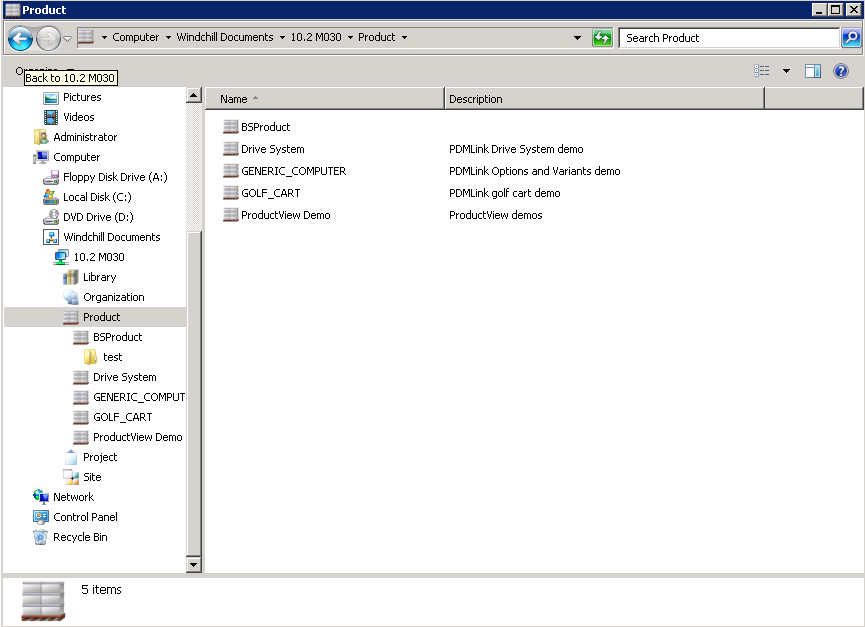
The PTC Windchill Desktop Integration plugin adds the Windchill Documents system folder to your local environment. You can you use that Windows Explorer Integration to find, open, access and download Windchill documents without the need to open the Windchill web application in a browser.
 

DTI.png

This will give you a variety of ways to easily access and interact with documents just like they had been stored on your local system:


  • by double clicking on a file in the Windows Explorer
  • by using the context (right mouse button) menu on the Windchill node, any context folder or document in the Windows Explorer
  • by the File > Open dialog of any local application (like Microsoft Word, Adobe Acrobat…)
  • ...


But I do not want to miss the (in my opinion) most natural way of interacting with documents in Windows – Drag and Drop.

As working with the Explorer Integration should just feel natural, Drag and Drop capabilities have been integrated and with Windchill 10.2 M010 these have even been enhanced.

Dragging a document file from your local system to a context folder under the Windchill Documents node will trigger one of the following actions (depending on the area where you drop the document):


  • New Document / New Multiple Documents
  • Check In
  • Replace Content


The other direction is supported as well:

Grabbing a document from a Windchill context folder and dragging it to your local system or another Windchill context will trigger corresponding actions depending if modifier keys (Shift and / or Ctrl) are applying and the target the document is dropped (possible actions are copy, move, create shortcut…).


Access to Windchill Functionality


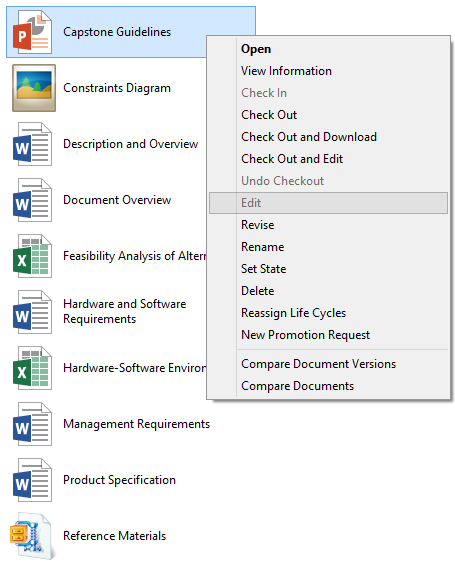
Starting with Windchill 10.2 F000, the right-click menu in Windows Explorer includes a wider range of Windchill actions. While in previous releases only actions such as Open and View Information were available, this expanded to the most commonly used actions on the Windchill web application (even multiselect for Check in, Set State… have been implemented in 10.2 M030).

The right mouse button menu is context sensitive and the actions availability will change depending on the object you open it on. Additional restrictions like access permissions, preferences and so on can have impact on the availability of actions.
WCUpgradeCFTR_DIChangesWindchillActionsAddedtotheRightClickMenu.png

My personal highlight is the introduction of the Compare Document functionality in the Windows Explorer integration with Windchill 10.2 F000.


Compare Documents


Starting Windchill 10.2 F000 (and enhanced in 10.2 M010) the Desktop integration added compare capabilities. But different to the compare functionality available in the Windchill web application this will concentrate less on comparing metadata but more on comparing the content of the documents.

Out of the box Windchill supports Microsoft Word 2007 and 2010 files and had been extended to Microsoft Excel and Microsoft PowerPoint in Windchill 10.2 M010 (dedicated support matrix below).


Office Version Microsoft Excel Microsoft Word Microsoft PowerPoint
2007 No Yes No
2010 No Yes Yes
2013 Yes Yes Yes


Additional file compare tools can be registered based on the file extension in the Windchill Desktop Integration Configuration menu.


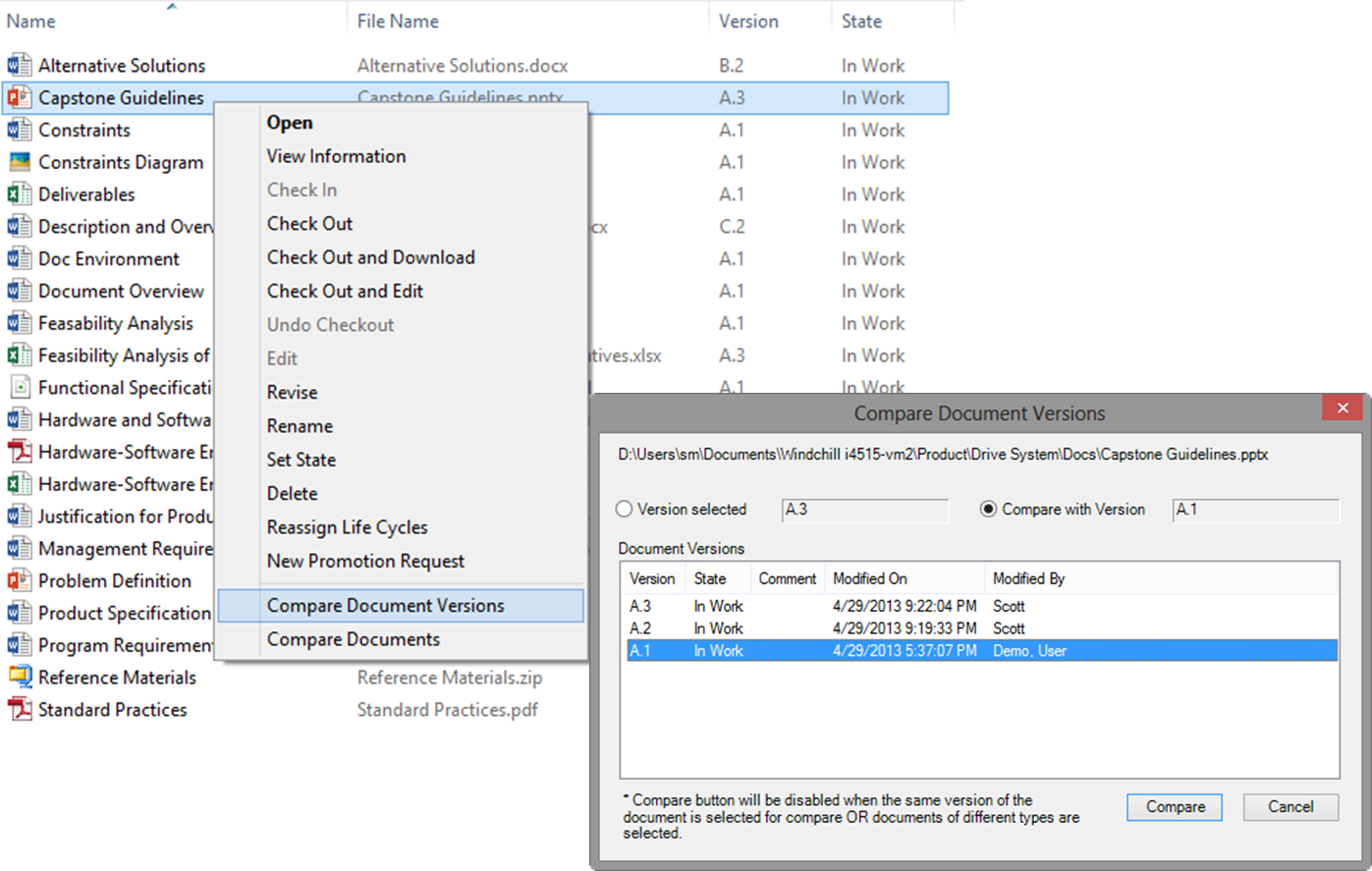
There are two different compare actions available:


  • Compare Document Versions

This will allow you to compare the file content of two different versions of the same document (see screenshot)

  • Compare Documents

This will allow you to compare the content of two different objects, which need to be of the same file type.
 

WCUpgradeCFTR_DIEnhancementsDocumentComparisonActionsandOptions.png


Going forward


This was the first part of my post about productivity enhancements on Windows Explorer Integration.

In the second part I will show you how easy it is to access Windchill Meta data in the Windows Explorer, how this can be adjusted to your needs and how simple it is to find any document with the integrated Windchill search.


If you are in the meantime interested in additional details on the Windchill Explorer Integration, you’ll find further information in the Windchill Help Center.


And as always any questions and comments are appreciated but I definitely would be very interested in your ideas:


  • What do you think about the enhanced functionality? Which functionality you like best?
  • For which things do you use the Windows Explorer integration?
  • …


Please let me and the community know about it.

27 replies

5-Regular Member
August 27, 2015

Good day everyone,

Glad to see this blog is so well received.  Just wanted to let you know Bjoern is on holiday and will return September 7 -  he will be responding then.

Thank you for your questions; please keep them coming.

Best,

Toby

12-Amethyst
August 30, 2015

Hi Chris,

I don't succeed very well to explain the difference between file management and document management to someone how basically don't want to listen.  Do you have a dominant key differentiator or a business case to make your point?  What makes Windchill so special and can't be solved in SharePoint?

The way I try to explain is that you have in one environment WTDocuments, WTParts and Tasks, that they are all interconnected to each other, that they all have history, workflows, ....  But that's in general too complicated, so freightening for managers.

TIA, Hugo.

12-Amethyst
August 30, 2015

When I try to re-educate our novice Windchill users, I mostly have a hard time to convince them not to rely on folders to structure their information.  I try to make my point by saying that if people had to approach the internet via a Windows Explorer way navigating up and down in a folder structure, it wouldn't that successful as it is now.

Second, folders in Windchill are helpful for configuring acces rights.  This is another requirement, not always compatible by the way end-users want to structure folders.

So DTI pictures Windchill folders in the Windows Explorer, making it difficult for me to keep users away from folders.  Maybe I should install DTI without the explorer integration.

Hugo.

18-Opal
August 31, 2015

Although we have some users that use the Windows folder structure to access PDMLink, and like it, it has a major problem that I have not found a good way to deal with.  It is not a complete structure of WC and only contains files/folders that are navigated too:

  1. Entire folder structure is duplicated for every person who accesses it. So people are not accessing the same structure.  This duplicates files and takes up a lot of space.
  2. It also makes it so it is difficult to know which ones you are currently working on.

Does anyone know a way to work with the windows folder structure in a better way?

12-Amethyst
September 1, 2015

Hi,

maybe a new idea should be created to include in the Windows Explorer DTI a Recent documents ?

Best regards

18-Opal
September 1, 2015

So kind of like WS functionality for documents, but accessed via Windows Explorer.  That could certainly help, however the other issue of the structure being duplicated for each user, is still a major show stopper.

12-Amethyst
September 1, 2015

Hi Hugo,

I am afraid. I do not have a magic formula. You are right it is damn complicated.

I think there is a consensus between us all that it is first to introduce it WTpart and related documents. After that, expend it to documents not related to WTpart.

I will soon (well maybe in 12/18 months) see how successful I am with my new company.

If I could get Quality dept and their QMS (which is just  a lot of files badly managed on a shared drive (they want to move to Sharepoint for version control.....) into Windchill then I will be very pride of this achievement....

remind me 18months

To me, it is about keeping as much as possible information under one roof.

I see Sharepoint as a duplication (in less powerful and I come back to this) than Windchill (even if one day a Sharepoint developer went mad at me by saying this and he said that sharepoint will eat Windchill and the like at breakfast, but he never told me how Sharepoint could handle document structure and even less CAD documents) of Windchill.

In addition Windchill as out of the box functionality that Sharepoint does not have such as

  • Document structure
  • Collaborative task management
  • Reference/Discribed by  (an URL in a word or excel file is not efficient at all as it cannot be managed)

and of course the inability of Sharepoint to link documents with product structure.

I am yet to see what Sharepoint can do that Windchill can't. Therefore it is obvious to me that if it is agreed that a company should only need one document manager, then it should be Windchill.

18-Opal
September 1, 2015

Under one roof is only good if it is good under that roof.

When the UI of WC is so deprived of some basic functionality, I honestly wonder which is better, several softwares that do well what they do (even though there is duplication) vs. one software that really messes up some basic stuff making it harder on the users.  Currently we have both in place where WC is used for several types of things in Engineering, while we also have separate software to handle other aspects of the company (Sales, Quality, EPM, Purchasing, Network Drives).  This is despite WC having the "capability" of doing most of these things.  As the saying goes, WC is truly a "jack of all trades..."

12-Amethyst
September 1, 2015

Hi Lawrence,

I indeed do not intend to have all documents in Windchill, only documents that can help engineers to develop better machines.  This is a very broad definition, e.g. quality audits or assembly instructions should be part of Windchill.  Supplier invoices for example aren't.

About the UI of Windchill, I see occasional users playing around and finding their way to information in Windchill remarkably well.  Although other users (how are supposed to be regulars) don't.  I think its more a matter of attitude then of UI, although the UI plays its role of course.

Suppose not all relevant information is under one rooftop, how are you managing access rights? And change?  And most of all, how do you avoid confusion among people, may they select by themselves where to put documentation?  Do you allow in the company a Windchill clan, and a SharePoint clan, and a clan that belongs nowhere?

Considerations for what they are worth.

18-Opal
September 1, 2015

In our company everything is clearly defined where stuff goes, and that is not ambiguous to people.  What I mean by duplication is stuff can get done in the sales application, then there is no connection to PDMLink so sales gives info to Engineering that route, and Engineering may or may not duplicate inside PDMLink depending on the need.  There is some inherent duplication meaning Project info may need to be manually recreated inside a project folder or a change notice whereas it would be nice if it were in the same system and just refer to the proper documentation.  Each system has its own access rights and is managed by the department that primarily uses it.  I really like the idea of combining stuff into one system, but I think the advantages would be a wash and the disadvantage would produce very unhappy users, even if the total change to the company efficiency was zero.

I mostly agree with you in that navigating/finding info in PDMLink is not the main problem when I mention UI.  It is more getting work done efficiently.  Examples: no save and keep working for change management, Cannot use the up or down arrows (nor formatting) in CM text boxes, no seamless handoffs between CR-->CNs, Useless tooltip boxes about number of allowed characters but blocks essential information while changing CAD attributes (and PTC calling this intended design functionality), tab key doesn't jump to next field, extraordinarily poor UI for admin controls of WC (on par with DOS!), no customization of icon UI for WS controls, cannot do to multiple objects what you can do to many (e.g. rename multiple CAD objects from search field without collection), removing ability to open CreoView files from Iteration History (this feature was evidently a (very useful) "mistake" and once they found out about it they removed it without any explanation!), Finding the right WS frames when restoring iteration is very challenging unless you know the time (then it is very useful), etc

Don't get me wrong, many of these problems are tied to very powerful features (so I wouldn't want PTC to "fix" the problem by just removing capability, rather tweak the UI).  In addition, I know that some of these things are getting better with newer versions but the problem is that at least 1/3rd of these problems actually were not problems in previous releases (and have gone multiple builds and releases without being fixed after multiple people have reported and mentioned on this forum)!  Quite honestly, it is a lot of the simple UI stuff that PTC misses (low hanging fruit) that could make a HUGE difference.

When I mean poor UI I primarily mean efficiency (Keyboard, mouse, and visual).  All too often it seems that PTCs features turn out to be bugs (like those horrid tool tips covering CAD Attributes and preventing seeing and selecting!), and there bugs turn out to be great features (like actually having menu options in the Version history so you can RMB open CreoView without opening the CAD page).

I really would like to have everything under one roof, but until WC fixes some of its basic UI problems that really hold it back, WC is just not ready to be that roof.  The sad part is that in many ways it is so close, but then ends up being so far a way.