1-Visitor
October 30, 2021
Solved

[Creo 7.0] Assembly mode - Can I pattern same parts in diferent directions?

  • October 30, 2021
  • 1 reply
  • 5540 views

Hi,

For a long time I've thought about using Pattern feature for different directions. Let's say I'm in assembly mode, I've got a simple steel structure with many connector just exactly as below:
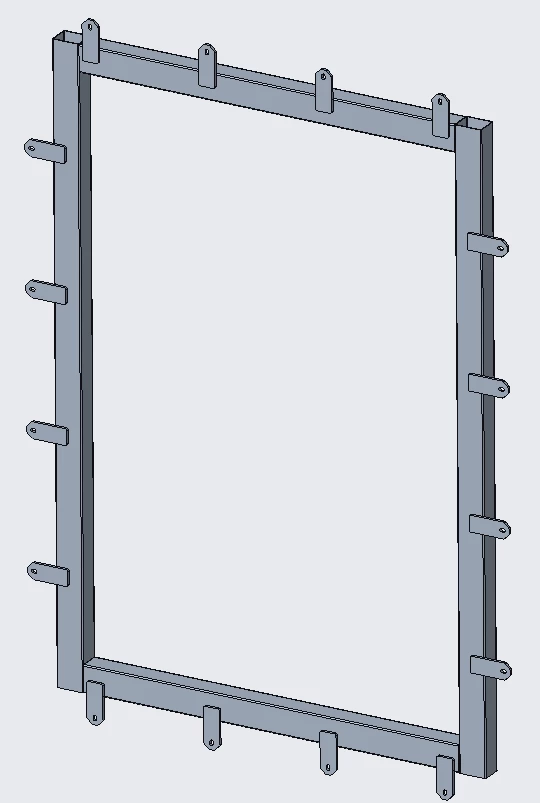
2021-10-30_10h48_40.png

Now that's ridiculous to insert every single element (connector) separately part by part. So we can use the Pattern inside assembly mode of course. So we need to (or maybe not) use 4 Patterns because connectors are placed in different dircetions like in the following picture:
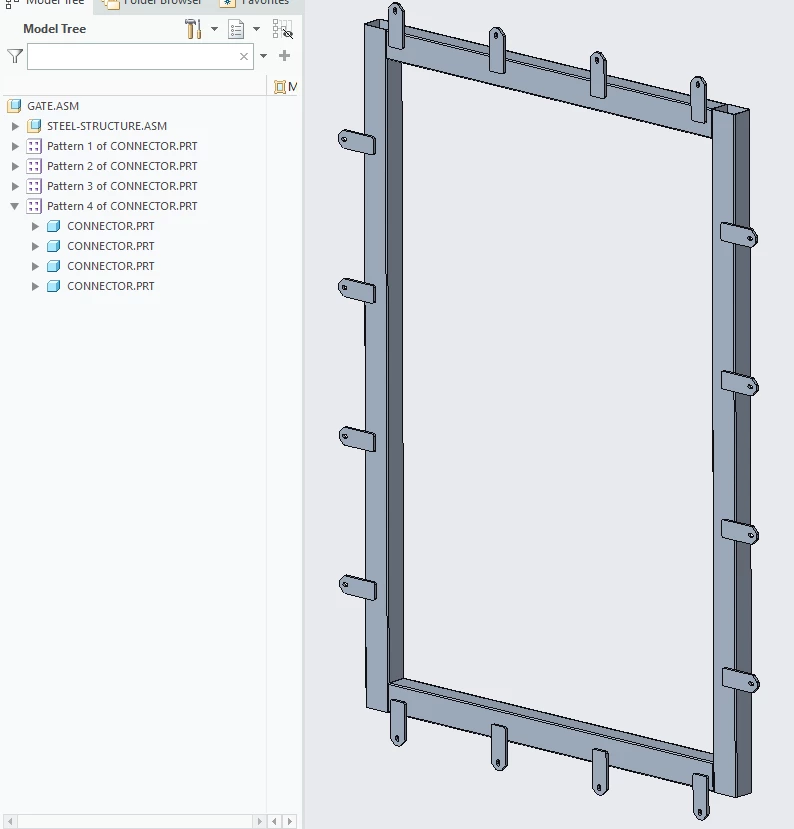
2021-10-30_10h49_39.png

I'd like to use only one Pattern for this operation but still keep directionality of these connectors. When I pattern all connectors with one Pattern I'm unfortunately losing this directionality as follows:
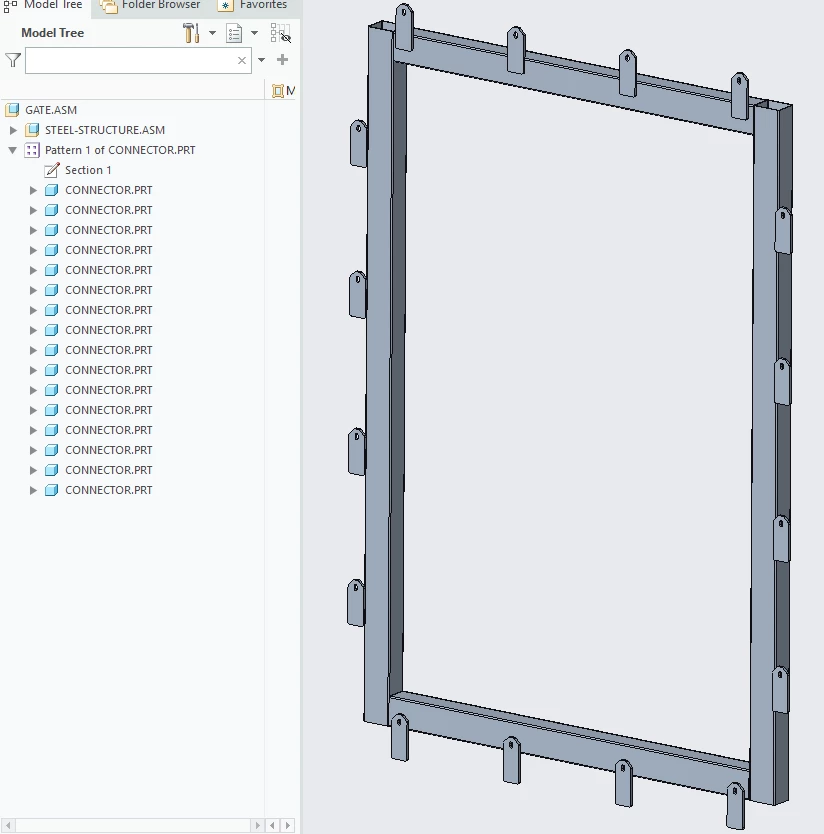
2021-10-30_10h56_03.png 
Therefore I've got a few questions. 


  1. Is it even possible to achieve that - using one Pattern and ain't losing the directionality?
  2. If the 1 point is impossible, what is the good practice for this example (and similar)? Should I create 4 Patterns separately?
  3. Is the good practice to use Patterns in assembly at all? Using it also has the downsides e.g. we cannot restructure parts/assms which are patterned (e.g cannot move existing Pattern to another assembly).

Thank you in advance for each reply!
Best answer by pausob


Your questions make me think of the bigger question to ask - how is this CAD model is intended to mimic the real life assembly of the part?

It seems you could do your whole GATE.ASM with 2 sub-assemblies, and each would have 1 pattern of connectors.... in this very symmetric example.

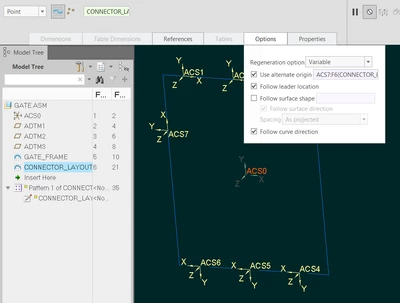
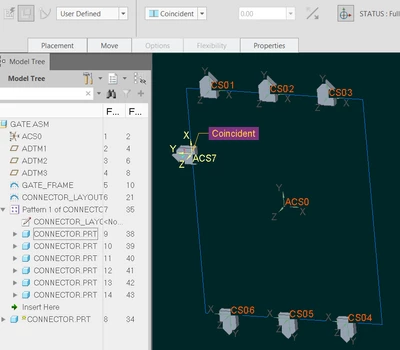
But is this how you would actually put this together?  Your assembly structure implies that the tubing is welded into a picture frame and then the connectors are laid out on top of it and welded to it.  In this case, it absolutely makes sense to pattern the connectors inside the assembly.  You can make a layout sketch in your top level assembly which will contain coordinate systems that specify the location and orientation of the connectors.  Then assemble the connector part via coincident coordinate system constraint to one those sketched coordinate systems, and then use the so called "point pattern" - see attached link to a youtube demo video.


One thing not mentioned in the video is that it's a good idea to always specify the origin of the 1st instance - search "alternate origin in sketch patterns" discussions about this esoteric point.


pausob_2-1635606392086.png


pausob_3-1635606420894.png


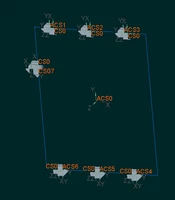
If the alternate origin option is not used:

pausob_4-1635606613443.png


1 reply

pausob19-TanzaniteAnswer
19-Tanzanite
October 30, 2021


Your questions make me think of the bigger question to ask - how is this CAD model is intended to mimic the real life assembly of the part?

It seems you could do your whole GATE.ASM with 2 sub-assemblies, and each would have 1 pattern of connectors.... in this very symmetric example.

But is this how you would actually put this together?  Your assembly structure implies that the tubing is welded into a picture frame and then the connectors are laid out on top of it and welded to it.  In this case, it absolutely makes sense to pattern the connectors inside the assembly.  You can make a layout sketch in your top level assembly which will contain coordinate systems that specify the location and orientation of the connectors.  Then assemble the connector part via coincident coordinate system constraint to one those sketched coordinate systems, and then use the so called "point pattern" - see attached link to a youtube demo video.


One thing not mentioned in the video is that it's a good idea to always specify the origin of the 1st instance - search "alternate origin in sketch patterns" discussions about this esoteric point.


pausob_2-1635606392086.png


pausob_3-1635606420894.png


If the alternate origin option is not used:

pausob_4-1635606613443.png


cadbart1-VisitorAuthor
1-Visitor
October 30, 2021

Wow, thank you @pausob, your reply is dope! Till today I've always thought about inside-sketching CSYS and CSYS constraint as useless features. I didn't know these are so powerful.


That approach is great for small numbers of patterned parts but what if we've got 40, 60 or even more patterned stuff? Setting 60 CSYS inside sketcher by hand is hugely monotonous and annoying especially since we don't have any pattern feature inside sketcher in Creo. So what about this type od design case?

Sorry, but I cannot see any "alternate origin in sketch patterns" topic on this forum and Google.

19-Tanzanite
October 30, 2021

Seems that the wording "alternate origin in point patterns" will yield more results.

https://community.ptc.com/t5/3D-Part-Assembly-Design/pattern-error/m-p/636605

For in-depth understanding of the alternate origin issue, I found this article / video:

https://community.ptc.com/t5/Creo-Parametric-Tips/Understanding-patterning-of-a-standard-hole-with-point-patterns/m-p/440311


Yes, the sketched point pattern only works well for small number of instances.  Another limitation is that it's a 2D sketch...


If you need to manage 60 of something, then I think that you should look into using table-driven patterns.

Table-pattern your coordinate system:

pausob_2-1635623097263.png

Then assemble your connector to the 1st instance.  Then pattern-by-reference the rest of the connectors:

pausob_3-1635623195956.png


That way you can manage and display the design intent information in tabular form...  Also, these tables are manipulated via MS-Excel, which makes generating 100's of instances fairly simple:


pausob_4-1635623252183.png