4-Participant
September 10, 2025
Solved

Iterating to ODEsolve soltution (shooting method)

  • September 10, 2025
  • 2 replies
  • 745 views

I am using Mathcad Prime Release 8.0 and Datecode8.0.0.0

I want to add an iteration process to an ODEsolve block. It would require iterating an initial condition until two of the solutions match.

Best answer by LucMeekes

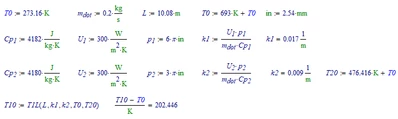
Answer: T1(0)=202.446 °C


Your problem:

LucMeekes_0-1758450230839.png

Solve the set of ODE:

LucMeekes_1-1758450249132.png

Extract the functions:

LucMeekes_2-1758450263056.png

Check that it's the solution:

LucMeekes_3-1758450278211.png

Solve the problem to find T10 for T1(L)=T2(L):

LucMeekes_4-1758450326421.png

Fill in the numbers:

LucMeekes_5-1758450347325.png

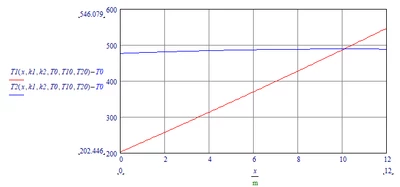
Plot:

LucMeekes_7-1758450452669.png

Note that Prime 9 and higher (present version is 11) can solve your set of DE symbolically, allowing you to through above exercise.

You can, (in your Prime 8 ) make the solve block be a function of T10 and then numerically solve it. For a simple example see: https://community.ptc.com/t5/Mathcad/Solve-Block-Iteration/m-p/889162 

This forum (part) is for installation and licensing problems. For more help, post your problem in the proper forum (part): https://community.ptc.com/t5/Mathcad/bd-p/PTCMathcad 


Success!
Luc

2 replies

15-Moonstone
September 10, 2025

hi @JM_14109889

Can you please share a sample worksheet? 

Regards,

Dhiraj 

4-Participant
September 11, 2025

Hi @DhirajPatil ,

See attached worksheet.  This worksheet has been simplified down to the basic equations.  Currently I am required to iterate variables until the solution of both equations is equal at "L" (T1(L)=T2(L).  All variables could potentially be iterated to achieve the solution, but most common would be T1(0) or U1.


Thanks.  

LucMeekes23-Emerald IVAnswer
23-Emerald IV
September 21, 2025

Answer: T1(0)=202.446 °C


Your problem:

LucMeekes_0-1758450230839.png

Solve the set of ODE:

LucMeekes_1-1758450249132.png

Extract the functions:

LucMeekes_2-1758450263056.png

Check that it's the solution:

LucMeekes_3-1758450278211.png

Solve the problem to find T10 for T1(L)=T2(L):

LucMeekes_4-1758450326421.png

Fill in the numbers:

LucMeekes_5-1758450347325.png

Plot:

LucMeekes_7-1758450452669.png

Note that Prime 9 and higher (present version is 11) can solve your set of DE symbolically, allowing you to through above exercise.

You can, (in your Prime 8 ) make the solve block be a function of T10 and then numerically solve it. For a simple example see: https://community.ptc.com/t5/Mathcad/Solve-Block-Iteration/m-p/889162 

This forum (part) is for installation and licensing problems. For more help, post your problem in the proper forum (part): https://community.ptc.com/t5/Mathcad/bd-p/PTCMathcad 


Success!
Luc

4-Participant
September 22, 2025

Thanks for the reply.  If I'm understanding correctly, I need to upgrade my MathCad version to make use of the above solution.

23-Emerald IV
September 22, 2025

That is one way. As usual there are several ways (to Rome). So you can also do it the numeric way, by making the result of the solve-block a (set of) function(s) in T10, after which you can solve for the proper T10-value that makes T1(L)=T2(L).

You can also use the symbolics available in Prime 8 to compute the solution via the Laplace transform, which changes the set of ODE into a set of equations, which you solve and then transform back to the x-domain.

That goes like this:

LucMeekes_6-1758579109177.png

Now with results

LucMeekes_0-1758578699955.png

Note that in Prime the result may have the laplace integral (definition)

(  Something like LucMeekes_7-1758579389325.png   )

instead of "laplace(T1(x),x,s)" and "laplace(T2(x),x,s)" so you may have to change the substitution below for your needs.

Simplify:

LucMeekes_1-1758578718598.png

LucMeekes_3-1758578769499.png

LucMeekes_4-1758578777693.png

LucMeekes_5-1758578816509.png

The functions may become big, but they should still be workable.


Success!
Luc