
3-Newcomer
April 14, 2026
Solved

BoM tables, repeat regions, and relations

  • April 14, 2026
  • 3 replies
  • 96 views

Hi all,

For our assemblies, we add a BoM table to the drawing. These were setup a while ago, and we have a few different tables saved for different purposes. The main one is a simple table with a repeat region as follows

This works fine for most of the parts, but it doesn’t allow us to define a different part number other than the one defined in Windchill. If we were starting again with our installation, we would probably add a relation in the start part against a parameter such as ‘BOM_PART_NUMBER’ which defaulted to the Windchill part number but could be changed by the user. This parameter would then be what is defined in the repeat region.

However, we now have many thousand parts and none of them have this parameter, and so we cannot change the part number in the BoM without changing the file name of the part.

Having done some research, it looks like relations can be added to the repeat region, and so a conditional statement can be added. Descriptively, what I had in mind is that if the parameter ‘BOM_PART_NUMBER’ exists in the part, then this is used in the column. If it doesn’t exist, then the standard number as defined by asm.mbr.name is used.

Copilot suggested adding this relation:

IF EXISTS("BOM_PART_NUMBER")

  BOM_PN = BOM_PART_NUMBER

ELSE

  BOM_PN = asm.mbr.name

ENDIF

But this doesn’t work.

Any help greatly appreciated.

Thanks.
Best answer by jdworak

I really like you logic and what we have done exactly what you have said but went one step further than Copilot .  


The 1st check is to see if the parameter “BOM_PN” exists. You can replace “BOM_PN” any parameter that you want.

The 2nd check will see if the parameter has a value. If it does use it vs the “ASM_MBR_Name”.


Note our display cell value in the repeat region is called “&rpt.rel.SHOWPN”


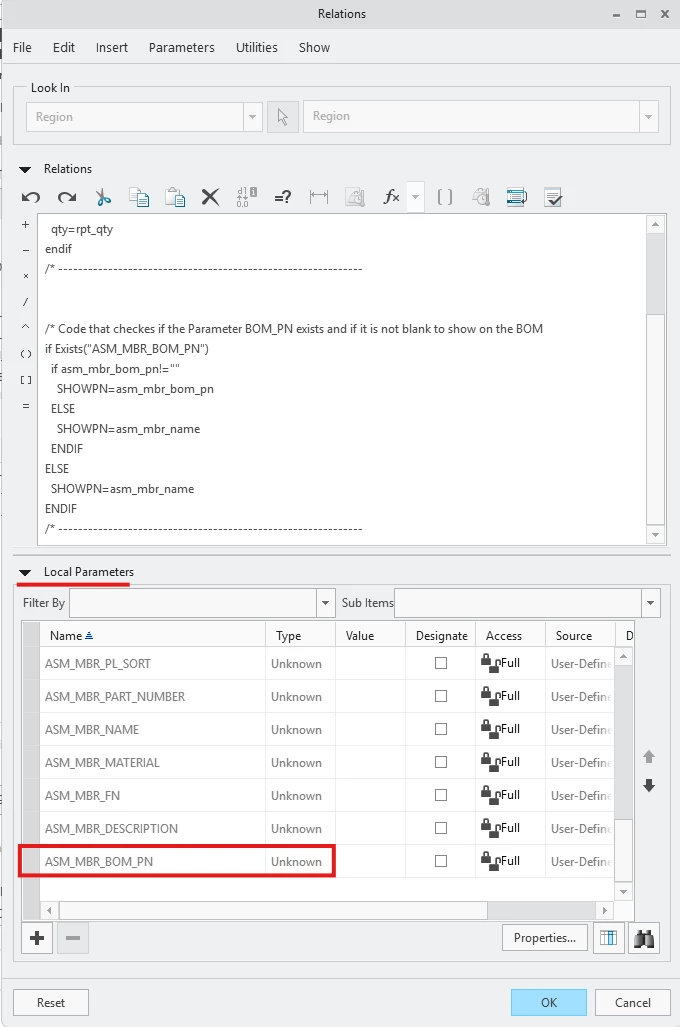
/* Code that checkes if the Parameter BOM_PN exists and if it is not blank to show on the BOM
if Exists("ASM_MBR_BOM_PN")
if asm_mbr_bom_pn!=""
SHOWPN=asm_mbr_bom_pn
ELSE
SHOWPN=asm_mbr_name
ENDIF
ELSE
SHOWPN=asm_mbr_name
ENDIF
/* -------------------------------------------------------------


---------------


Some things to note. 

Just because you add the relations into the table will not make it work inherently. What I would recommend doing is also look at the Local parameters. See below.


If you do not see it I would add a column with the parameter you need the relation to see. Once you have verified that the relation works you can remove the column that only has your parameter. 


3 replies

Dale_Rosema
23-Emerald III
23-Emerald III
April 14, 2026

This is what i have used for manual entries into quantities. This may help you with part number overides.

I add the relation to the table before editing the table for the “&rpt.rel.newqty”. 


Add relations before updating the “&rpt.rel.newqty”.


&rpt.rel.newqty


IF asm_mbr_pn == "9594"

  NEWQTY = "0.5"

ELSE

IF asm_mbr_pn == "9556"

  NEWQTY = "0.5"

ELSE

  NEWQTY = rpt_qty

ENDIF

ENDIF

Dale_Rosema
23-Emerald III
23-Emerald III
April 14, 2026

Here is lengthy post in which I learned how to do this:


kdirth
21-Topaz I
21-Topaz I
April 14, 2026

The first step in this process is to change the cell in the first row to your user defined name (BOM_PN) from the default (BOM_PART_NUMBER).  Don’t know if you have done this in the table.

There is always more to learn.
Dale_Rosema
23-Emerald III
23-Emerald III
April 14, 2026

You have to make sure you have the relation in the table before changing the cell. I had issues doing it the other way around.

jdworak5-Regular MemberAnswer
5-Regular Member
April 14, 2026

I really like you logic and what we have done exactly what you have said but went one step further than Copilot .  


The 1st check is to see if the parameter “BOM_PN” exists. You can replace “BOM_PN” any parameter that you want.

The 2nd check will see if the parameter has a value. If it does use it vs the “ASM_MBR_Name”.


Note our display cell value in the repeat region is called “&rpt.rel.SHOWPN”


/* Code that checkes if the Parameter BOM_PN exists and if it is not blank to show on the BOM
if Exists("ASM_MBR_BOM_PN")
if asm_mbr_bom_pn!=""
SHOWPN=asm_mbr_bom_pn
ELSE
SHOWPN=asm_mbr_name
ENDIF
ELSE
SHOWPN=asm_mbr_name
ENDIF
/* -------------------------------------------------------------


---------------


Some things to note. 

Just because you add the relations into the table will not make it work inherently. What I would recommend doing is also look at the Local parameters. See below.


If you do not see it I would add a column with the parameter you need the relation to see. Once you have verified that the relation works you can remove the column that only has your parameter. 


3-Newcomer
April 15, 2026

Thanks guys - that’s works a treat. 

There was two gotcha’s that I’d missed that are required:

  1. The parameter in the part is ‘BOM_PART_NUMBER’, and so in the relations in the table, this needs to be preceded by ‘ASM_MBR_’ so that it becomes ‘ASM_MBR_BOM_PART_NUMBER’
  2. This parameter needs to be added in to the local parameters section

So, the part has this:

and the relations in the repeat region has this: