
1-Visitor
February 16, 2016
Question

Can't get dimensions from my model to the drawing

  • February 16, 2016
  • 3 replies
  • 9460 views

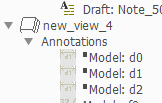
New guy here after 15 years of SolidWorks so be gentle. I'm trying to get some model annotations to come in to my drawing. I did something (can't figure out what) and they show up in the drawing tree with the symbol greyed out and a black box next to the name. I can't for the life of me figure out how to get them to show up.

This thread is inactive and closed by the PTC Community Management Team. If you would like to provide a reply and re-open this thread, please notify the moderator and reference the thread. You may also use "Start a topic" button to ask a new question. Please be sure to include what version of the PTC product you are using so another community member knowledgeable about your version may be able to assist.

3 replies

23-Emerald IV
February 16, 2016

Pick on them, delete them, then re-show them with the "Show Model Annotations" tool.

mramsey1-VisitorAuthor
1-Visitor
February 17, 2016

Sorry, no dice with that working. I right click in the drawing tree and hit delete; select the view and hit show model annotations and it's not there any more.

24-Ruby III
February 17, 2016

Hi,

I tested your problem. In my test, grey dimension glyphs with black boxes appeared in drawing tree, when I suppressed feature containing these dimensions.

MH

mramsey1-VisitorAuthor
1-Visitor
February 17, 2016

There's nothing to suppress. the model is a bushing with one revolve feature. If I suppress it then I don't have a model at all.

24-Ruby III
February 18, 2016

Hi,

can you upload the model+drawing ?

MH

mramsey1-VisitorAuthor
1-Visitor
February 17, 2016

Since this is such a simple part I tried just deleting all the features in the model so maybe I was starting from scratch. I can't add the OD or the ID of the part, just the length and chamfer dimensions show up.

23-Emerald IV
February 18, 2016

Just for testing, try creating a new drawing view, or maybe even an entirely new drawing...

mramsey1-VisitorAuthor
1-Visitor
February 18, 2016

I finally got it. After I had deleted all the features in the model I still didn't have those dimensions in the view. What I had to do was add a new general view and grab the dimensions from there and move them to the view I wanted. That is way more difficult than it needs to be. For all you old time ProE guys I don't know how you hung in as long as you have if this is what you have to go through making a drawing.