

1-Visitor
September 2, 2015
Question

Creo 3.0: How to move cursor from one cell from another cell quickly in drawing?

  • September 2, 2015
  • 3 replies
  • 3721 views

Hi everyone, we are using Creo 3.0 now, and found that it is very annoying to input content in the table of Creo 3.0 drawing. As below picture shown, after I inputed some content in one cell, how to move the mourse cursor quickly to another cell? Cause if I click the next dell directly, I found that the cursor would not move to next cell as wished, have to click at some other blank places a few times, after the cell finished input is not selected, then we can click next cell directly, hope someone can give me a tip, it is really annoying, sometimes I just want to through the mouse away,  thanks.
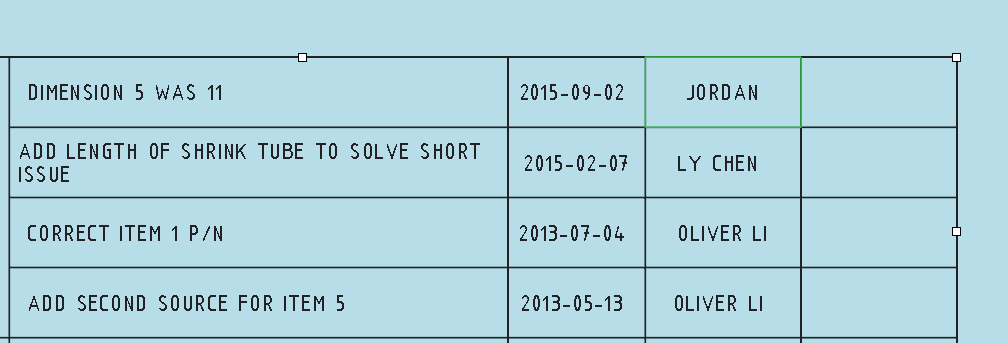
TABLE INPUT.PNG


This thread is inactive and closed by the PTC Community Management Team. If you would like to provide a reply and re-open this thread, please notify the moderator and reference the thread. You may also use "Start a topic" button to ask a new question. Please be sure to include what version of the PTC product you are using so another community member knowledgeable about your version may be able to assist.

3 replies

23-Emerald IV
September 2, 2015

I feel your pain.  Editing tables in Creo 3 is no fun.  Getting into edit mode can be tricky and getting out of it can be even trickier.  There is no way to move between cells other than with the mouse.  To maintain you sanity, double click in a cell to edit it, then when finished click once outside of the table to exit edit mode.  From there you can either click once more to deselect the entire table or double click inside a different cell to keep editing.  If you double click in another cell, it probably won't look like you're in edit mode until you actually start typing (no flashing cursor).  This new text edit mode is very, very poorly implemented.  The issues extend beyond just tables to drawing parameters, repeat regions, and mapkeys.  (See other discussions on this community.)

12-Amethyst
September 2, 2015

Just to add my 2 cents:  (I'm on Creo 2..)

yes, double click in each cell to edit it.  There is (was?) another thread about table properties, that if you add a column or row, the table properties aren't carried over to those new cells.

Text Styles and Drawing Tables - Worth your vote!!!

go here to vote up the product idea!

It would be nice if you could do what "windows" does, and allow you to use the tab key to jump around in a table.

zli-31-VisitorAuthor
1-Visitor
September 11, 2015

Voted and hope this issue can be solved, make 2D drawing easier.
Going to be mad about it, talked with our IT guy to see if we can use Creoi2.0 or former version, and they said no, now, just can wish PTC release 4.0 quicker and solve these issues. Actually I have strated to use another software for new designs, but there're so many legacy designs need to maintain. What a hell it is.

24-Ruby III
September 11, 2015

Hi,

I spent some time with CR3 M050 and realized that there are two different scenarios:

1.] filling empty table cells ... see 01_fill_empty_table_cells.mp4

  • set selection filter to Table Cell
  • select 1-st cell
  • doubleclick 1-st cell
  • enter value
  • select 2-nd cell
  • doubleclick 2-nd cell
  • enter value
  • and so on ...

2.] filling non-empty table cells ... see 02_fill_non-empty_table_cells.mp4

  • set selection filter to Table Cell
  • select 1-st cell
  • click 1-st cell
  • enter value
  • select 2-nd cell
  • click 2-nd cell
  • wait half second
  • click 2-nd cell
  • enter value (sometimes cursor is not displayed )
  • and so on ...

Martin Hanak

zli-31-VisitorAuthor
1-Visitor
September 11, 2015

Hi Martin,

Now I understand how to edit table cell now, not just double click here & there blindly, thank you much. I can work now althrough it is still a pain task, too many steps.

24-Ruby III
September 11, 2015

I think the simpliest solution for PTC R&D could be to implement a function Edit Table in Excel .